HTB Sherlock SmartyPants
Windows Event Log DFIR with EvtxECmd and Timeline Explorer, using Microsoft Defender SmartScreen Debug logs to trace RDP access, tool installs, data theft, and anti-forensic log clearing.


Platform: Hack The Box Category: DFIR / Windows Event Log Analysis Difficulty: Very Easy
Introduction
SmartyPants is a Windows DFIR Sherlock that follows an intrusion against a file server used by Forela’s CTO, Dutch. The attacker connected through Remote Desktop Protocol (RDP), installed several legitimate utilities, searched for confidential documents, transferred the stolen data to cloud storage, destroyed files and cleared event logs to hide their activity.
The main lesson from this Sherlock is that legitimate applications can become attacker tools. It also shows the value of Microsoft Defender SmartScreen Debug logs, which recorded executable and document paths even after the attacker cleared other important Windows logs.
Scenario
Forela’s CTO, Dutch, stores important files on a separate Windows system because the domain environment at Forela is frequently breached due to its exposure across various industries. On 24 January 2025, an intruder accessed the file server, installed utilities, stole critical files and deleted them. SmartScreen Debug logging had recently been enabled, giving investigators additional visibility into the incident.
Tools Used
- EvtxECmd — parses Windows
.evtxfiles and exports their records into formats such as CSV. - Timeline Explorer — opens and filters the CSV timeline produced by EvtxECmd.
Evidence Provided
- A collection of Windows Event Log (
.evtx) files fromCTO-FILESVR. - Important sources included:
Security.evtxMicrosoft-Windows-TerminalServices-RemoteConnectionManager%4Operational.evtxMicrosoft-Windows-SmartScreen%4Debug.evtx
Preparing the Evidence
I first combined all supplied event logs into one CSV file with EvtxECmd:
EvtxECmd.exe -d "C:\Users\g01d\Desktop\Sherlock HTB\SmartyPants\Logs" --csv "C:\Users\g01d\Desktop\Sherlock HTB\SmartyPants\Output" --csvf "combinedLogs.csv"Command explanation:
-drecursively processes every event log in the selected directory.--csvspecifies the output directory.--csvfsets the output filename.
The command created combinedLogs.csv, which I opened in Timeline Explorer for filtering and analysis.
Task 1 - Identify the RDP Login Time
Question: The attacker logged in to the machine where Dutch saves critical files via RDP on 24 January 2025. What was the login timestamp?
I filtered the following event log:
Microsoft-Windows-TerminalServices-RemoteConnectionManager/OperationalI then searched for Event ID 1149, which records successful RDP authentication on this system. The matching event identified the username Dutch and showed that the connection was established at 10:15:14.
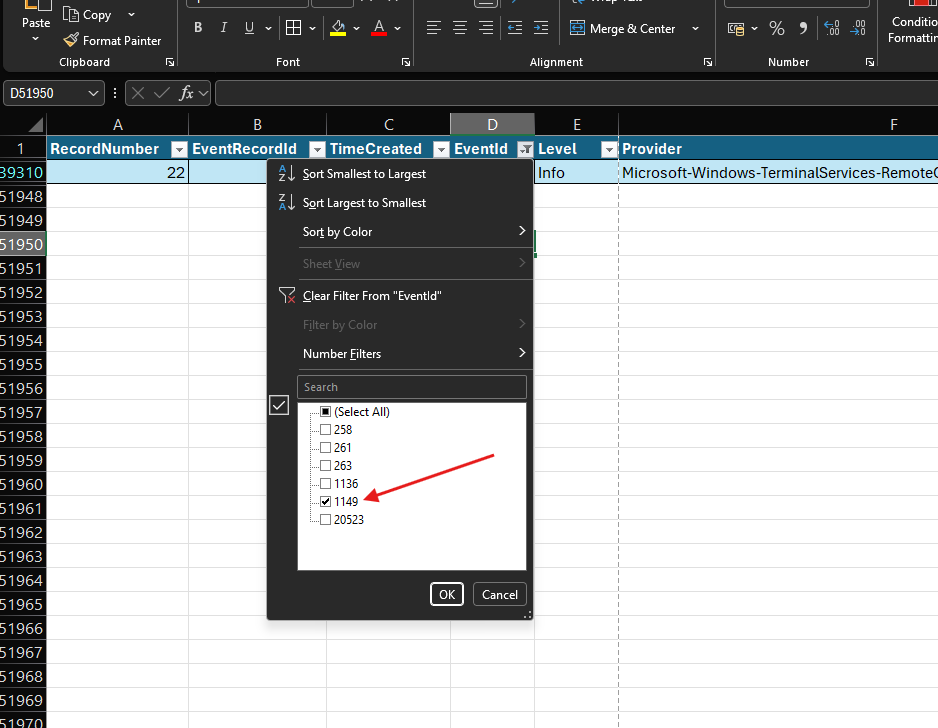
Event ID 261, which appeared slightly earlier, only showed that the RDP listener had received a connection. Event ID 1149 was the stronger evidence because it confirmed that the user authenticated successfully.
Answer:
2025-01-24 10:15:14Task 2 - Identify the First Installed Tool
Question: What was the first tool downloaded and installed by the attacker?
The scenario specifically mentioned SmartScreen Debug logs, so I filtered the SourceFile column for:
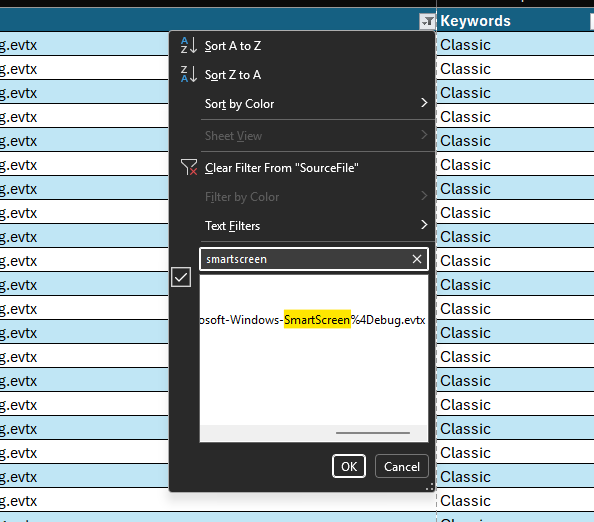
Microsoft-Windows-SmartScreen%4Debug.evtxAfter sorting the events chronologically and examining the executable paths in the payload, I found activity for:
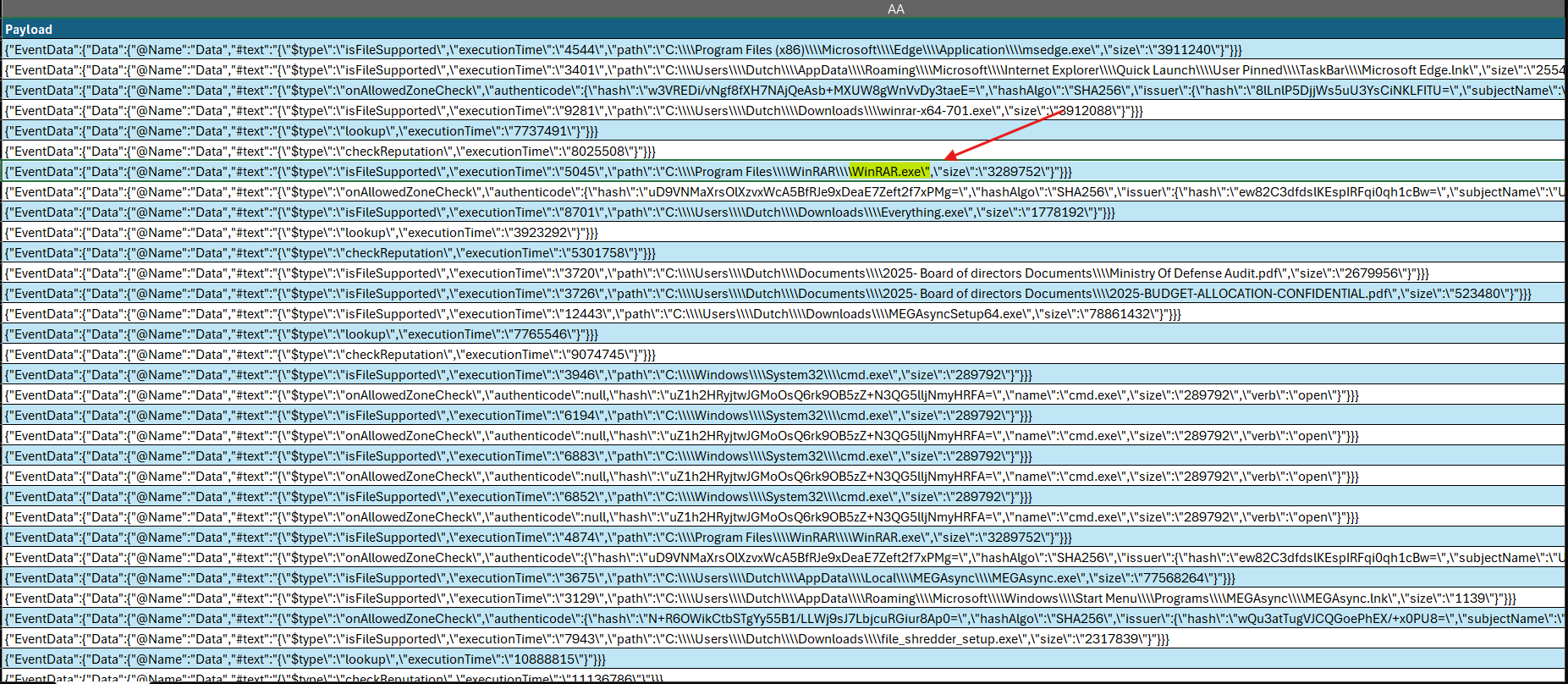
C:\Program Files\WinRAR\WinRAR.exeThe Program Files path showed that WinRAR had been installed on the system. It appeared before the other attacker utilities in the SmartScreen timeline.
What is Microsoft Defender SmartScreen?
Microsoft Defender SmartScreen checks websites and downloaded files for suspicious or unsafe content. Its Debug log can also provide useful forensic traces of files opened through the Windows graphical interface, including executable paths, document paths and timestamps.
Further reading: SmartScreen Logs — Evidence of Execution
Answer:
WinRARTask 3 - Find the Portable File-Search Tool
Question: What was the full path of the portable tool used to search for files?
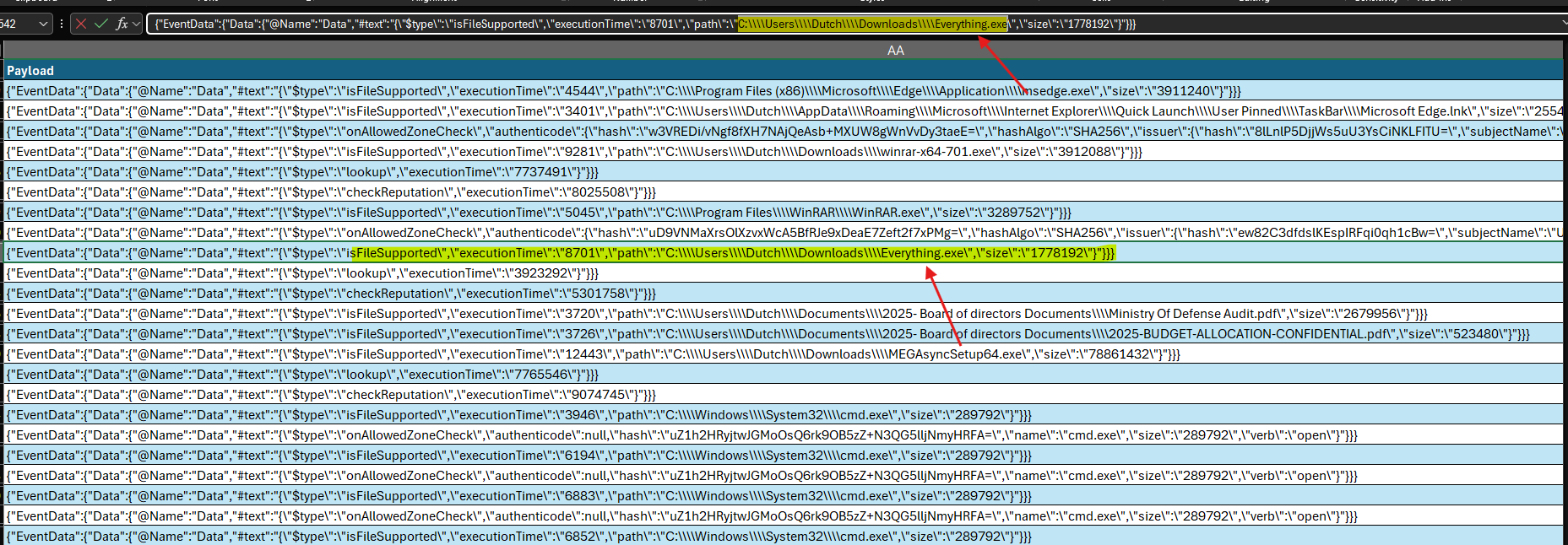
Continuing through the SmartScreen events, I found the following executable:
C:\Users\Dutch\Downloads\Everything.exeEverything is a lightweight Windows search utility created by voidtools. Unlike normal Windows Search, it can quickly locate files and folders by reading the NTFS file system index. The executable was launched directly from the Downloads directory, supporting the question’s description of it as a portable tool.
Answer:
C:\Users\Dutch\Downloads\Everything.exeTask 4 - Determine the Execution Time of Everything
Question: When was the tool from Task 3 executed?
I used the TimeCreated value from the same SmartScreen event that contained the path to Everything.exe.
The spreadsheet interface displayed 10:17:34 because it rounded the fractional seconds. The original event timestamp occurred during second 33, and HTB expects the value without fractional seconds.
The JSON field "executionTime":"8701" is not the clock time. It represents an internal duration in milliseconds.
Answer:
2025-01-24 10:17:33Task 5 — Identify the First Confidential Document
Question: What was the first confidential document accessed by the attacker?
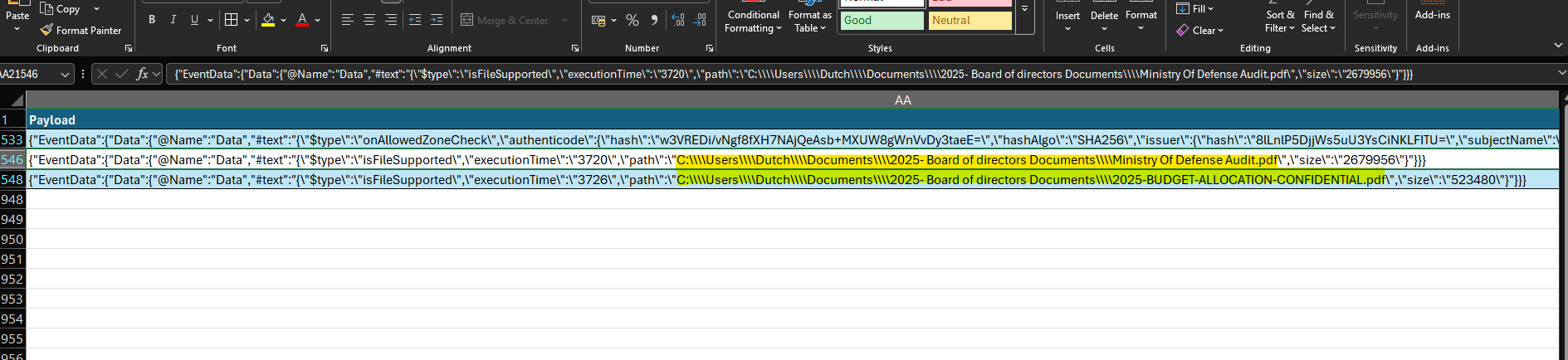
I filtered the SmartScreen payload for .pdf and sorted the matching events by time. Two confidential documents appeared, and the first one was:
C:\Users\Dutch\Documents\2025- Board of directors Documents\Ministry Of Defense Audit.pdfSmartScreen recording this path indicates that the document was opened through the Windows interface. In the context of the incident, this was evidence that the attacker accessed the file and breached its confidentiality.
Answer:
C:\Users\Dutch\Documents\2025- Board of directors Documents\Ministry Of Defense Audit.pdfTask 6 — Identify the Second Confidential Document
Question: What was the name and full path of the second stolen document?
The next PDF entry in the SmartScreen timeline was:
C:\Users\Dutch\Documents\2025- Board of directors Documents\2025-BUDGET-ALLOCATION-CONFIDENTIAL.pdfAnswer:
C:\Users\Dutch\Documents\2025- Board of directors Documents\2025-BUDGET-ALLOCATION-CONFIDENTIAL.pdfTask 7 — Identify the Cloud Exfiltration Utility
Question: What cloud utility did the attacker install to steal and exfiltrate the documents?
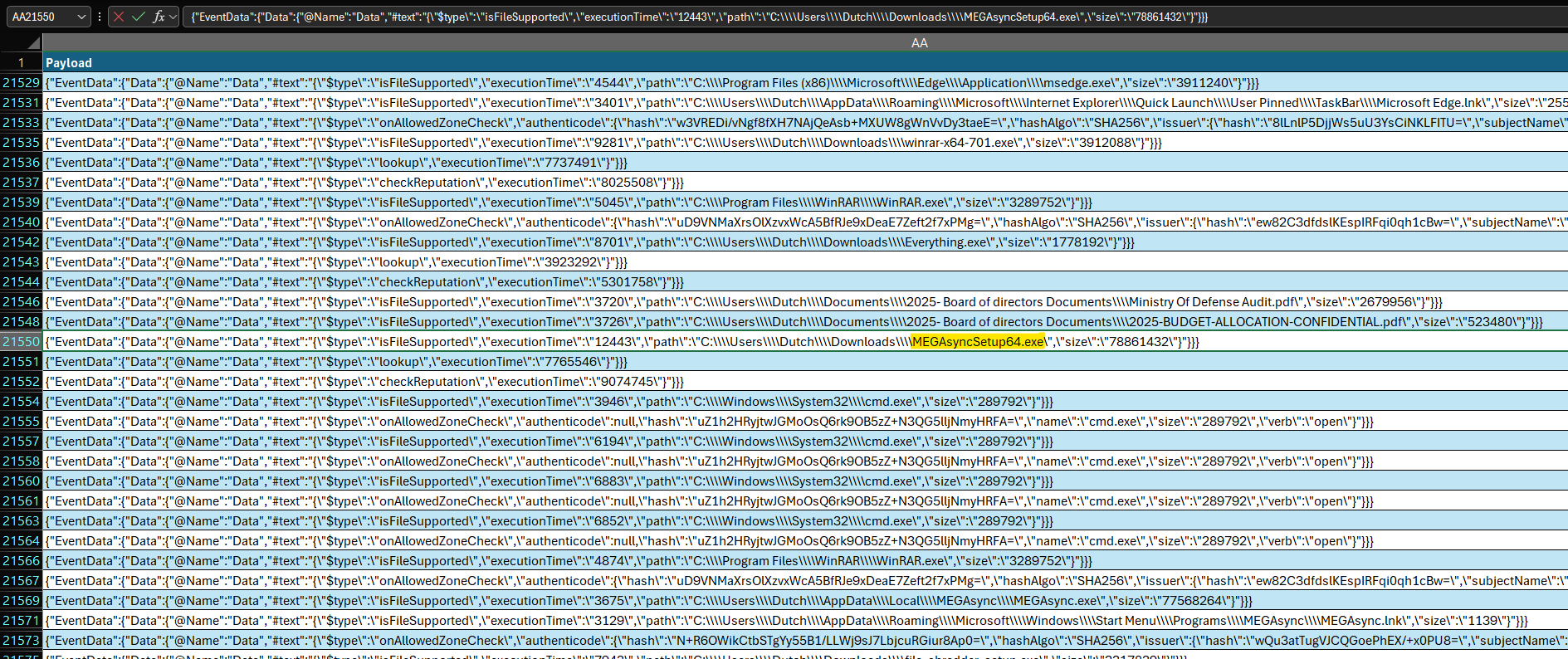
I returned to the executable entries in the SmartScreen log and found:
C:\Users\Dutch\Downloads\MEGAsyncSetup64.exeThis installer belongs to MEGAsync, the desktop synchronization client for the MEGA cloud-storage service. In this incident, it provided a way to upload the stolen documents from the compromised host to external cloud storage.
Answer:
MEGAsyncTask 8 — Determine When MEGAsync Was Executed
Question: When was the cloud utility executed?
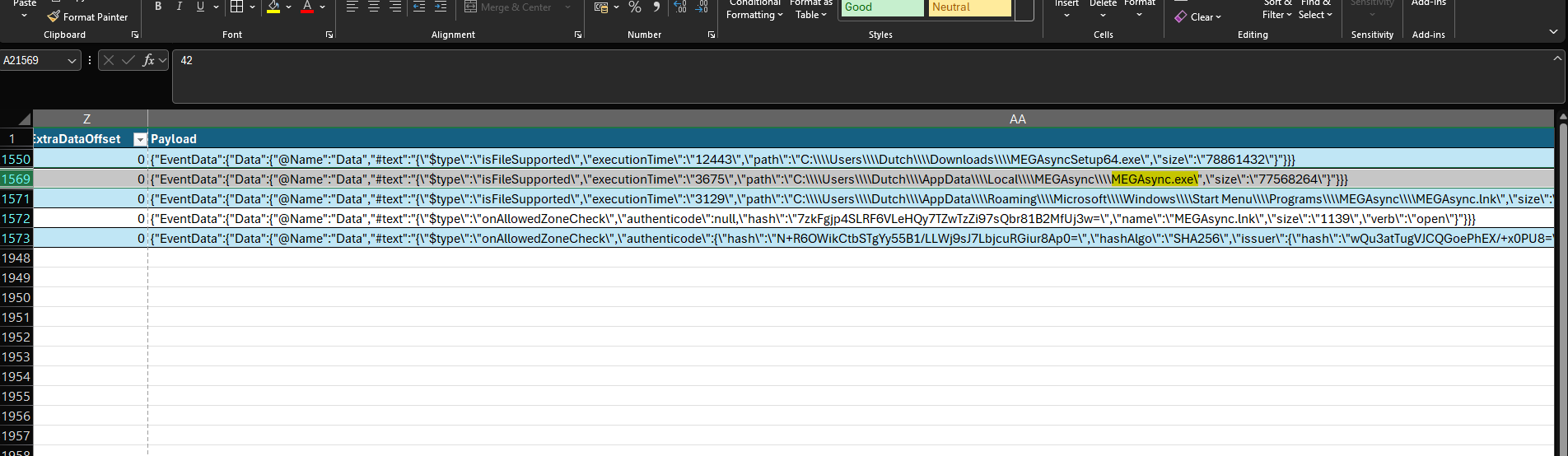
Filtering the SmartScreen payload for MEGAsync produced several entries. The event at 10:20:05 referred to the installer, MEGAsyncSetup64.exe, rather than the installed application itself.
The later event showed the installed MEGAsync application being launched at 10:22:19.
Answer:
2025-01-24 10:22:19Task 9 — Identify the Data-Destruction Utility
Question: What utility did the attacker use to make the deleted data unrecoverable?
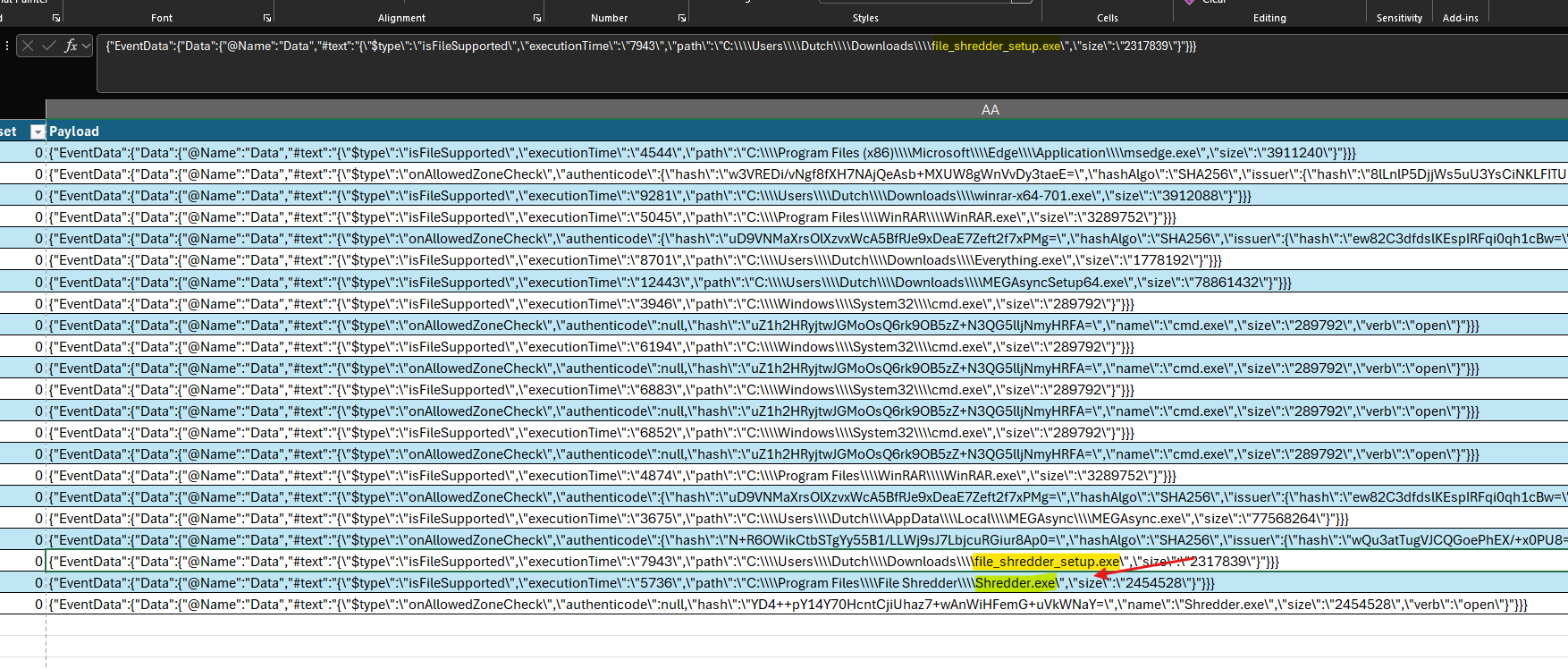
Further down the SmartScreen timeline, I found both the installer and installed executable:
C:\Users\Dutch\Downloads\file_shredder_setup.exe
C:\Program Files\File Shredder\Shredder.exe
Normal deletion usually removes the file-system reference while leaving the underlying data available until it is overwritten. File-shredding tools deliberately overwrite the file data, greatly reducing the chance of forensic recovery. This matched the destructive activity described in the scenario.
Answer:
File ShredderTask 10 — Determine When the Security Log Was Cleared
Question: When was the Windows Security log cleared?
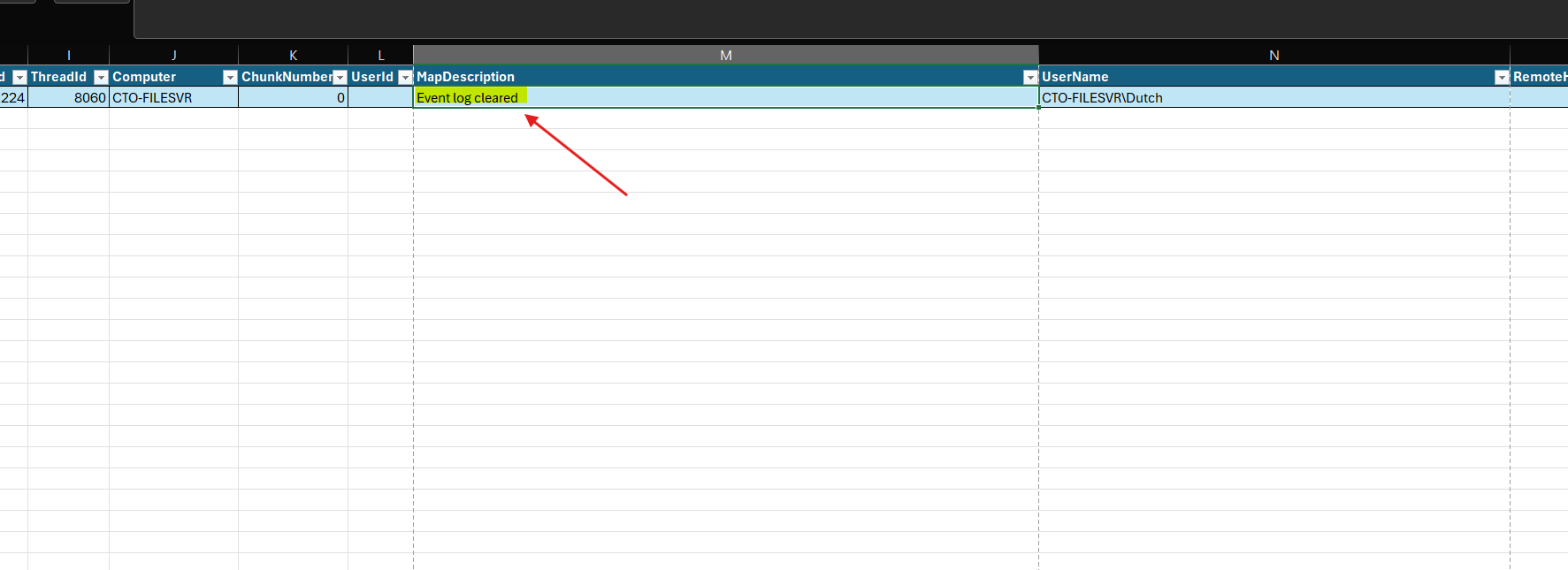
Windows records the clearing of the Security audit log with Event ID 1102. I applied these filters in Timeline Explorer:
| Column | Filter |
|---|---|
Channel | Security |
EventId | 1102 |
TimeCreated | 2025-01-24 |
Description | Event log cleared |
The matching event came from Security.evtx, identified CTO-FILESVR\Dutch as the account and recorded the time as 10:28:41.9. HTB requires the timestamp without fractional seconds.
Answer:
2025-01-24 10:28:41Incident Timeline
| Time (24 January 2025) | Activity | Evidence |
|---|---|---|
10:15:14 | Successful RDP authentication as Dutch | Terminal Services Event ID 1149 |
Around 10:17 | WinRAR installed and executed | SmartScreen Debug |
10:17:33 | Portable Everything.exe executed | SmartScreen Debug |
Around 10:19 | Two confidential PDF documents accessed | SmartScreen Debug |
10:20:05 | MEGAsync installer executed | SmartScreen Debug |
10:22:19 | Installed MEGAsync application executed | SmartScreen Debug |
Around 10:26 | File Shredder installed and executed | SmartScreen Debug |
10:28:41 | Windows Security log cleared | Security Event ID 1102 |
MITRE ATT&CK Mapping
| Observed activity | Technique |
|---|---|
| RDP access to the file server | T1021.001 — Remote Desktop Protocol |
| Downloading WinRAR, Everything, MEGAsync and File Shredder | T1105 — Ingress Tool Transfer |
| Searching the system with Everything | T1083 — File and Directory Discovery |
| Accessing sensitive local documents | T1005 — Data from Local System |
| Using WinRAR to prepare files for transfer | T1560.001 — Archive via Utility |
| Using MEGAsync for suspected cloud exfiltration | T1567.002 — Exfiltration to Cloud Storage |
| Shredding files to prevent recovery | T1485 — Data Destruction |
| Clearing the Windows Security log | T1070.001 — Clear Windows Event Logs |
Indicators and Important Artifacts
| Type | Value |
|---|---|
| Compromised account | CTO-FILESVR\Dutch |
| Compromised host | CTO-FILESVR |
| Search utility | C:\Users\Dutch\Downloads\Everything.exe |
| Cloud utility installer | C:\Users\Dutch\Downloads\MEGAsyncSetup64.exe |
| Destruction utility installer | C:\Users\Dutch\Downloads\file_shredder_setup.exe |
| Destruction utility | C:\Program Files\File Shredder\Shredder.exe |
| RDP authentication event | Event ID 1149 |
| Security log-clearing event | Event ID 1102 |
Conclusion
This Sherlock showed how a short Windows intrusion can be reconstructed by correlating multiple event-log sources. The attacker authenticated through RDP, installed legitimate utilities, searched for confidential documents, used cloud storage for suspected exfiltration, destroyed data and cleared logs.
The most useful evidence came from the SmartScreen Debug log. Even though the attacker tried to remove evidence, SmartScreen retained paths and timestamps for the applications and documents opened through the Windows interface. This demonstrates why investigators should not depend on only one log source: when one source is cleared, another may still preserve the attacker’s activity.
References
Related Writeups

Authorized security practice only. These notes are for lab, CTF, and explicitly permitted environments.