M57-Jean: Corporate Document Exfiltration Investigation
DFIR case study on the M57.biz Jean scenario: tracing a leaked employee spreadsheet from FTK Imager acquisition through Outlook PST analysis to a spear-phishing exfiltration timeline.
Scenario
M57.biz is a small start-up company. Jean works as its Chief Financial Officer (CFO) and uses a company laptop containing confidential business documents.
A sensitive spreadsheet containing employee names, positions, salaries, Social Security Numbers (SSNs), and employment costs was discovered as an attachment in the technical-support forum of a competitor’s website. Investigators believed that the spreadsheet originated from Jean’s laptop.
Jean claimed that M57 President Alison Smith asked her to prepare the spreadsheet and send it by email. Alison denied requesting, receiving, or knowing about the spreadsheet disclosure.
The purpose of this investigation was to determine:
- When the spreadsheet was created.
- How it left Jean’s laptop.
- How it reached the competitor’s website.
- Whether Jean’s laptop was hacked or Jean disclosed the file herself.
- Whether Alison or another M57 employee was involved.
Filename clarification: The scenario material refers to
m57plan.xlsx, but the file recovered from Jean’s Desktop and attached to the email wasm57biz.xls. This report uses the filename found in the evidence.
Tools Used
- FTK Imager 8.2.0.26
- GoldFynch PST Viewer
- Linux
sha256sum,cmp, andstringsutilities
1. Evidence Loading and Verification
The supplied forensic image was a multi-volume Expert Witness Format image:
nps-2008-jean.E01nps-2008-jean.E02
Both segments were stored in the same directory. Loading the first segment in FTK Imager caused the second segment to be recognized automatically.
Loading the image
The image was added to FTK Imager as an evidence item. FTK identified an NTFS partition containing a Windows XP installation and user profiles including Jean, Devon, and Administrator.
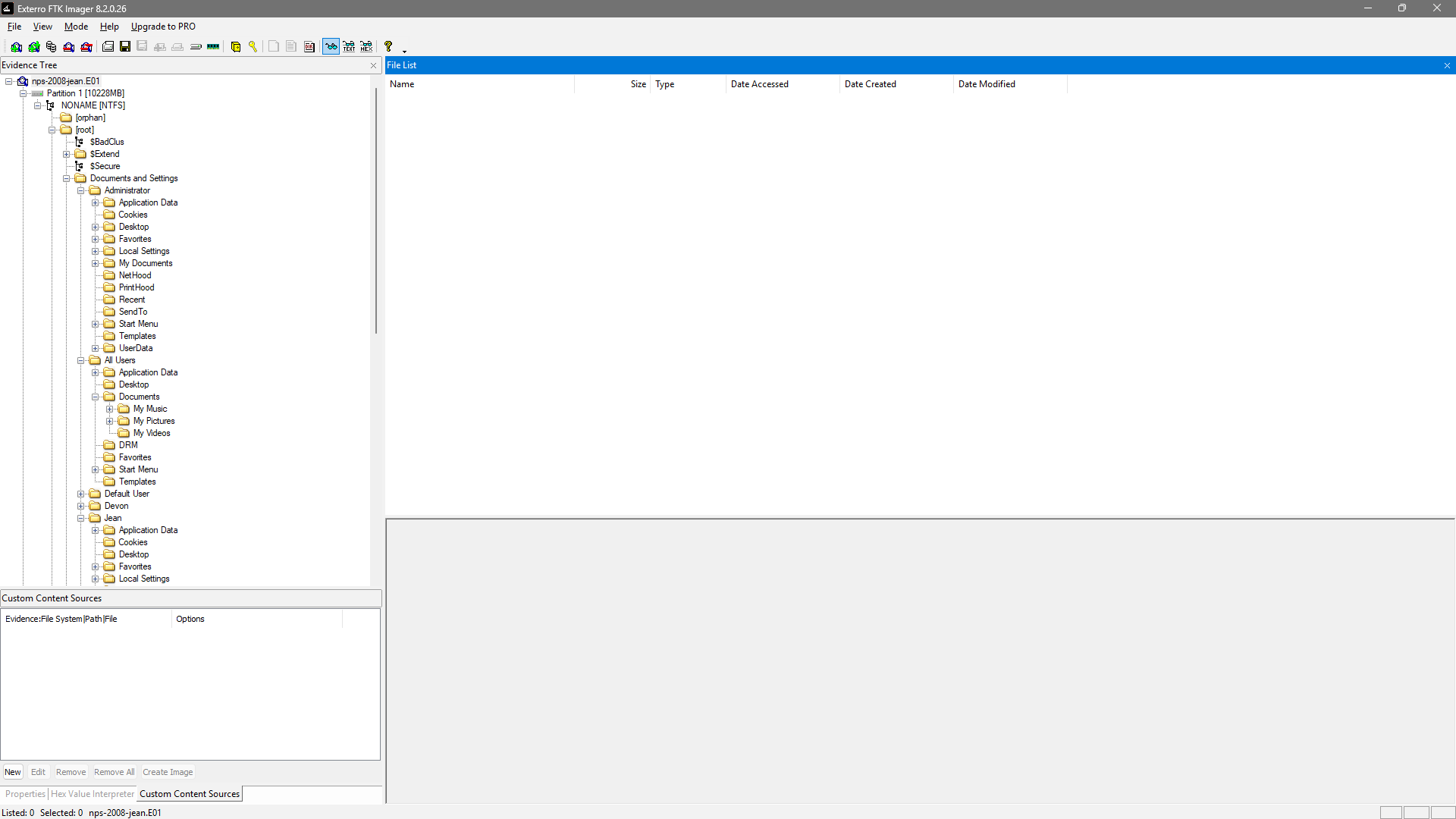
Figure 1: Jean’s multi-volume E01 image loaded in FTK Imager.
Image verification
FTK Imager’s Verify Drive/Image function was used to confirm evidence integrity.
| Property | Result |
|---|---|
| Image | nps-2008-jean.E01 |
| Sector count | 20,971,520 |
| Computed MD5 | 78a52b5bac78f4e711607707ac0e3f93 |
| Stored verification MD5 | 78a52b5bac78f4e711607707ac0e3f93 |
| Verification result | Match |
| Computed SHA-1 | ba7dc57e08bb6e3393aee15c713ae04feadcd181 |
| Bad blocks | None found |
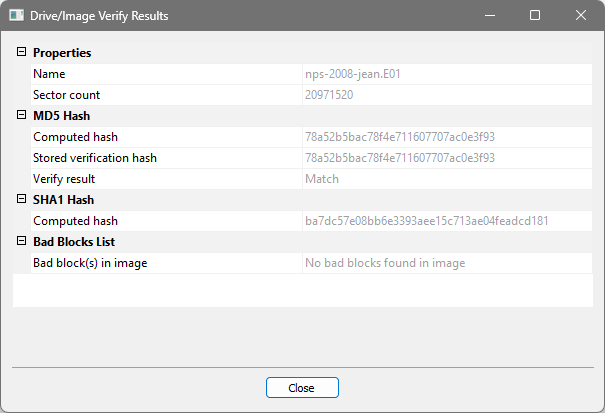
Figure 2: FTK Imager verification results showing a matching MD5 and no bad blocks.
The matching stored and computed MD5 values confirm that the image was not altered between its creation and verification.
2. Spreadsheet Discovery
The spreadsheet was located at:
Documents and Settings\Jean\Desktop\m57biz.xls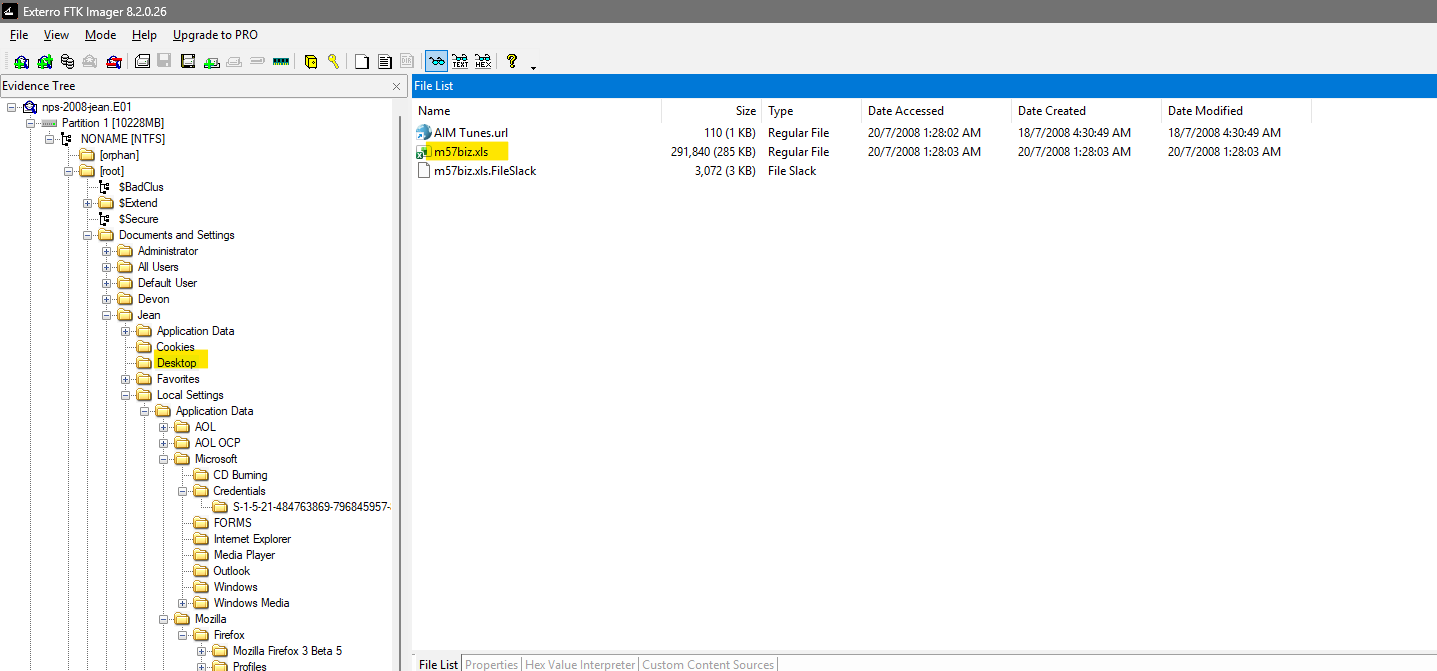
Figure 3: m57biz.xls located on Jean’s Desktop in FTK Imager.
The file appeared as a normal allocated file in FTK Imager. It was not marked as deleted.
NTFS metadata
| Property | Value shown by FTK Imager |
|---|---|
| Filename | m57biz.xls |
| Size | 291,840 bytes |
| Created | 20 July 2008 01:28:03 |
| Modified | 20 July 2008 01:28:03 |
| Accessed | 20 July 2008 01:28:03 |
| Allocation status | Allocated |
The three matching NTFS timestamps indicate that this copy appeared on Jean’s Desktop at approximately the same time it was prepared for transmission.
Internal Microsoft Office metadata
The workbook’s OLE metadata contained additional historical information:
| Metadata field | Value |
|---|---|
| Author | Alison Smith |
| Last saved by | Jean User |
| Internal creation time | 12 June 2008 16:13:51 |
| Internal last-saved time | 20 July 2008 02:28:03 |
This indicates that Alison was the original document author, while Jean later saved the investigated copy. Authorship alone does not establish participation in the disclosure.
The one-hour difference between the NTFS time and the internal Office last-saved time is consistent with different timezone or daylight-saving interpretations. Both raw values are retained rather than silently adjusting either timestamp.
Spreadsheet hashes
| Algorithm | Hash |
|---|---|
| MD5 | eb2ee642e690c2cae7208d43992f72cb |
| SHA-256 | 47bf236ce872137d9827cf9d7a5e89bfe7f27c37f537d7b074c82d183e006f9a |
3. Outlook Mailbox Examination
Jean’s Outlook Personal Storage Table, outlook.pst, was exported from her profile and examined using GoldFynch because FTK Imager could display and export the file but did not parse its mailbox structure.
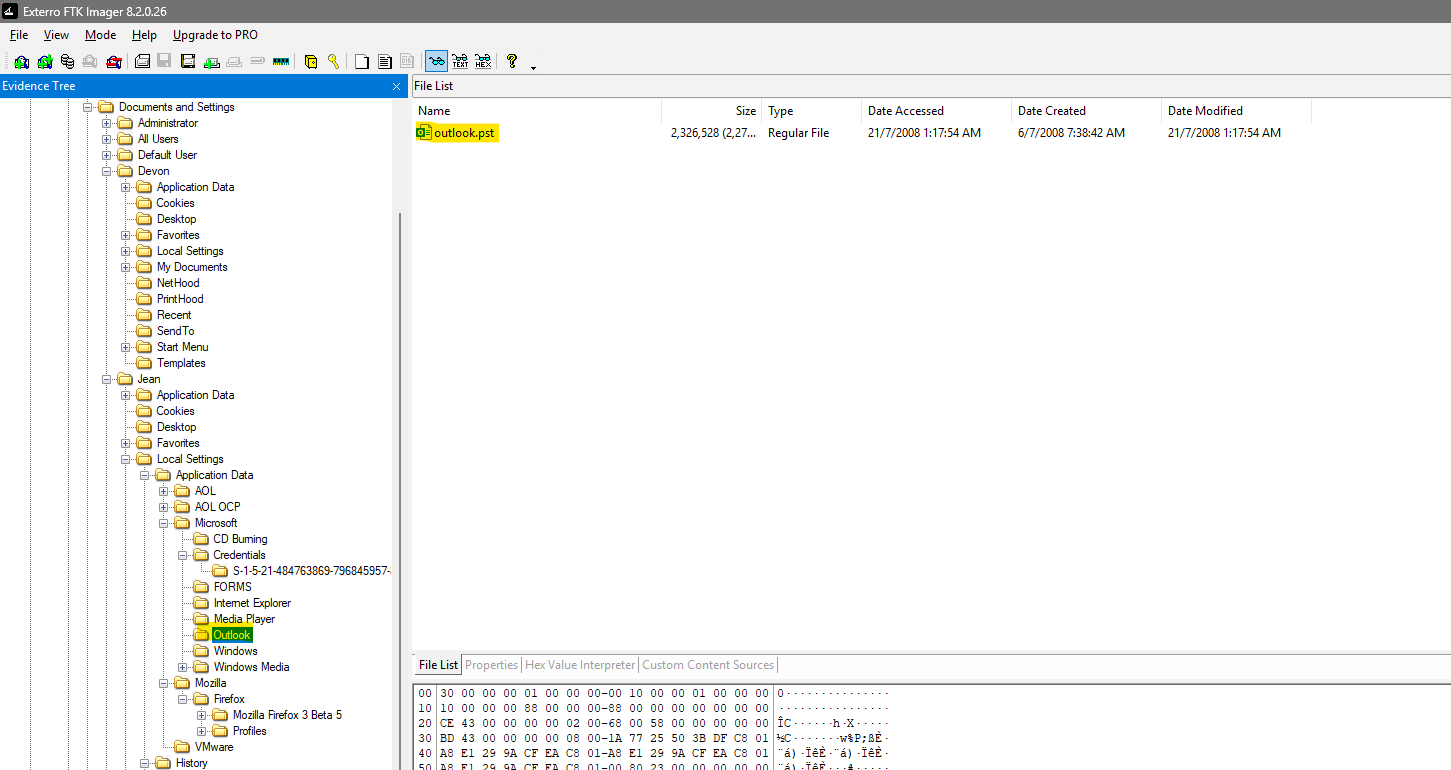
Figure 4: outlook.pst exported from Jean’s profile in FTK Imager.
PST properties
| Property | Value |
|---|---|
| Filename | outlook.pst |
| Format | Microsoft Outlook Personal Storage, ANSI, version 14 |
| Size | 2,326,528 bytes |
| Encryption | Compressible encryption |
| MD5 | 8c862a8c7ad8b7aff1df4d44fbf1fe95 |
| SHA-256 | e17b8c393fc3478c9a6bd59628d551798c4bf35d2a68ac891341dc611bbf1119 |
The training PST was uploaded to GoldFynch for parsing. This approach is acceptable for this public training dataset. Real client or organizational evidence should not be uploaded to a third-party service without authorization and an approved evidence-handling procedure.
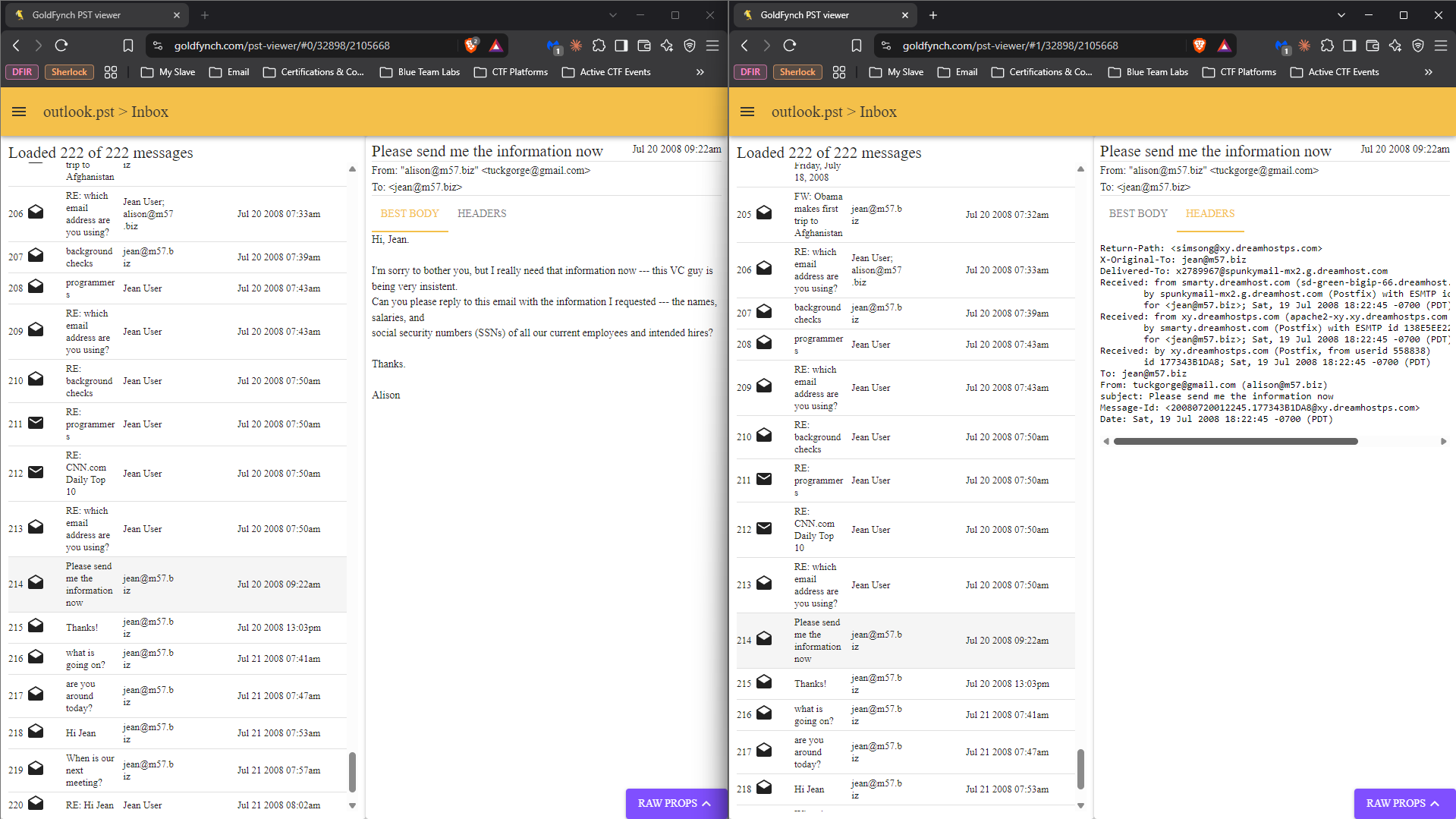
Figure 5: outlook.pst parsed in GoldFynch PST Viewer.
4. Email Evidence
4.1 Alison clarified her genuine address
At 20 July 2008 07:43 MYT, Jean received a genuine message with the following header:
From: "alex" <alison@m57.biz>
Return-Path: <alison@m57.biz>
Subject: RE: which email address are you using?
The message stated:
Whoops. It looks like my email was misconfigured. My email is alison@m57.biz, not alex. Sorry about that.
In this header, alex is only the display name; the actual address is alison@m57.biz. This message is important because Jean was explicitly informed of Alison’s correct address shortly before receiving the fraudulent request.
4.2 Fraudulent request for employee information
At 20 July 2008 09:22 MYT, Jean received a message titled “Please send me the information now.” It requested the names, salaries, and SSNs of current employees and intended hires.
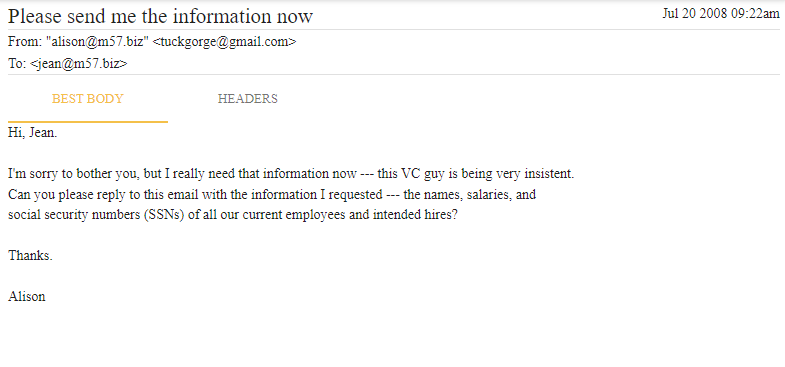
Figure 6: Fraudulent request for employee information, viewed in GoldFynch.
GoldFynch displayed:
From: "alison@m57.biz" <tuckgorge@gmail.com>
To: <jean@m57.biz>
The relevant header fields were:
From: tuckgorge@gmail.com (alison@m57.biz)
To: jean@m57.biz
Subject: Please send me the information now
Message-Id: <20080720012245.177343B1DA8@xy.dreamhostps.com>
Date: Sat, 19 Jul 2008 18:22:45 -0700 (PDT)
The message’s actual sender address was tuckgorge@gmail.com. The text alison@m57.biz was used to impersonate Alison. The date converts to 20 July 2008 01:22:45 UTC, or 09:22:45 MYT.
4.3 Jean sent the spreadsheet
At approximately 20 July 2008 09:28 MYT, Jean replied:
I’ve attached the information that you have requested to this email message.
The reply contained the attachment:
m57biz.xlsThis provides direct evidence that Jean transmitted the confidential spreadsheet by email. The approximately six-minute interval between the request and reply left little time for verification of the sender.
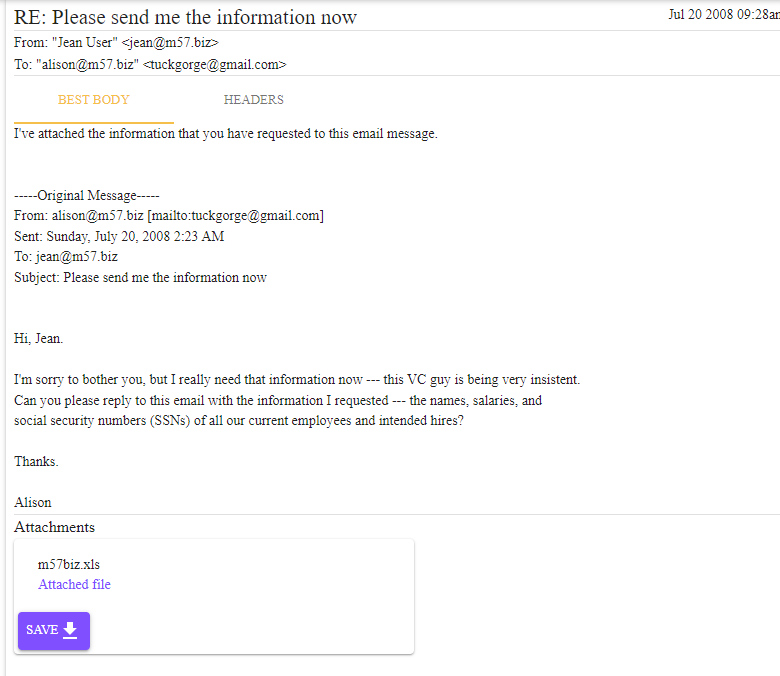
Figure 7: Jean’s reply with m57biz.xls attached, viewed in GoldFynch.
4.4 External sender confirmed receipt
At 20 July 2008 13:03 MYT, Jean received a message titled “Thanks!” from the same external address.
From: tuckgorge@gmail.com (alison@m57.biz)
To: jean@m57.biz
Subject: Thanks!
Message-Id: <20080720050340.39FD03B1DAE@xy.dreamhostps.com>
Date: Sat, 19 Jul 2008 22:03:40 -0700 (PDT)
The message stated:
Jean, Thanks for the file. I’ll handle it from here. Once again, please don’t tell anyone about this.
This message confirms that the external sender received Jean’s file and intended to take further action. The secrecy request is also consistent with malicious social engineering.
4.5 Genuine Alison questioned Jean
On 21 July 2008, genuine messages from alison@m57.biz included:
- “what is going on?” — “What are you doing?”
- “are you around today?” — “Jean, Something very strange is going on. Do you know anything about it?”
These messages support Alison’s statement that she did not knowingly request or receive the spreadsheet.
5. Exported Email Integrity
Relevant messages were exported from the PST and hashed immediately after export.
| Artifact | Description | SHA-256 |
|---|---|---|
214.bin | Fraudulent information request | a290cbbeb41e0aa041b9b1bf9cdc341bc79bd6cc4de73ff96fd4082f41747622 |
215.bin | External sender’s “Thanks!” confirmation | 6d6aa8472bf30a88bb3c0783b09ad0fd8546ae681448f5757cdc2b8ce3602f3c |
216.bin | Genuine Alison: “what is going on?” | 6b24003d9ec80bf1daba52ec5912c9e491dbcaaeca7d830cd171ceab3dd619c0 |
217.bin | Genuine Alison: “are you around today?” | cbf20b56fb5f54d6f9827a88e58f3453abd6e200a36e2ef443d5c1d3901d1636 |
These hashes preserve the integrity of the derived exports from the time they were created. The original outlook.pst remains the primary mailbox evidence.
6. Timeline of Events
| Date and time | Time basis | Event |
|---|---|---|
| 12 Jun 2008 16:13:51 | Office metadata, timezone unspecified | Workbook internally created; author recorded as Alison Smith |
| 20 Jul 2008 07:43 MYT | Converted/displayed email time | Alison tells Jean that her correct address is alison@m57.biz |
| 20 Jul 2008 09:22:45 MYT | Converted from -0700 header | Fraudulent request arrives from tuckgorge@gmail.com |
| 20 Jul 2008 01:28:03 | Raw NTFS time shown by FTK | m57biz.xls created/modified/accessed on Jean’s Desktop |
| About 20 Jul 2008 09:28 MYT | GoldFynch display | Jean replies with m57biz.xls attached |
| 20 Jul 2008 13:03:40 MYT | Converted from -0700 header | External sender confirms receipt and requests secrecy |
| 21 Jul 2008 07:41 MYT | GoldFynch display | Genuine Alison asks, “What are you doing?“ |
| 21 Jul 2008 07:47 MYT | GoldFynch display | Genuine Alison states that something strange is happening |
Timestamps are reported with their original basis because FTK, Office metadata, email headers, and GoldFynch may apply timezone and daylight-saving rules differently.
7. Findings
Question 1: When was the spreadsheet created?
The workbook’s internal metadata records an original creation time of 12 June 2008 16:13:51 and identifies Alison Smith as the author. Jean was recorded as the last person to save it. The investigated Desktop copy has NTFS created, modified, and accessed timestamps of 20 July 2008 01:28:03, close to the time Jean emailed it.
Therefore, Jean did not necessarily create the original workbook. She created or saved the investigated copy immediately before disclosure.
Question 2: How did it leave Jean’s laptop?
The spreadsheet left Jean’s laptop as an attachment to her reply to the fraudulent email. The reply body explicitly stated that the requested information was attached, and GoldFynch identified the attachment as m57biz.xls.
This finding has high confidence.
Question 3: How did it reach the competitor’s website?
The external operator of tuckgorge@gmail.com confirmed receiving the file and stated, “I’ll handle it from here.” The available laptop evidence therefore establishes the transfer from Jean to that external actor.
No direct browser, server, or forum artifact examined in this investigation proves the exact upload action. It is reasonable to infer that the external recipient or an associate subsequently posted the spreadsheet, but this step cannot be conclusively attributed using Jean’s disk image alone.
This finding has moderate confidence and must be expressed as an inference rather than a proven fact.
Question 4: Was Jean hacked, or did she disclose the file herself?
The evidence does not demonstrate malware, remote access, account compromise, or automatic extraction of the document. Instead, Jean manually replied to an impersonation email and attached the spreadsheet.
Jean was therefore socially engineered, not technically hacked. She personally performed the disclosure, although the available evidence does not prove that she knowingly collaborated with the attacker.
Jean’s conduct was particularly negligent because Alison had confirmed her legitimate address shortly before the fraudulent request, while the malicious message clearly used the external address tuckgorge@gmail.com.
Question 5: Was Alison or another employee involved?
Alison was recorded as the original workbook author, but that fact concerns document history rather than the later disclosure. Her genuine emails, genuine address, and reaction after the incident support the conclusion that she was impersonated.
No other M57 employee is proven to have knowingly participated. The other identified participant was the unidentified external operator of tuckgorge@gmail.com.
8. Findings Summary
| Finding | Supporting evidence | Confidence |
|---|---|---|
| Jean saved the investigated copy | NTFS and Office metadata | High |
| Jean emailed the spreadsheet | Reply body and attachment record | High |
| Sender impersonated Alison | Display name differed from actual Gmail address | High |
| External actor received the file | ”Thanks!” confirmation email | High |
| Alison knowingly participated | Not supported by the examined evidence | High confidence in non-attribution |
| External recipient posted the file to the competitor forum | Consistent with sequence, but no direct upload artifact | Moderate |
| Jean’s laptop was technically hacked | Not supported by the examined evidence | High confidence in rejection |
9. Limitations
- Only Jean’s disk image was examined. The attacker’s Gmail account, DreamHost server records, competitor forum logs, and Alison’s computer were unavailable.
- The evidence identifies
tuckgorge@gmail.combut does not establish the real identity of its operator. - The
Return-Pathvaluesimsong@xy.dreamhostps.comand the DreamHostReceivedchain identify message infrastructure, not necessarily the human attacker. - The exact forum upload was not directly observed. Attribution of that action remains an inference.
- An exact hash comparison between Jean’s Desktop copy and a separately downloaded email attachment was not completed. The attachment name and surrounding email evidence nevertheless demonstrate transmission of a file named
m57biz.xls. - Differences between displayed and raw timestamps require careful timezone handling. Raw values have been retained wherever possible.
10. Conclusion
The evidence shows that Jean’s laptop was not the victim of a demonstrated technical intrusion. An external actor used the display identity alison@m57.biz while sending from tuckgorge@gmail.com and requested confidential employee information. Jean replied within approximately six minutes and attached m57biz.xls.
The external sender later confirmed receipt and instructed Jean not to tell anyone. Genuine messages from Alison show that she was confused by Jean’s actions and was not aware of the request. Although Alison was the original workbook author, no evidence shows that she participated in the exfiltration.
The most defensible conclusion is that Jean disclosed the spreadsheet after falling for email impersonation and social engineering. The external recipient likely arranged its publication on the competitor’s website, but the exact uploader and the real identity behind tuckgorge@gmail.com cannot be conclusively determined from Jean’s disk image alone.
Appendix A: Key Evidence Hashes
nps-2008-jean.E01
MD5:  78a52b5bac78f4e711607707ac0e3f93
SHA1: ba7dc57e08bb6e3393aee15c713ae04feadcd181

outlook.pst
MD5:    8c862a8c7ad8b7aff1df4d44fbf1fe95
SHA256: e17b8c393fc3478c9a6bd59628d551798c4bf35d2a68ac891341dc611bbf1119

m57biz.xls
MD5:    eb2ee642e690c2cae7208d43992f72cb
SHA256: 47bf236ce872137d9827cf9d7a5e89bfe7f27c37f537d7b074c82d183e006f9a
Appendix B: Integrity Commands
sha256sum outlook.pst m57biz.xls
sha256sum 214.bin 215.bin 216.bin 217.binRelated Writeups


Authorized security practice only. These notes are for lab, CTF, and explicitly permitted environments.