HTB Sherlock RogueOne
Windows memory forensics with Volatility 3: identifying a malicious svchost.exe, tracing its child shell and C2 connection, recovering the executable, and building an incident timeline.

Challenge Information
-
Platform: Hack The Box
-
Category: Sherlock
-
Challenge: RogueOne
-
Investigation Type: Memory Forensics
-
Operating System: Windows 10 x64
-
Memory Image:
20230810.mem
Sherlock Scenario
Your SIEM system generated multiple alerts in less than a minute, indicating potential C2 communication from Simon Stark’s workstation. Despite Simon not noticing anything unusual, the IT team had him share screenshots of his task manager to check for any unusual processes.
No suspicious processes were found, yet alerts about C2 communications persisted. The SOC manager then directed the immediate containment of the workstation and a memory dump for analysis.
As a memory forensics expert, we are tasked with assisting the SOC team at Forela to investigate and resolve this incident.
Tools Used
-
Kali Linux
-
Volatility 3
-
VirusTotal
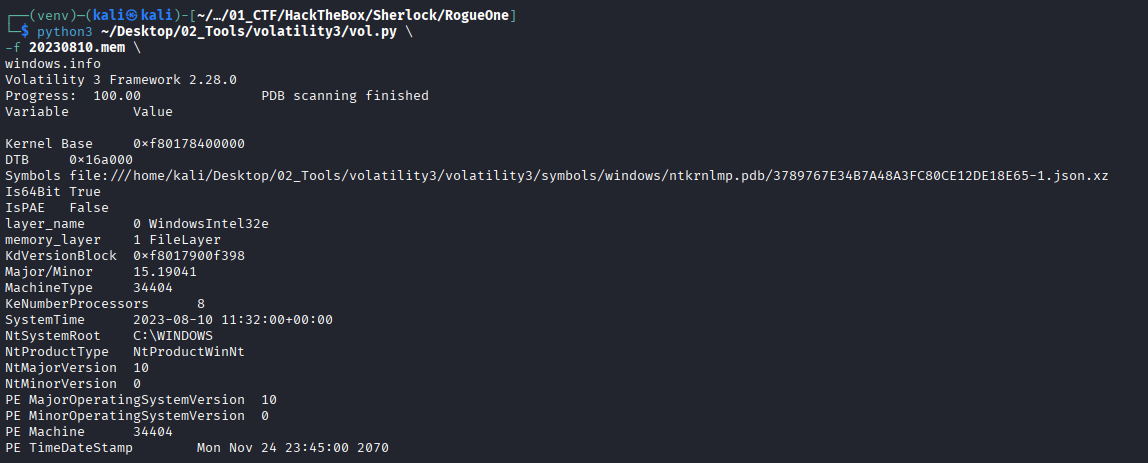
The provided memory image was:
20230810.memBefore starting the investigation, I activated the Python virtual environment containing Volatility 3:
source ~/Desktop/02_Tools/volatility3/venv/bin/activateInitial Memory Triage
Before answering the Sherlock questions, I first identified information about the memory image.
python3 ~/Desktop/02_Tools/volatility3/vol.py \
-f 20230810.mem \
windows.info
Volatility successfully identified the memory image as a 64-bit Windows 10 system.
I then enumerated running processes:
python3 ~/Desktop/02_Tools/volatility3/vol.py \
-f 20230810.mem \
windows.pslist
To make parent-child relationships easier to identify, I also used:
python3 ~/Desktop/02_Tools/volatility3/vol.py \
-f 20230810.mem \
windows.pstree
Question 1 – Identify the Malicious Process
Please identify the malicious process and confirm process ID of malicious process.
Investigation
Because the scenario mentioned active C2 communication, I started by examining active and historical network connections.
python3 ~/Desktop/02_Tools/volatility3/vol.py \
-f 20230810.mem \
windows.netscan
One connection immediately stood out:
172.17.79.131:64254
→ 13.127.155.166:8888
ESTABLISHED
PID 6812
svchost.exe
The process name svchost.exe initially appears legitimate because Windows normally runs many instances of it.
However, checking the process tree revealed something abnormal.
python3 ~/Desktop/02_Tools/volatility3/vol.py \
-f 20230810.mem \
windows.pstree
The suspicious process was:
PID: 6812
PPID: 7436
Process: svchost.exe
Path: C:\Users\simon.stark\Downloads\svchost.exe
A legitimate svchost.exe normally runs from:
C:\Windows\System32\svchost.exeThis executable was instead running directly from Simon’s Downloads directory and was spawned by explorer.exe.
I also checked its command line:
python3 ~/Desktop/02_Tools/volatility3/vol.py \
-f 20230810.mem \
windows.cmdline | grep -B 3 -A 5 6812
Result:
6812 svchost.exe "C:\Users\simon.stark\Downloads\svchost.exe"To investigate potential malicious memory regions, I ran:
python3 ~/Desktop/02_Tools/volatility3/vol.py \
-f 20230810.mem \
windows.malware.malfind --pid 6812
Volatility identified an executable PAGE_EXECUTE_READWRITE region containing an MZ header, providing further evidence that PID 6812 was malicious.
Answer
Process: svchost.exe
PID: 6812
Evidence Screenshot
Question 2 – Identify the Child Process
The SOC team believe the malicious process may spawned another process which enabled threat actor to execute commands. What is the process ID of that child process?
Investigation
Since PID 6812 had already been identified as malicious, I examined its child processes using windows.pstree.
python3 ~/Desktop/02_Tools/volatility3/vol.py \
-f 20230810.mem \
windows.pstree
The process tree showed:
explorer.exe
└── svchost.exe (6812)
    └── cmd.exe (4364)
        └── conhost.exe (9204)
The malicious svchost.exe spawned cmd.exe.
A command shell such as cmd.exe could provide the attacker with the ability to execute commands on the compromised workstation.
The command line output also confirmed this relationship:
6812    svchost.exe
4364    cmd.exe
9204    conhost.exe
Answer
4364Evidence Screenshot

Question 3 – MD5 Hash of the Malicious File
The reverse engineering team need the malicious file sample to analyze. Your SOC manager instructed you to find the hash of the file and then forward the sample to reverse engineering team. Whats the md5 hash of the malicious file?
Investigation
We already knew the malware filename and location:
C:\Users\simon.stark\Downloads\svchost.exeI searched memory for file objects associated with svchost.exe:
python3 ~/Desktop/02_Tools/volatility3/vol.py \
-f 20230810.mem \
windows.filescan | grep -i 'svchost.exe'
Among the legitimate System32 files were two suspicious entries:
0x9e8b909045d0  \Users\simon.stark\Downloads\svchost.exe
0x9e8b91ec0140  \Users\simon.stark\Downloads\svchost.exe
I created a directory for recovered files:
mkdir -p dumpedThen dumped the malicious executable:
python3 ~/Desktop/02_Tools/volatility3/vol.py \
-f 20230810.mem \
-o dumped \
windows.dumpfiles --virtaddr 0x9e8b909045d0
I also recovered the second file object:
python3 ~/Desktop/02_Tools/volatility3/vol.py \
-f 20230810.mem \
-o dumped \
windows.dumpfiles --virtaddr 0x9e8b91ec0140
Volatility recovered an ImageSectionObject containing the executable.
I verified the recovered file:
file dumped/*It was identified as:
PE32+ executable for MS Windows, x86-64Finally, I calculated its MD5 hash:
md5sum dumped/*.imgBoth recovered objects produced the same MD5:
5bd547c6f5bfc4858fe62c8867acfbb5Answer
5bd547c6f5bfc4858fe62c8867acfbb5Evidence Screenshot

Question 4 – Identify the C2 Address
In order to find the scope of the incident, the SOC manager has deployed a threat hunting team to sweep across the environment for any indicator of compromise. It would be a great help to the team if you are able to confirm the C2 IP address and ports so our team can utilise these in their sweep.
Investigation
Since PID 6812 was confirmed malicious, I filtered the network scan results using its PID.
python3 ~/Desktop/02_Tools/volatility3/vol.py \
-f 20230810.mem \
windows.netscan | grep 6812
The result showed:
Local Address:  172.17.79.131
Local Port:     64254
Remote Address: 13.127.155.166
Remote Port:    8888
State:          ESTABLISHED
PID:            6812
Process:         svchost.exe
The remote endpoint is therefore the attacker’s C2 infrastructure.
Answer
13.127.155.166:8888IOC
| Type | Value |
|---|---|
| C2 IP | 13.127.155.166 |
| C2 Port | 8888 |
| Protocol | TCP |
| Process | svchost.exe |
| PID | 6812 |
Evidence Screenshot

Question 5 – Execution and C2 Establishment Time
We need a timeline to help us scope out the incident and help the wider DFIR team to perform root cause analysis. Can you confirm time the process was executed and C2 channel was established?
Investigation
The process execution timestamp was available from windows.pstree.
python3 ~/Desktop/02_Tools/volatility3/vol.py \
-f 20230810.mem \
windows.pstree
PID 6812 showed:
Create Time:
2023-08-10 11:30:03 UTC
I then compared this against the network connection:
python3 ~/Desktop/02_Tools/volatility3/vol.py \
-f 20230810.mem \
windows.netscan | grep 6812
The C2 connection was also created at:
2023-08-10 11:30:03 UTCTherefore, the malicious process established its C2 connection almost immediately after execution.
Hack The Box required the answer using the following format:
DD/MM/YYYY HH:MM:SSAnswer
10/08/2023 11:30:03Question 6 – Memory Offset of the Malicious Process
What is the memory offset of the malicious process?
Investigation
The process offset can be obtained from the Offset(V) column in windows.pslist or windows.pstree.
I filtered the process list for PID 6812:
python3 ~/Desktop/02_Tools/volatility3/vol.py \
-f 20230810.mem \
windows.pslist | grep 6812
The malicious process had the following virtual memory offset:
0x9e8b87762080Answer
0x9e8b87762080Question 7 – VirusTotal First Submission
You successfully analyzed a memory dump and received praise from your manager. The following day, your manager requests an update on the malicious file. You check VirusTotal and find that the file has already been uploaded, likely by the reverse engineering team. Your task is to determine when the sample was first submitted to VirusTotal.
Investigation
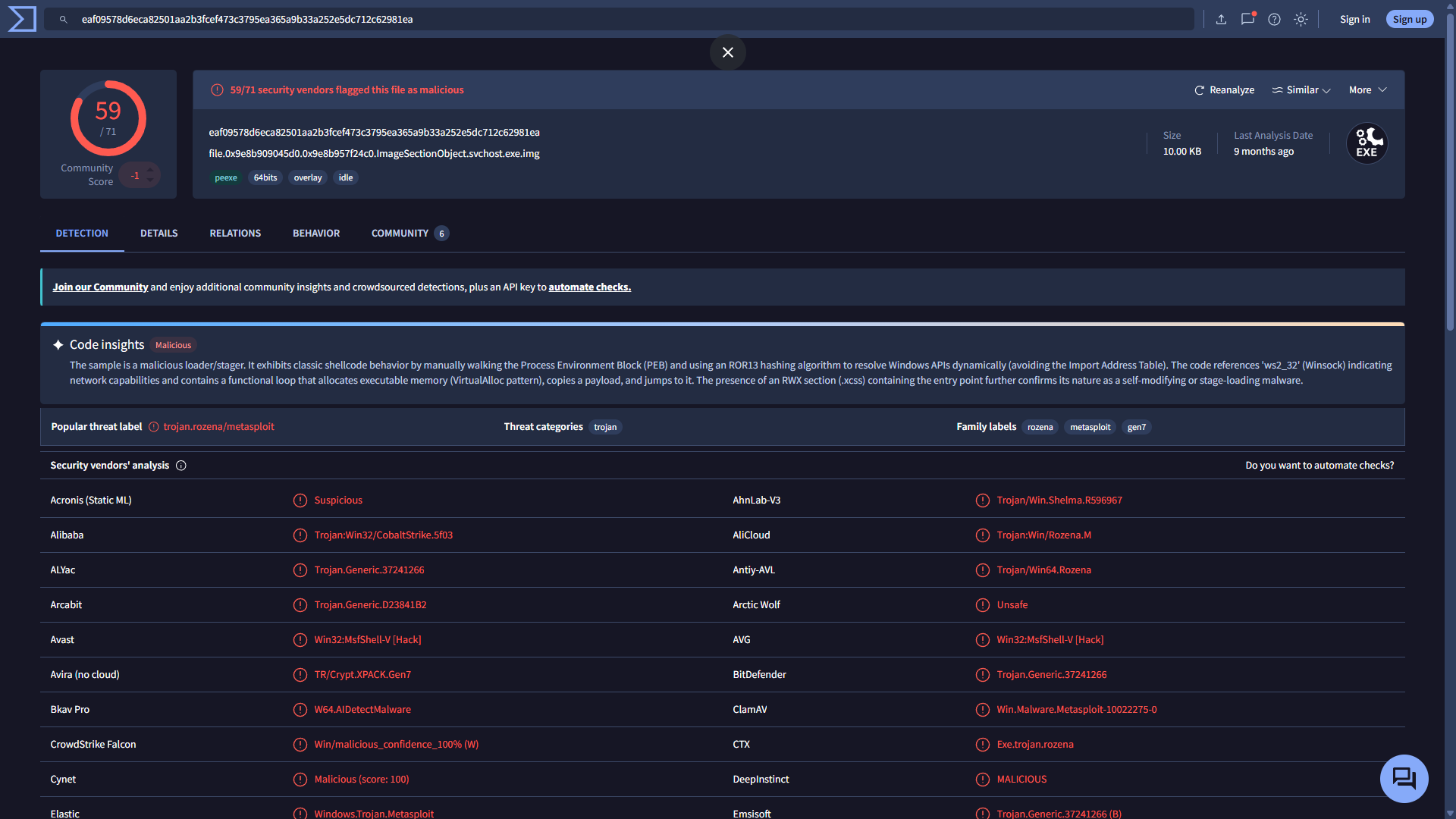
Earlier, the malware sample was identified with the MD5:
5bd547c6f5bfc4858fe62c8867acfbb5I searched this hash on VirusTotal.
Inside the sample information, I checked:
Details → History → First SubmissionVirusTotal showed the sample was first submitted at:
2023-08-10 11:58:10 UTCHack The Box required the timestamp using the format:
DD/MM/YYYY HH:MM:SSAnswer
10/08/2023 11:58:10Evidence Screenshot
Investigation Timeline
| Time (UTC) | Event |
|---|---|
11:20:21 | WinRAR opened Aws hosts.zip |
11:22:31 | Suspicious svchost.exe PID 936 executed from Downloads |
11:27:15 | PID 936 spawned cmd.exe PID 8260 |
11:30:03 | Malicious svchost.exe PID 6812 executed |
11:30:03 | PID 6812 established C2 connection to 13.127.155.166:8888 |
11:30:57 | PID 6812 spawned cmd.exe PID 4364 |
11:31:52 | Belkasoft RAM Capturer started |
11:32:00 | Memory image system time |
11:58:10 | Malware first submitted to VirusTotal |
Indicators of Compromise
| IOC Type | Value |
|---|---|
| Malicious filename | svchost.exe |
| Malicious path | C:\Users\simon.stark\Downloads\svchost.exe |
| Process ID | 6812 |
| Child process | cmd.exe |
| Child PID | 4364 |
| Memory offset | 0x9e8b87762080 |
| C2 IP | 13.127.155.166 |
| C2 Port | 8888 |
| MD5 | 5bd547c6f5bfc4858fe62c8867acfbb5 |
Final Answers
| Question | Answer |
|---|---|
| Malicious process | svchost.exe |
| Malicious PID | 6812 |
| Child process PID | 4364 |
| Malware MD5 | 5bd547c6f5bfc4858fe62c8867acfbb5 |
| C2 IP | 13.127.155.166 |
| C2 port | 8888 |
| Execution/C2 time | 10/08/2023 11:30:03 |
| Memory offset | 0x9e8b87762080 |
| VirusTotal first submission | 10/08/2023 11:58:10 |
Conclusion
The memory investigation identified a malicious executable masquerading as the legitimate Windows svchost.exe.
Unlike legitimate copies located in C:\Windows\System32, the malicious executable was running from:
C:\Users\simon.stark\Downloads\svchost.exeThe malicious process had PID 6812 and established an outbound TCP connection to:
13.127.155.166:8888The process subsequently spawned cmd.exe with PID 4364, strongly indicating that the threat actor obtained remote command-execution capability.
The malicious executable was successfully recovered from memory using Volatility’s windows.dumpfiles plugin. Its MD5 hash was identified as:
5bd547c6f5bfc4858fe62c8867acfbb5The recovered sample and associated network indicators can be provided to the reverse-engineering and threat-hunting teams for further analysis and environment-wide detection.
This investigation demonstrates how memory forensics can reveal malicious activity that may not be visible through normal tools such as Windows Task Manager.

Related Writeups



Authorized security practice only. These notes are for lab, CTF, and explicitly permitted environments.