DFIR First Image Analysis: Autopsy Walkthrough
Autopsy-based DFIR walkthrough of a Dell Latitude CPi image, covering system artifacts, user attribution, network evidence, installed tools, malware, and webmail findings.
DFIR First Image Analysis: Autopsy Walkthrough
Case Overview
A complaint was submitted alleging wireless network intrusion (“Wi-Fi hacking”). Responding authorities recovered an abandoned Dell Latitude CPi laptop suspected of being used to intercept wireless network traffic within range of public hotspots (e.g., Starbucks and T-Mobile locations), with the intent of capturing credit card numbers, usernames, and passwords. The suspect is known online by the alias Mr. Evil. This report documents the forensic examination of a disk image acquired from the suspect computer, addressing twenty investigative questions concerning system identification, user activity, installed tools, and evidence of malicious intent.
Acquisition details (per Autopsy image metadata):
| Field | Value |
|---|---|
| Evidence description | Dell Latitude CPi |
| Case number | Greg Schardt |
| Examiner | Shane Robinson |
| Acquired date | Wed Sep 22 22:06:04 2004 |
| Image size | 4871301120 bytes |
| Sector size | 512 bytes |
| Time zone | Asia/Kuala_Lumpur |
| Acquisition software version | 4.19a |
Tools Used
- Autopsy 4.22.1
- VirusTotal
Investigation Questions
Q1. What is the image hash?
Objective: Verify the integrity of the acquired forensic image by recording its cryptographic hash value.
Procedure:
- In Autopsy, select the data source
4Dell Latitude CPi.E01in the tree view. - Open the File Metadata tab.
- Record the value listed under
MD5.
Evidence:
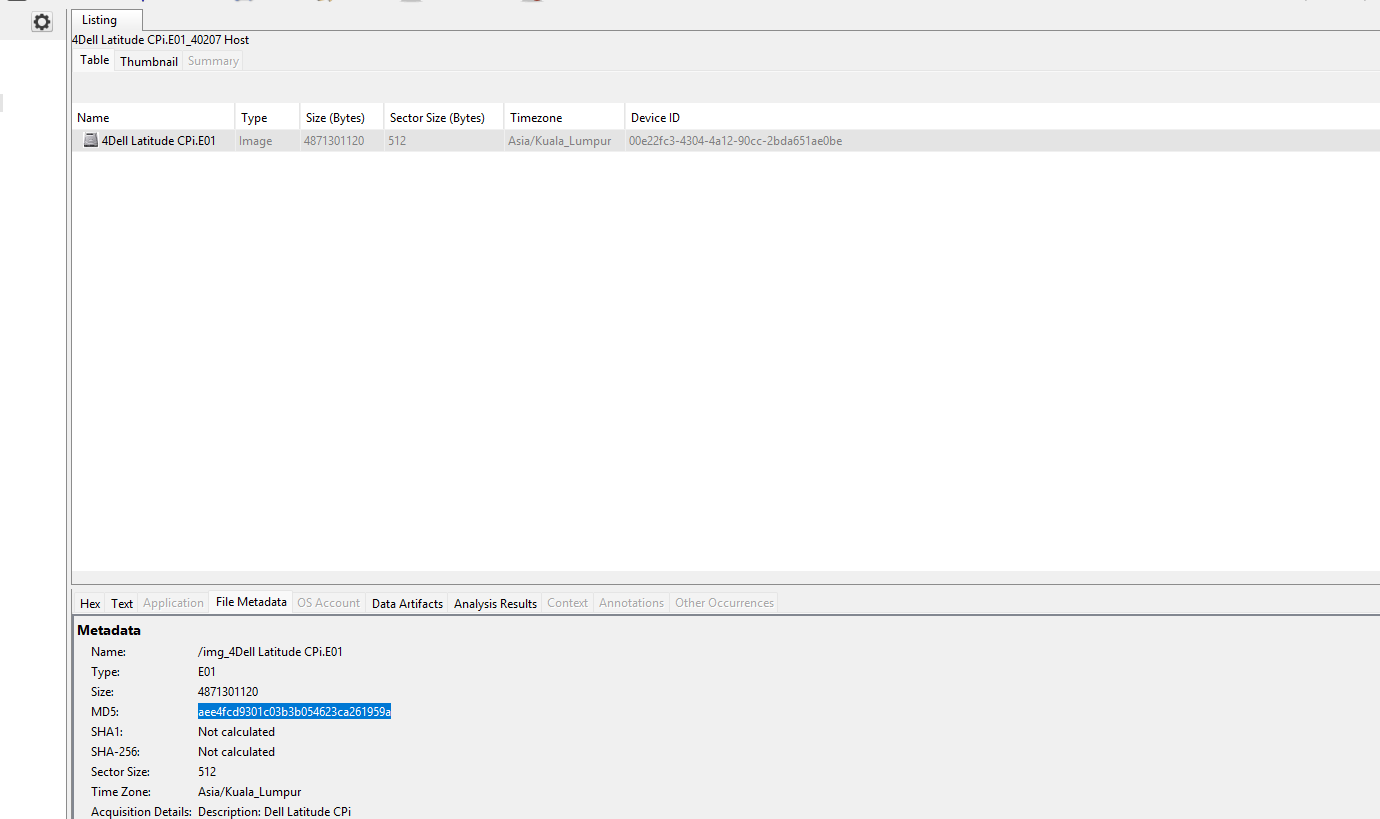
MD5: aee4fcd9301c03b3b054623ca261959a[!warning] Evidence discrepancy The originally recorded answer contained a trailing pipe character (
aee4fcd9301c03b3b054623ca261959a|). The Autopsy File Metadata pane shown above displays the hash without this character. The value stated in the Finding reflects the screenshot evidence.
Finding: The image MD5 hash is aee4fcd9301c03b3b054623ca261959a.
Forensic Relevance: The hash allows independent verification that the image has not been altered since acquisition, supporting the integrity of the chain of custody.
Q2. What operating system was used on the computer?
Objective: Identify the operating system installed on the suspect computer to determine the applicable forensic artifacts and registry structure.
Procedure:
- Navigate to Data Artifacts → Operating System Information in Autopsy.
- Review the
Program Namefield. - Cross-reference against the acquisition metadata under File Metadata.
Evidence:
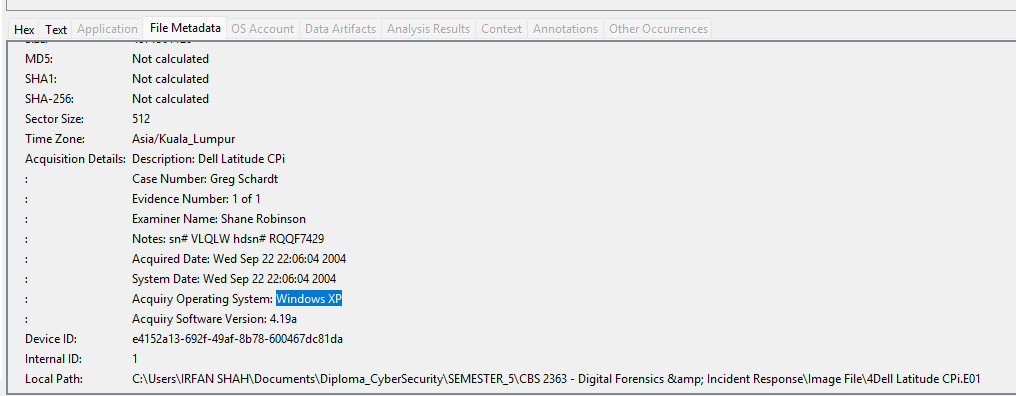
Program Name: Microsoft Windows XP
Acquiry Operating System: Windows XP
Finding: The computer ran Windows XP.
Forensic Relevance: Confirming the operating system determines which registry hives, log formats, and artifact locations (e.g., Prefetch, index.dat) are relevant to the remainder of the examination.
Q3. When was the install date?
Objective: Determine when the operating system was installed, to establish the earliest point of the system timeline.
Procedure:
- Navigate to
Data Sources → vol2 → WIN98. - Open the File Metadata tab for the
WIN98folder. - Record the
Createdtimestamp, used as an indicator of installation time.
Evidence:
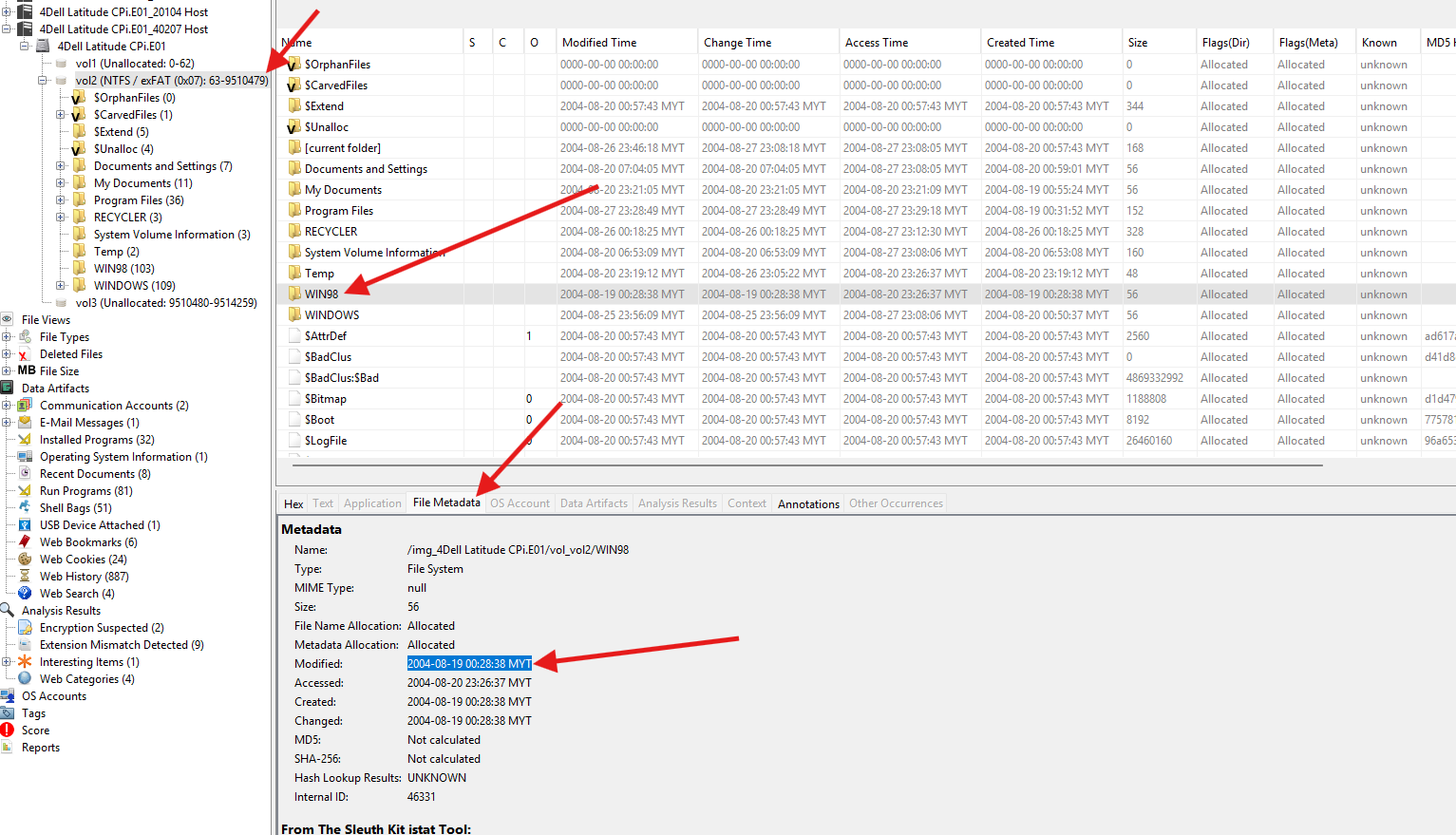
Path:    vol2/WIN98
Created: 2004-08-19 00:28:38 MYT
Finding: The operating system was installed on 2004-08-19 00:28:38 MYT.
Forensic Relevance: The install date anchors the start of the system timeline, allowing the examiner to distinguish pre-existing system artifacts from those created during the period of alleged misuse.
Q4. Who is the registered owner?
Objective: Identify the individual to whom the operating system was registered, supporting attribution of the device.
Procedure:
- Navigate to Data Artifacts → Operating System Information.
- Review the
Ownerfield.
Evidence:
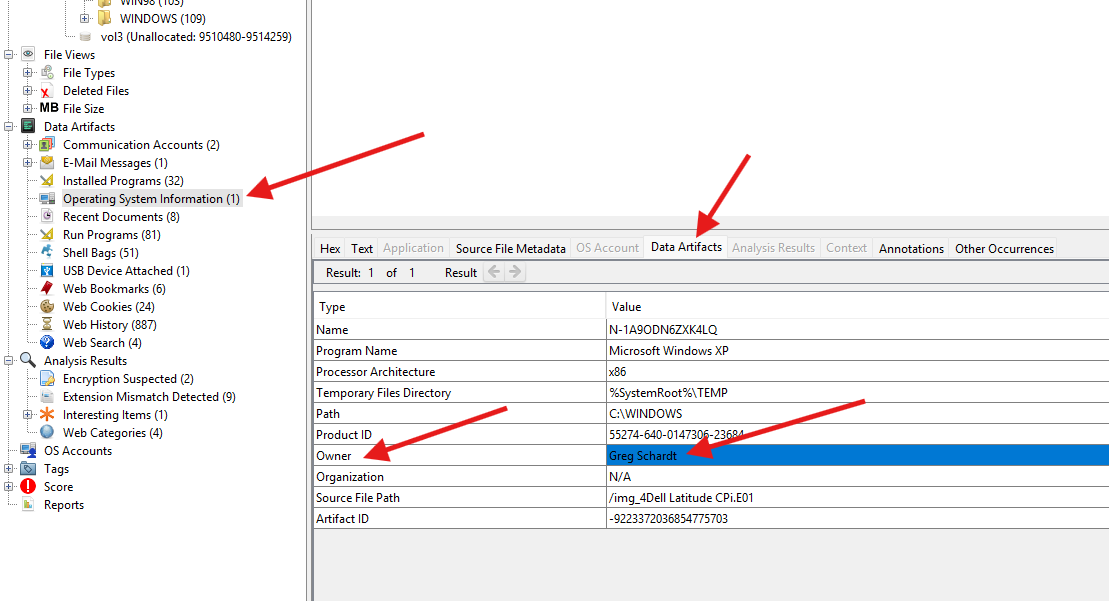
Owner:      Greg Schardt
Product ID: 55274-640-0147306-23684
Finding: The registered owner is Greg Schardt.
Forensic Relevance: Ties the physical device to a named individual, supporting attribution alongside the Mr. Evil online alias identified elsewhere in the investigation.
Q5. What is the computer account name?
Objective: Identify the computer/host account name assigned to the system.
Procedure:
- Navigate to Data Artifacts → Operating System Information.
- Review the
Namefield.
Evidence:
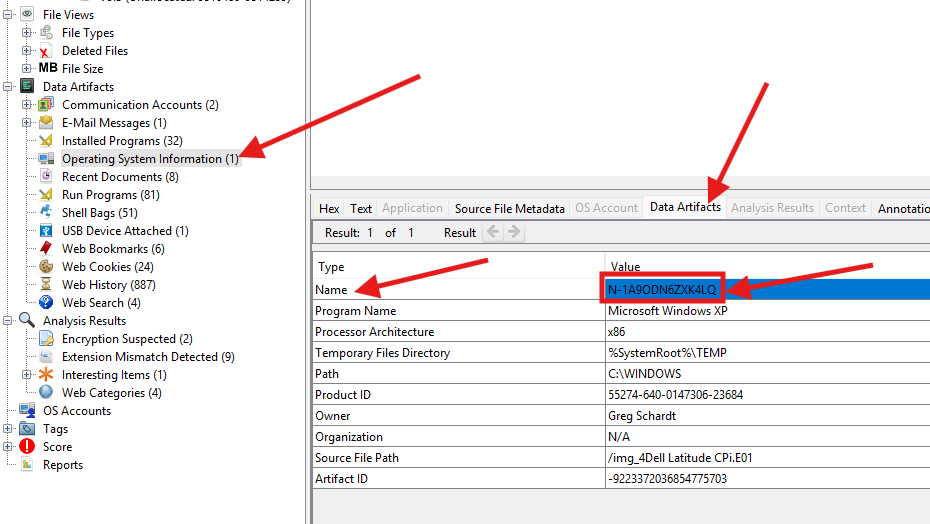
Name: N-1A9ODN6ZXK4LQFinding: The computer account name is N-1A9ODN6ZXK4LQ.
Forensic Relevance: The host name also appears in third-party application configuration files (e.g., irunin.ini, Q10), allowing correlation between system identity and installed-tool artifacts.
Q6. When was the last recorded computer shutdown date/time?
Objective: Determine the last recorded shutdown time to establish the end of the active system usage timeline.
Procedure:
- Navigate to
Data Sources → 4Dell Latitude → vol2 → WINDOWS\system32\config\software. - Open the hive with Registry Viewer and navigate to the
Prefetcherkey underCurrentVersion. - Select the
ExitTimevalue and review its data.
Evidence:
Original navigation note:
4Dell Latitude --> vol2 --> WINDOWS\system32\config\software\Microsoft\WindowNT\CurrentVersion\Prefetcher\ExittimeConfirmed registry value (Registry Viewer):
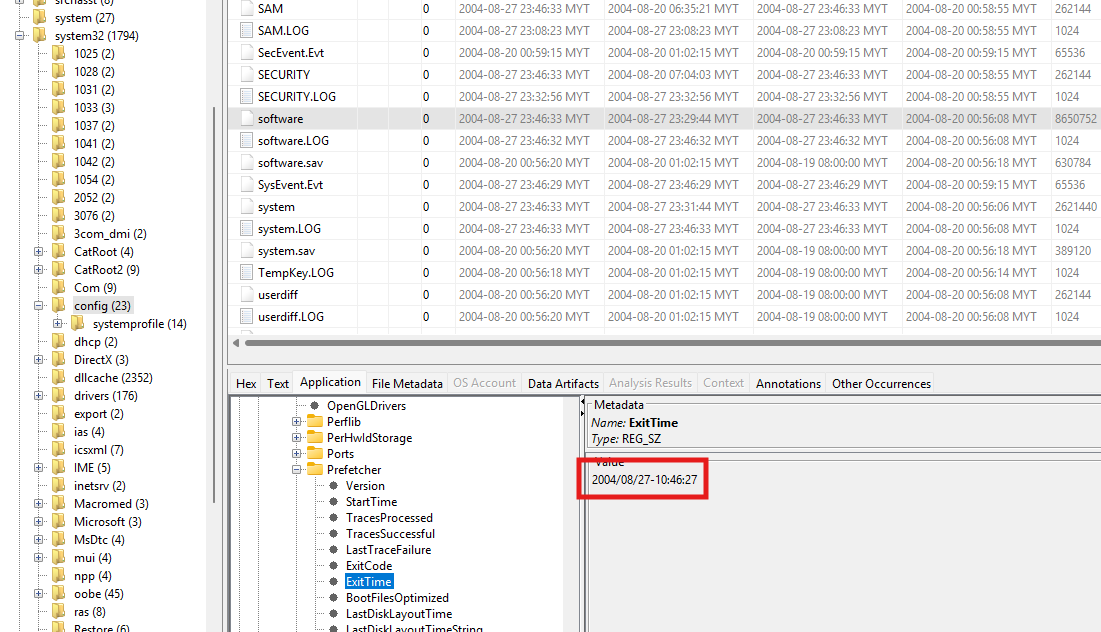
Registry key: HKLM\SOFTWARE\Microsoft\Windows NT\CurrentVersion\Prefetcher
Value name:   ExitTime
Value data:   2004/08/27-10:46:27
Finding: The last recorded shutdown occurred at 2004-08-27 10:46:27.
Forensic Relevance: Marks the endpoint of the reconstructed system timeline and can be correlated against last-logon and file-activity timestamps to establish the duration of the final user session.
Q7. How many accounts are recorded (total number)?
Objective: Enumerate all local user and system accounts present on the machine.
Procedure:
- Navigate to OS Accounts in the Autopsy tree.
- Review the account listing, including SID, login name, and creation time.
Evidence:
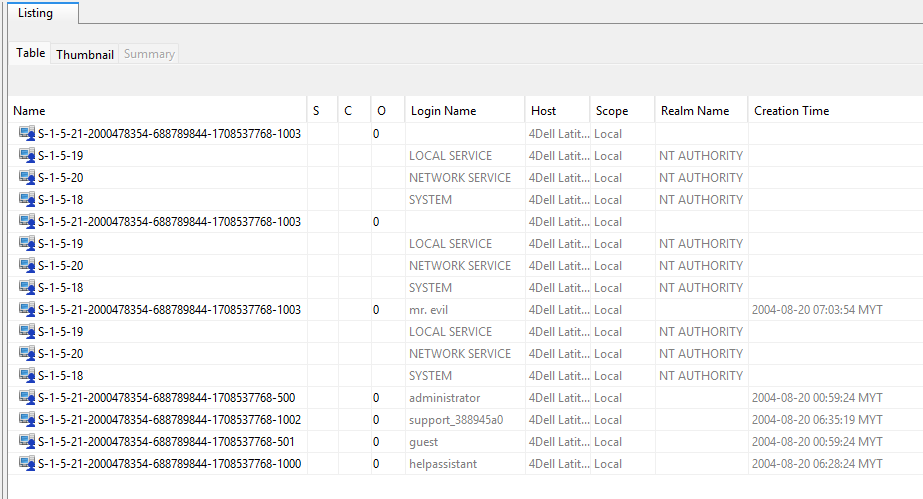
| SID ending | Account | Meaning |
|---|---|---|
-500 | administrator | Built-in Administrator |
-501 | guest | Built-in Guest |
-1000 | helpassistant | Windows Remote Assistance account |
-1002 | support_388945a0 | Microsoft support-related account |
-1003 | mr. evil | Manually created local user; most suspicious |
S-1-5-18 | SYSTEM | Windows Local System |
S-1-5-19 | LOCAL SERVICE | Restricted service account |
S-1-5-20 | NETWORK SERVICE | Network-facing service account |
Full SID for the suspect account:
S-1-5-21-2000478354-688789844-1708537768-1003Finding: 8 accounts are recorded in total.
Forensic Relevance: Distinguishes default Windows/service accounts from the manually created mr. evil account, which is the primary account of forensic interest throughout the remainder of the examination.
Q8. Who was the last user to logon to the computer?
Objective: Identify the last user account to log on interactively, to correlate account activity with the suspect’s online alias.
Procedure:
- Navigate to
Data Sources → <disk image> → Windows\System32\Config\SOFTWARE. - Open the hive with Registry Viewer and navigate to:
HKLM\SOFTWARE\Microsoft\Windows NT\CurrentVersion\Winlogon - Inspect the
DefaultUserName,AltDefaultUserName, andDefaultDomainNamevalues.
Evidence:
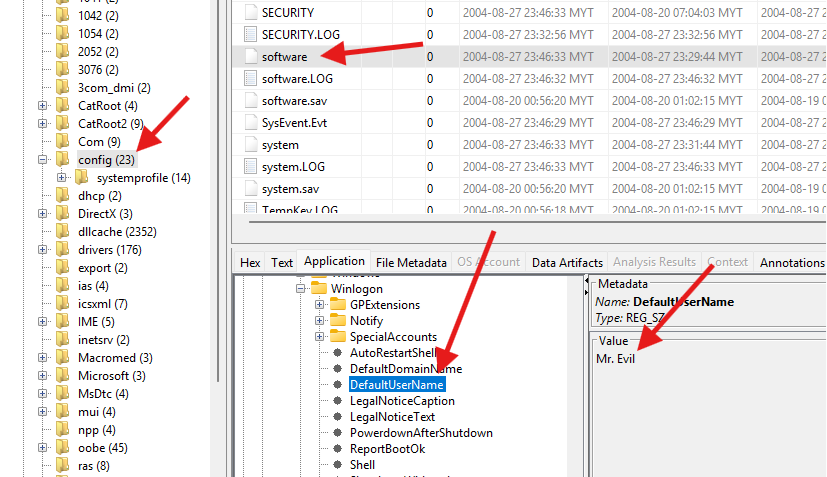
Registry key: HKLM\SOFTWARE\Microsoft\Windows NT\CurrentVersion\Winlogon
Value name:   DefaultUserName
Value data:   Mr. Evil
Finding: The last user to log on was Mr. Evil.
Forensic Relevance: Directly links the mr. evil local account (Q7) to the Mr. Evil alias used by the suspect, reinforcing user attribution.
Q9. List the network cards used by this computer.
Objective: Identify the network interface hardware present on the system, relevant to the alleged wireless interception activity.
Procedure:
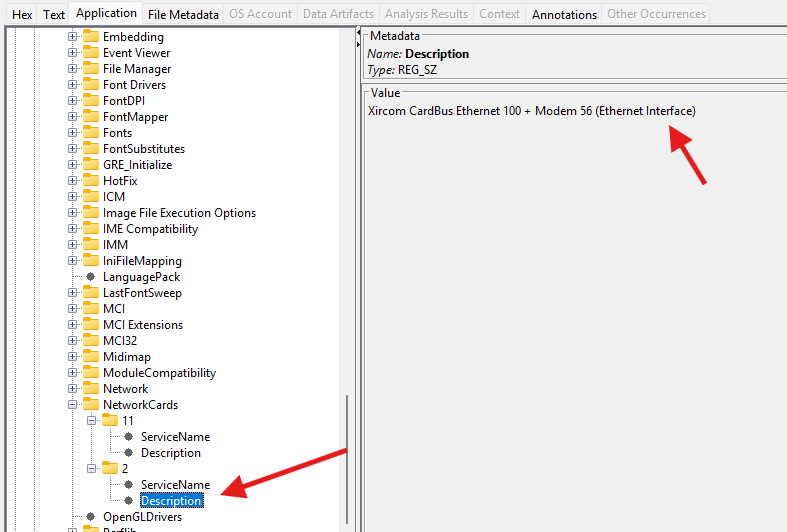
- Open the
SOFTWAREregistry hive in Autopsy. - Navigate to:
Microsoft → Windows NT → CurrentVersion → NetworkCards - Examine each numbered subkey and record the
Descriptionvalue.
Evidence:
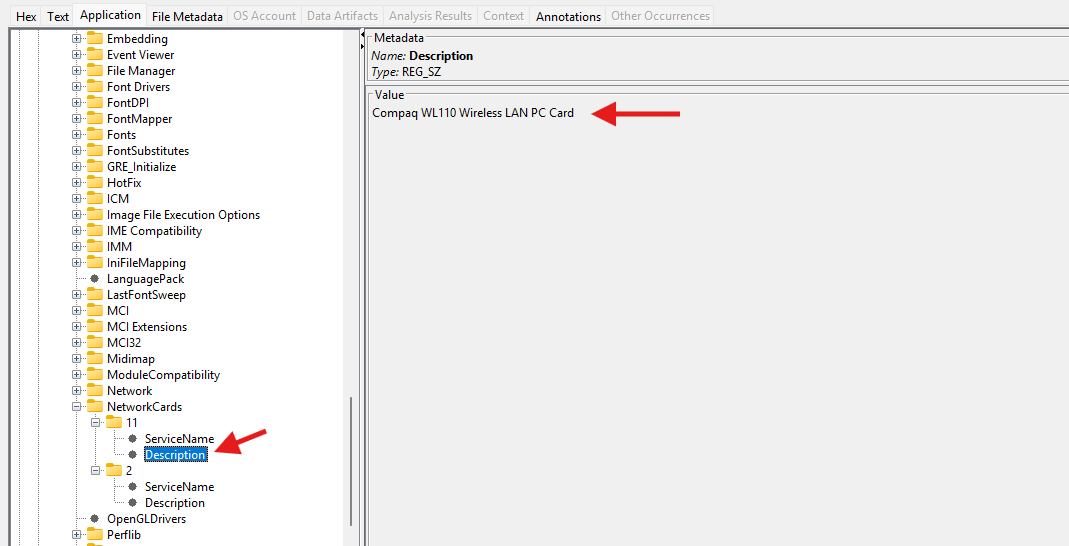
NetworkCards\1\Description: Compaq WL110 Wireless LAN PC Card
NetworkCards\2\Description: Xircom CardBus Ethernet 100 + Modem 56 (Ethernet Interface)
Finding: Two network adapters were identified — one wireless LAN card, Compaq WL110 Wireless LAN PC Card, and one wired Ethernet/modem adapter, Xircom CardBus Ethernet 100 + Modem 56.
Forensic Relevance: Confirms the system was equipped with wireless networking hardware consistent with the wireless-hotspot interception activity described in the case scenario.
Q10. What is the IP address and MAC address of the computer?
Objective: Determine the network configuration of the suspect computer, in particular the address of the wireless adapter identified in Q9.
Procedure:
- Navigate to
Data Sources → vol2 → Program Files → Look@LAN → irunin.ini. - Open the file in the Text viewer.
- Review the
[Variables]section for the%LANIP%and%LANNIC%entries. - Reformat the raw
%LANNIC%value into six hexadecimal octet pairs.
Evidence:
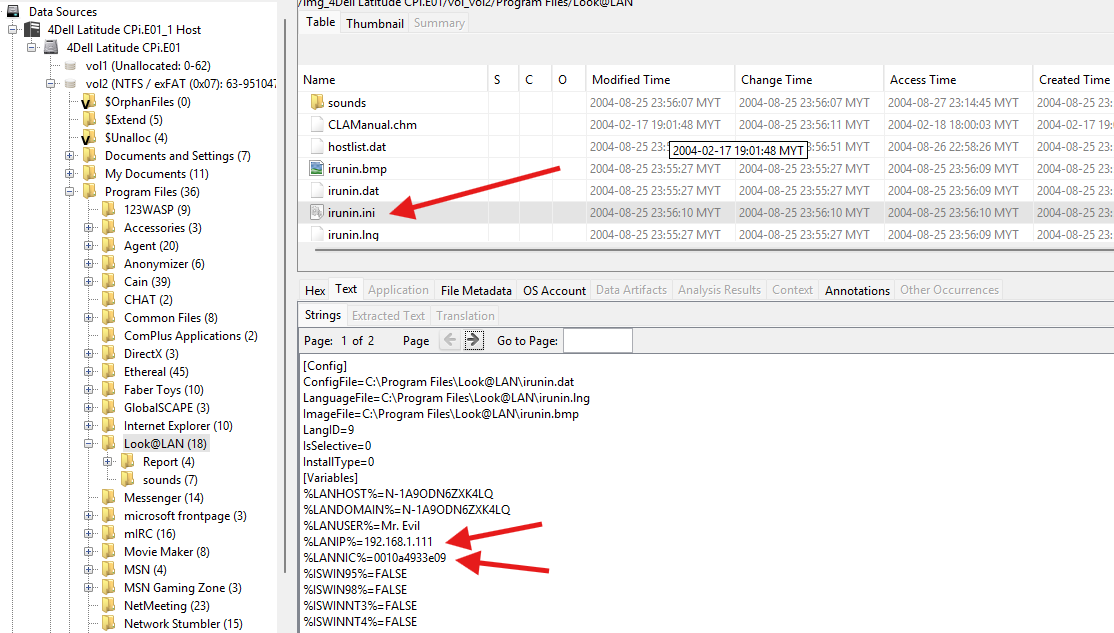
%LANHOST%=N-1A9ODN6ZXK4LQ
%LANDOMAIN%=N-1A9ODN6ZXK4LQ
%LANUSER%=Mr. Evil
%LANIP%=192.168.1.111
%LANNIC%=0010a4933e09
Finding:
IP address:  192.168.1.111
MAC address: 00:10:A4:93:3E:09
Forensic Relevance: The 00:10:A4 OUI is registered to Compaq, consistent with the Compaq WL110 Wireless LAN PC Card identified in Q9, confirming that the addressed interface was the wireless adapter used for network activity.
Q11. Search for programs/tools that aided in the crime (wireless hacking).
Objective: Identify installed applications consistent with wireless network reconnaissance, traffic interception, and credential theft.
Procedure:
- Navigate to Results → Extracted Content → Installed Programs.
- Review the list of installed applications for tools associated with wireless attacks.
Evidence:
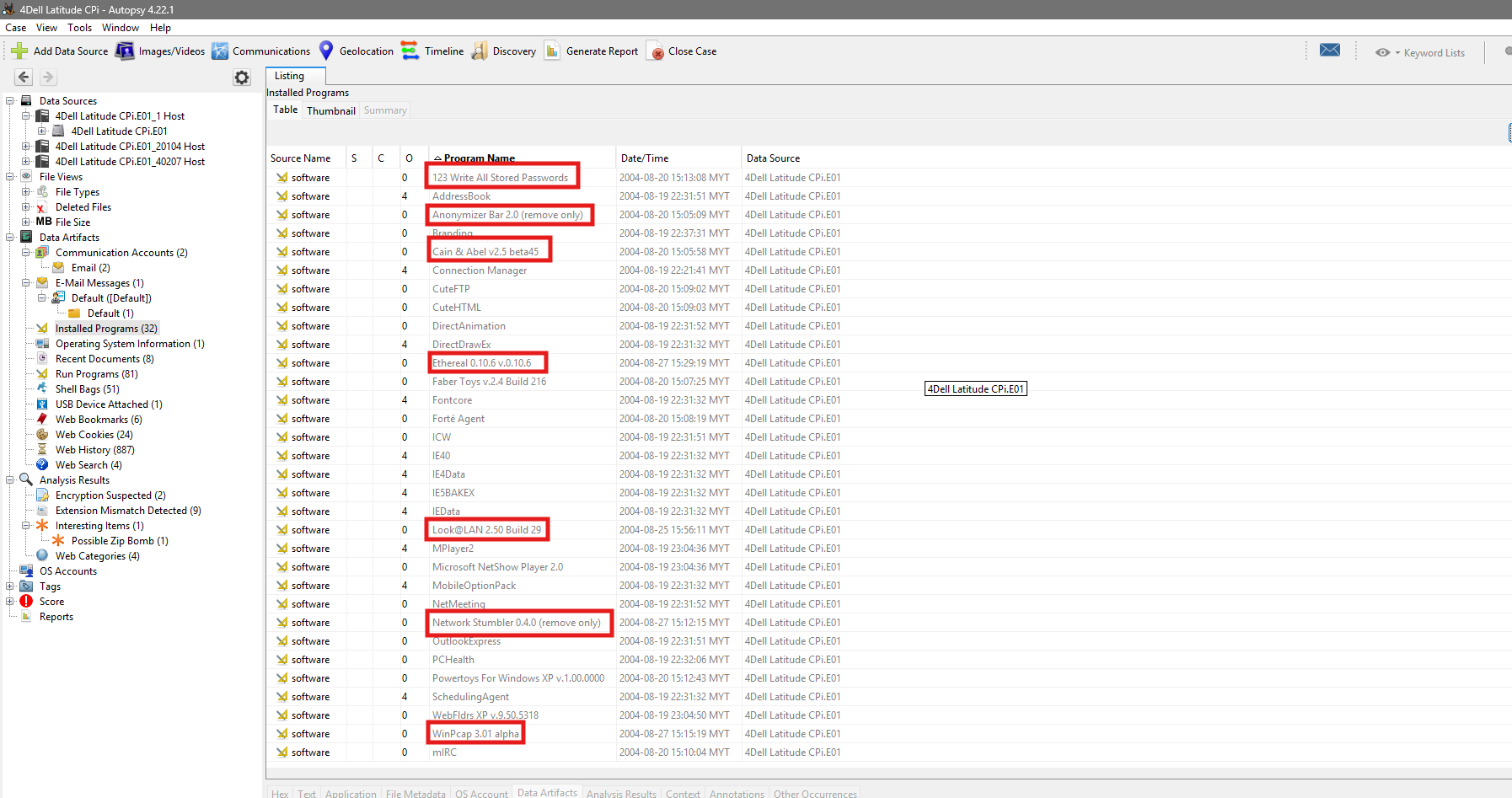
| Program | Purpose |
|---|---|
Network Stumbler 0.4.0 | Detects nearby wireless networks |
Cain & Abel v2.5 beta45 | Password recovery and network sniffing |
Ethereal 0.10.6 | Captures and analyses network packets |
WinPcap 3.01 alpha | Packet-capture driver used by sniffing tools |
Look@LAN 2.50 | Scans and monitors devices on a network |
123 Write All Stored Passwords | Extracts stored passwords |
Anonymizer Bar 2.0 | Hides or anonymises browsing activity |
Finding: Seven tools associated with wireless network reconnaissance, packet interception, and credential recovery were identified among the installed programs.
Forensic Relevance: These tools collectively demonstrate capability and intent consistent with the alleged offense: locating wireless networks, capturing traffic, and recovering stored credentials.
Q12. Which email client is used by Mr. Evil?
Objective: Identify the email client software configured on the suspect account.
Procedure:
- Navigate to
Data Sources → vol2 → Program Files → Agent → Data → AGENT.INI. - Open the file in the Text viewer and review the profile section.
Evidence:
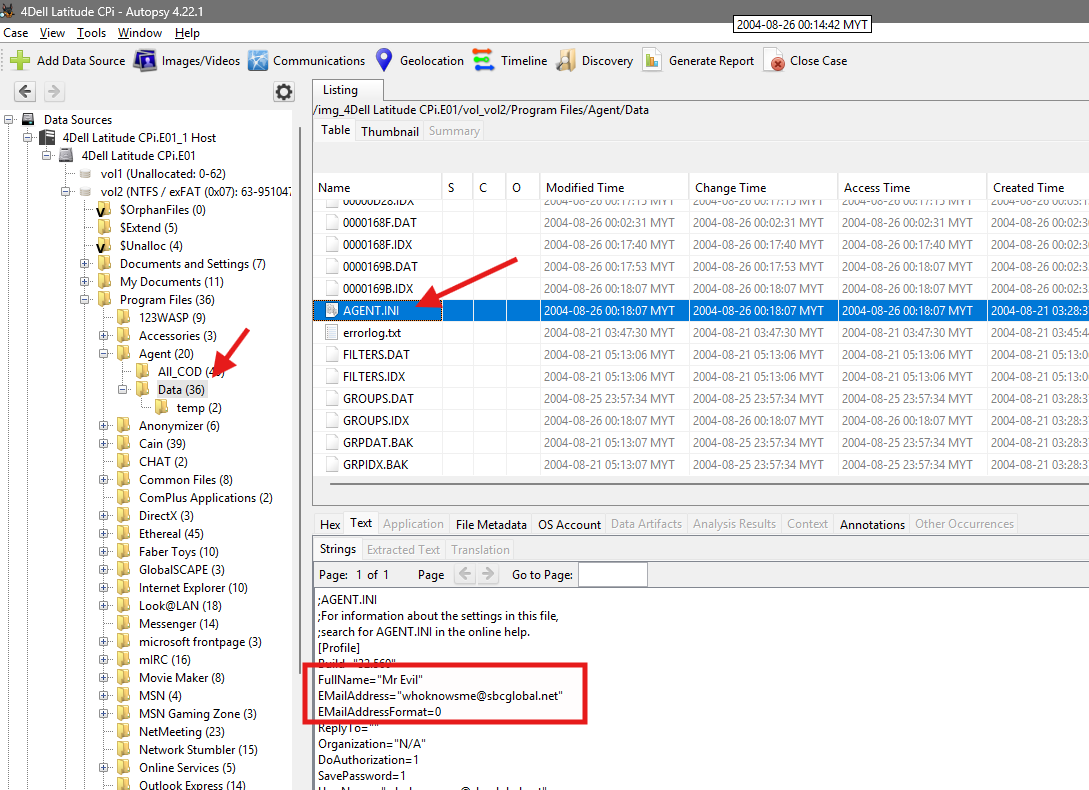
FullName="Mr Evil"
EMailAddress="whoknowsme@sbcglobal.net"
Finding: The email client used was Forte Agent.
Forensic Relevance: Establishes a communications channel associated with the suspect, supporting further examination of email-based activity and correlating the Mr Evil identity across applications.
Q13. What is the SMTP email address for Mr. Evil?
Objective: Determine the SMTP account address configured within the suspect’s email client.
Procedure:
- Navigate to
Data Sources → vol2 → Program Files → Agent → Data → AGENT.INI. - Review the
[Profile]section for theSMTPUserNamevalue.
Evidence:
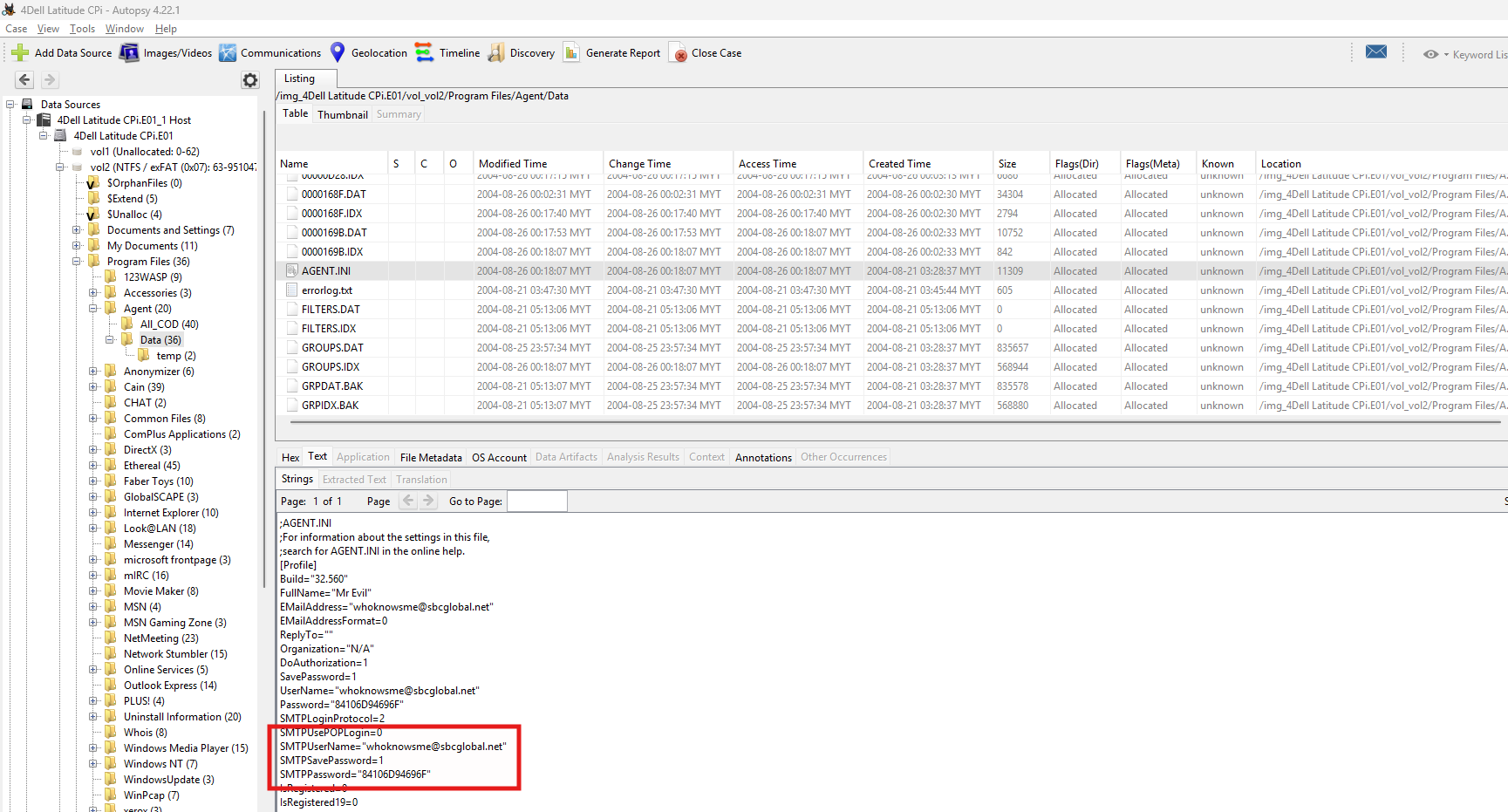
SMTPUserName="whoknowsme@sbcglobal.net"The same address also appears under the EMailAddress and UserName fields.
Finding: The SMTP email address is whoknowsme@sbcglobal.net.
Forensic Relevance: Provides a specific email address for potential correlation with external service providers, webmail activity (Q20), and communication records.
Q14. How many executable files are in the recycle bin?
Objective: Determine the number of executable files discarded in the Recycle Bin associated with the suspect account.
Procedure:
- Navigate to:
Data Sources → vol2 → RECYCLER → S-1-5-21-2000478354-688789844-1708537768-1003 - Review the folder contents and identify files with the
.exeextension.
Evidence:
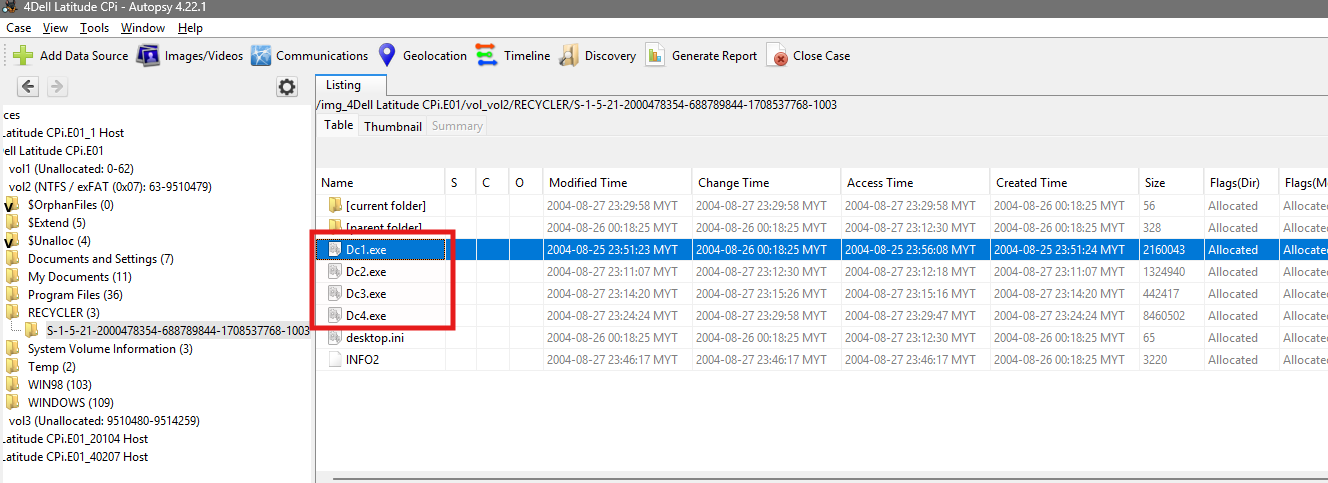
Dc1.exe
Dc2.exe
Dc3.exe
Dc4.exe
desktop.ini and INFO2 were excluded, as they are not executable files.
Finding: 4 executable files were found in the Recycle Bin.
Forensic Relevance: Deleted executables in the suspect’s own Recycle Bin (SID -1003) may represent tools that were used and subsequently discarded, indicating a possible attempt to remove evidence of tool usage.
Q15. Are there any malware on the computer?
Objective: Determine whether malicious or suspicious files are present on the system.
Procedure:
- Review Analysis Results → Interesting Items in Autopsy.
- Identify flagged files and record their path and hash.
- Submit the file hash to VirusTotal for reputation analysis.
Evidence:
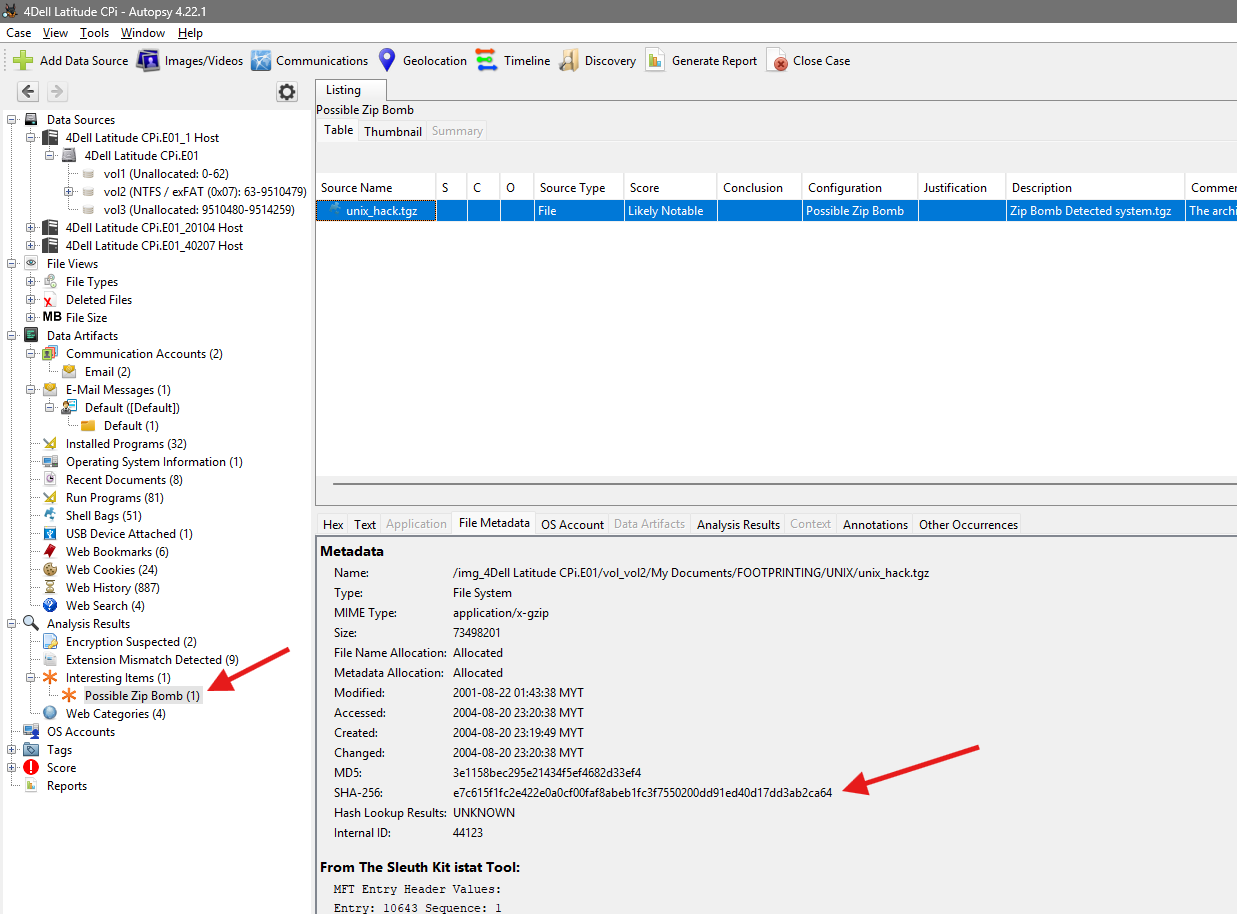
File:    unix_hack.tgz
Path:    /My Documents/FOOTPRINTING/UNIX/unix_hack.tgz
SHA-256: e7c615f1fc2e422e0a0cf00faf8abeb1fc3f7550200dd91ed40d17dd3ab2ca64
Autopsy classification: Analysis Results → Interesting Items → Possible Zip Bomb
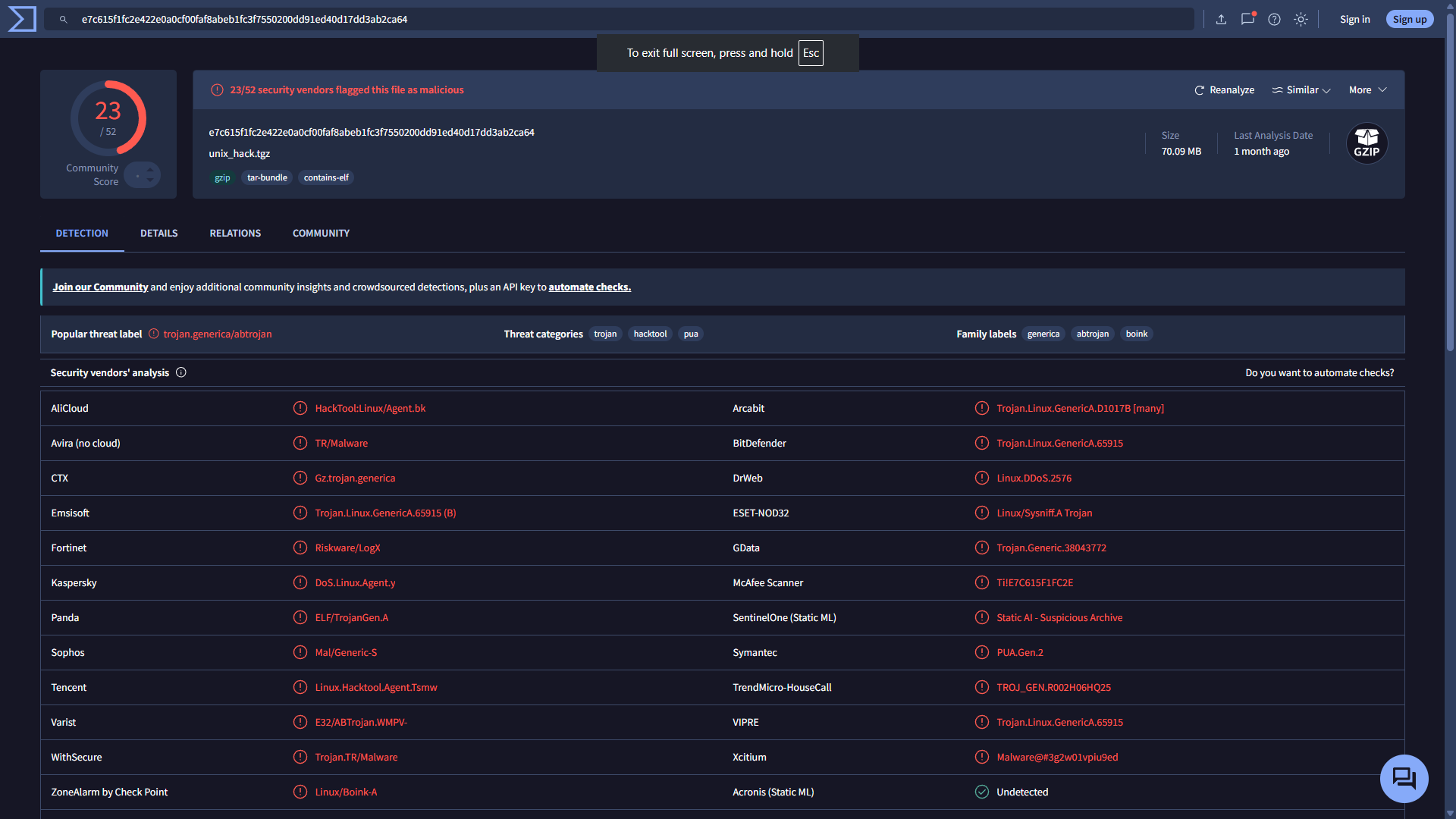
VirusTotal detection: 23/52 security vendors flagged the file as malicious, with classifications including Linux Trojan, hacktool, PUA, and DoS-related malware.
Finding: Yes — unix_hack.tgz was confirmed malicious/suspicious.
Forensic Relevance: Establishes the presence of an offensive Linux tool archive on the system, supporting the inference that the suspect possessed attack tooling beyond the Windows-based wireless-hacking utilities identified in Q11.
Q16. A popular IRC program called mIRC was installed. What are the user ID and related details?
Objective: Identify the identity and network configuration used by the suspect within the mIRC chat client.
Procedure:
- Navigate to
Data Sources → vol2 → Program Files → mIRC → mirc.ini. - Review the
[ident]and[mirc]sections.
Evidence:
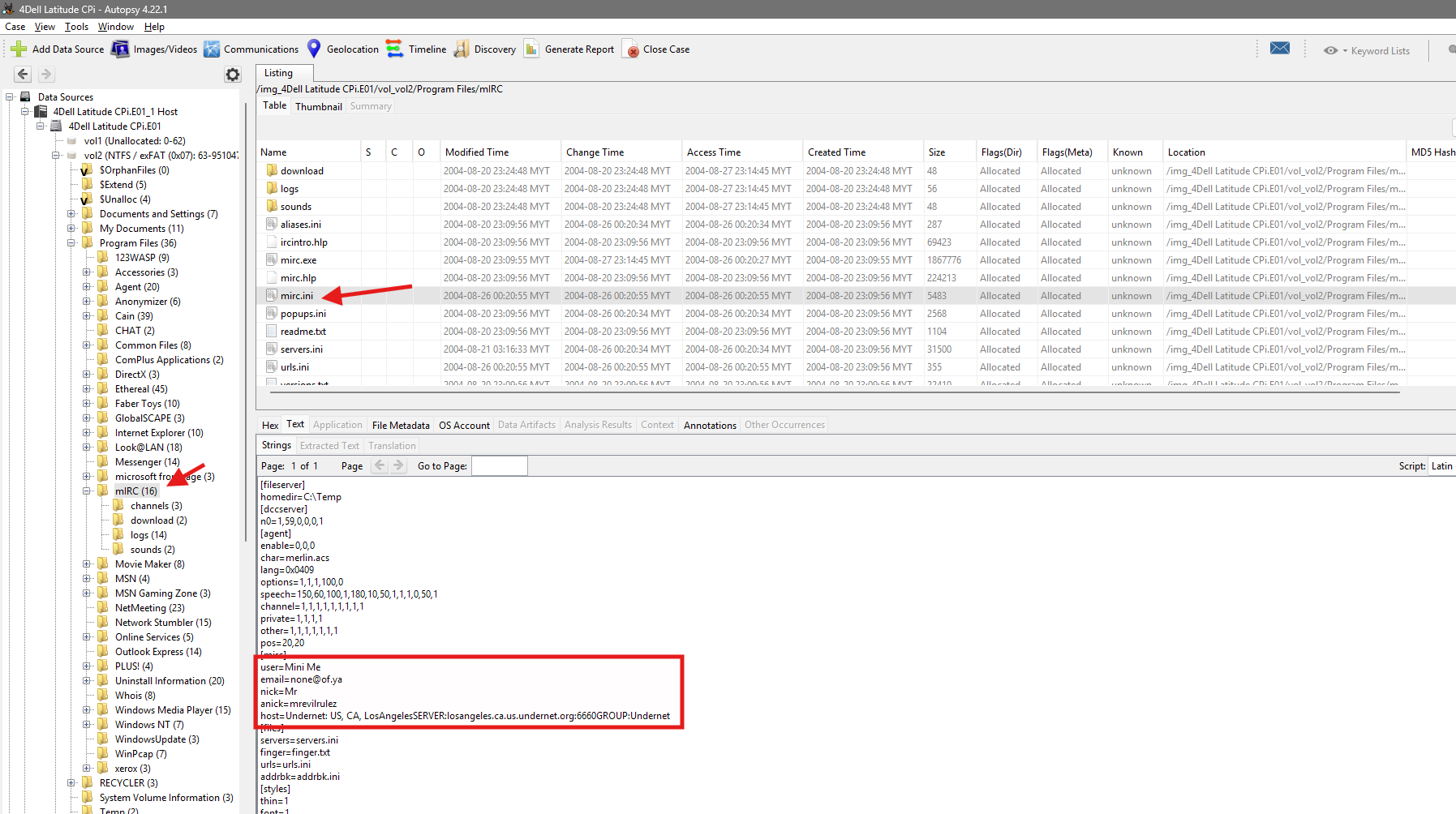
Ident User ID: Mrevil
User name: Mini Me
Email: none@of.ya
Nickname: Mr
Alternative nickname: mrevilrulez
IRC server: losangeles.ca.us.undernet.org
Finding:
User ID:               Mrevil
User name:              Mini Me
Email:                  none@of.ya
Nickname:               Mr
Alternative nickname:   mrevilrulez
Forensic Relevance: Further corroborates the suspect’s use of the Mr. Evil / Mrevil identity across multiple applications, and identifies an IRC server that may hold corroborating chat logs.
Q17. What is the name of the file that contains the intercepted TCP packet data (Ethereal)?
Objective: Locate the file used to store packets captured and reassembled by the Ethereal sniffing tool.
Procedure:
- Navigate to
Data Sources → vol2 → Documents and Settings → Mr. Evil. - Identify the relevant file and note its location relative to the default
My Documentssave directory.
Evidence:
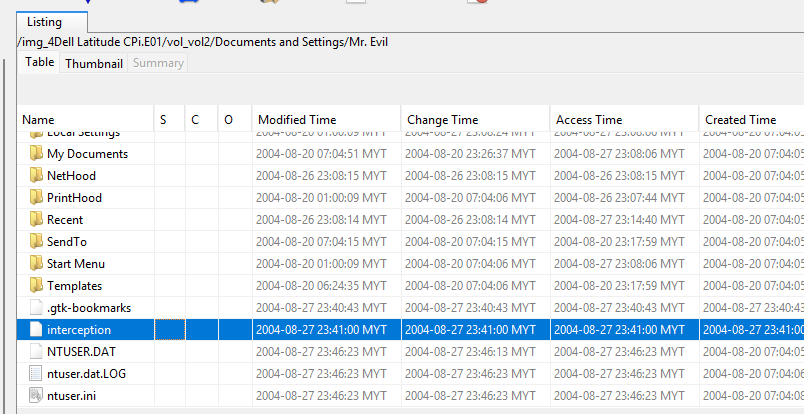
Path: Documents and Settings\Mr. Evil\interceptionThe file has no visible file extension. It was located directly under Documents and Settings\Mr. Evil, rather than inside My Documents.
Finding: The intercepted data was saved in a file named interception.
Forensic Relevance: Confirms active use of Ethereal for packet capture, directly corroborating the alleged interception of network traffic described in the case scenario.
Q18. Which internet browser was used?
Objective: Identify the web browser used to generate the recovered web-history artifacts.
Procedure:
- Review Data Artifacts → Web History in Autopsy.
- Inspect the
Source File/Pathfield of several records. - Confirm browser installation under
Data Sources → vol2 → Program Files → Internet Explorer.
Evidence:
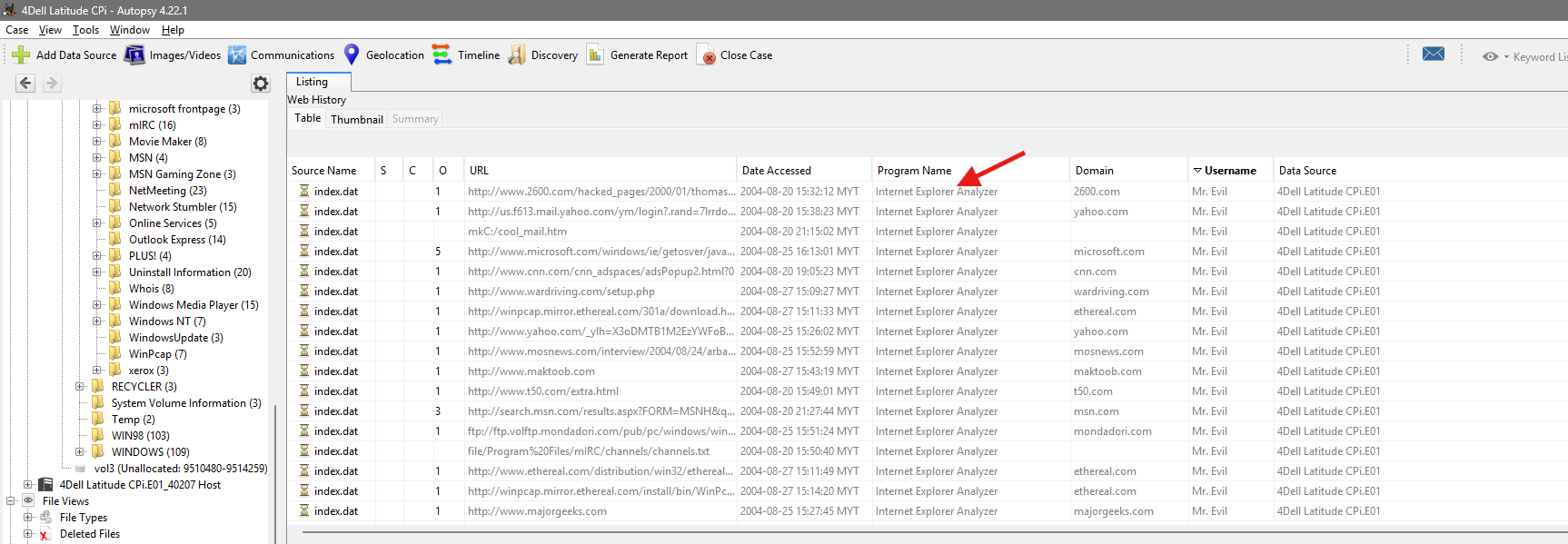
Path: Documents and Settings\Mr. Evil\Local Settings\History\History.IE5\index.datThe presence of History.IE5, Content.IE5, and index.dat artifacts confirms Internet Explorer activity.
Finding: The browser used was Microsoft Internet Explorer.
Forensic Relevance: Identifies the correct artifact format (index.dat) underlying the website and webmail evidence discussed in Q19 and Q20.
Q19. What websites was the suspect accessing?
Objective: Identify the websites accessed by the suspect, filtering advertisement and content-delivery noise out of the raw web-history table.
Procedure:
- Review Data Artifacts → Web History in Autopsy.
- Export the Web History table as a CSV file, due to the volume of duplicate records, advertisements, redirects, and supporting web resources.
- Provide the CSV file to ChatGPT to assist with deduplication, extraction of main domain names, and separation of likely user-accessed sites from advertisement/content-delivery domains.
- Manually verify the resulting domain list against the original Autopsy records.
Evidence:
2600.org
wardriving.com
netstumbler.com
ethereal.com
elitehackers.com
us.f613.mail.yahoo.com
google.com
whatismyip.com
majorgeeks.com
msn.com
cnn.com
Finding: The suspect accessed wireless-security and hacking sites (2600.org, wardriving.com, netstumbler.com, elitehackers.com), a packet-analysis resource (ethereal.com), a webmail service (us.f613.mail.yahoo.com), search/utility sites (google.com, whatismyip.com, majorgeeks.com), and general news/portal sites (msn.com, cnn.com).
[!note] Web History was exported to CSV due to its volume; ChatGPT assisted only with deduplication and domain organisation of the exported data. Autopsy remained the primary evidence source, and all listed domains were manually verified against the original Autopsy Web History records.
Forensic Relevance: The browsing pattern demonstrates active research into wireless hacking techniques and tools, supporting intent, and independently corroborates the use of Ethereal (Q11, Q17) and a Yahoo webmail account (Q20).
Q20. What is the web-based email address for the main user?
Objective: Identify the web-based (webmail) email address associated with the suspect.
Procedure:
- Review Data Artifacts → Web History in Autopsy.
- Filter or keyword search for
mrevil2000,yahoo.com, andid_check. - Locate and review the Yahoo account-registration URL.
- Run an Autopsy keyword search for
mrevil2000@yahoo.comandmrevil2000across Web History, cookies, temporary internet files, and cached pages for corroboration.
Evidence:
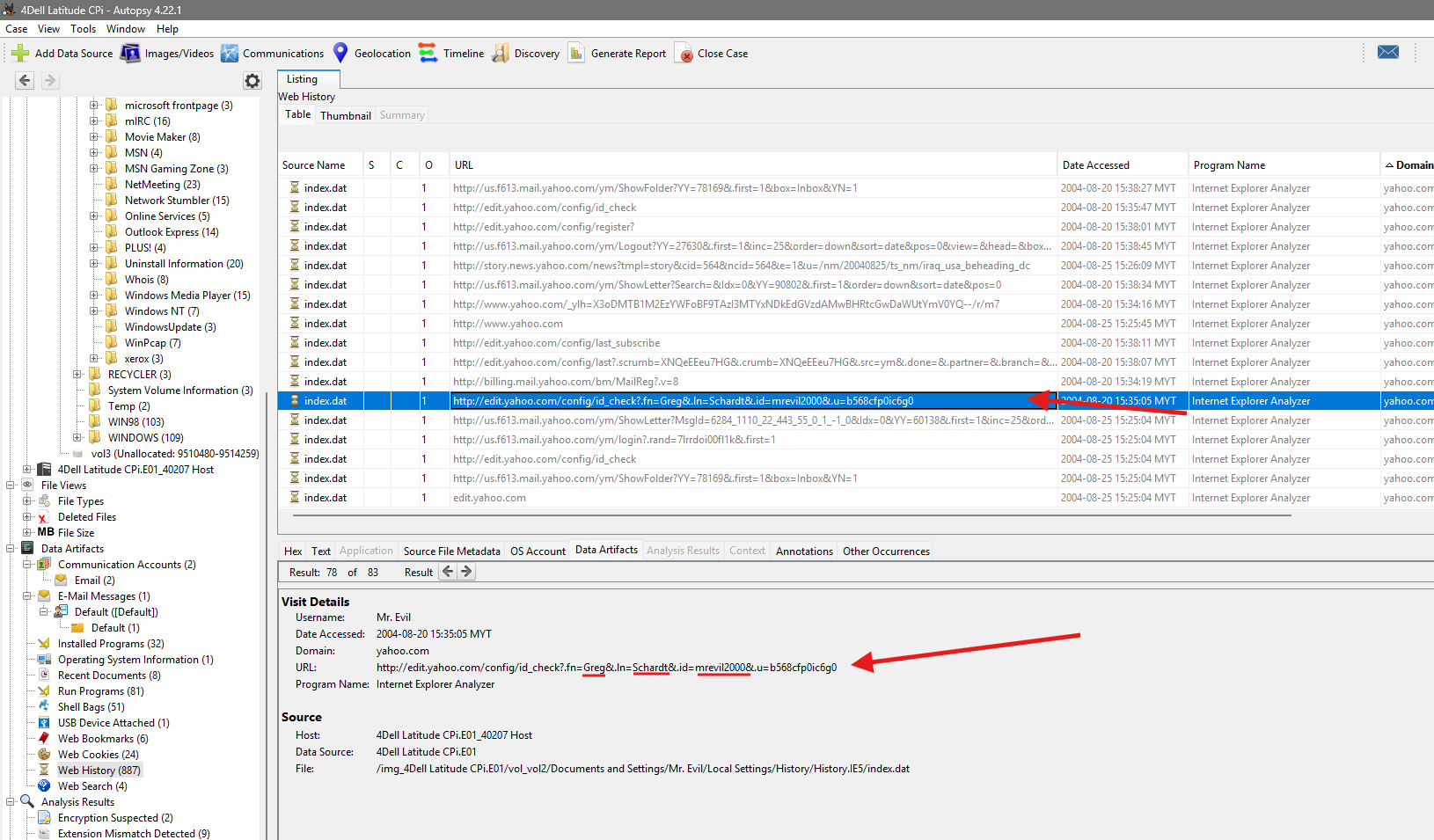
http://edit.yahoo.com/config/id_check?...&.id=mrevil2000...First name: Greg
Last name: Schardt
Yahoo ID: mrevil2000Finding: The web-based email address is mrevil2000@yahoo.com.
Forensic Relevance: Directly links the registered owner (Greg Schardt, Q4) to the online alias Mr. Evil and the mrevil2000 account, closing the loop on attribution across the physical device, local accounts, IRC identity, and webmail.
Conclusion and Limitations
The examination of the Dell Latitude CPi disk image (MD5 aee4fcd9301c03b3b054623ca261959a) established that the system was registered to Greg Schardt, operated under the local account mr. evil / Mr. Evil, and was equipped with a wireless adapter (Compaq WL110 Wireless LAN PC Card, MAC 00:10:A4:93:3E:09, IP 192.168.1.111) and a wired/modem adapter (Xircom CardBus Ethernet 100 + Modem 56). Installed software — including Network Stumbler, Cain & Abel, Ethereal, WinPcap, Look@LAN, 123 Write All Stored Passwords, and Anonymizer Bar — together with a saved packet-capture file (interception) and web-history evidence of visits to wireless-hacking resources, corroborates the allegation that the machine was used to locate and intercept traffic on wireless networks. A malicious archive (unix_hack.tgz) was also recovered and confirmed via VirusTotal (23/52 detections). Communication artifacts — whoknowsme@sbcglobal.net (Forte Agent), mrevil2000@yahoo.com (Yahoo webmail), and the Mrevil / mrevilrulez mIRC identity — consistently link the Mr. Evil alias to the registered owner, Greg Schardt.
Limitations:
- Web History records were voluminous and contained duplicate, advertisement, and content-delivery entries. The exported CSV was processed with the assistance of ChatGPT for deduplication and domain organisation only; Autopsy remained the primary and authoritative evidence source, and all findings were manually verified against the original records.
- One evidentiary discrepancy was identified and flagged (Q1: an extraneous character in the originally recorded image hash), resolved in favour of the value shown in the source screenshot.
- The registry path noted during examination for Q6 (
WindowNT) is preserved as originally recorded; the confirmed registry key, value name, and value data are corroborated by the accompanying Registry Viewer screenshot. - Findings are based solely on artifacts contained within the provided disk image. No live system, network capture, or external service records (e.g., ISP logs, Yahoo account records) were available for independent corroboration.
Related Writeups



Authorized security practice only. These notes are for lab, CTF, and explicitly permitted environments.