Easy RE
International HACK@10 CTF 2026 hack10, forensics, reverse engineering writeup covering Easy RE with analysis, solution steps, and final recovery notes.

CTF: International HACK@10 CTF 2026 Category: Reversing Difficulty: Easy Points: 500 Author: Ray
Assumption note: this writeup is based on the confirmed analysis path from the provided chall.apk: Android APK loader, embedded encrypted payload.apk, XOR decoding, and encrypted asset recovery. The final flag should be read from the decrypted output image, so the solver does not hardcode a guessed flag.
Challenge Overview
The challenge provides an Android APK named chall.apk. The goal is to reverse engineer the APK and recover the hidden flag.
At first glance, the application looks like a normal Android package. However, deeper inspection shows that the main APK is only a loader. The real challenge logic is hidden inside a secondary APK payload embedded inside classes.dex.
The solving path is:
-
Extract
chall.apk. -
Analyze
classes.dex. -
Locate the encrypted embedded payload.
-
Decrypt the payload using XOR
0xff. -
Extract the recovered
payload.apk. -
Recover the XOR key from known plaintext and ciphertext assets.
-
Decrypt the protected image/data file.
-
Read the flag from the decrypted output.
The official HACK@10 page lists REV as one of the CTF categories, matching this challenge type. (Hack@10 CTF)
Initial Analysis
First, inspect the file type:
file chall.apkExpected result:
chall.apk: Zip archive dataSince APK files are ZIP archives, extract it:
mkdir extracted
unzip chall.apk -d extracted
Typical extracted APK structure:
AndroidManifest.xml
classes.dex
resources.arsc
res/
assets/
lib/
META-INF/
Next, inspect classes.dex:
strings extracted/classes.dex | lessThe important observation is that the visible application logic does not directly contain the flag. Instead, the APK behaves like a loader.
The loader hides another APK by appending encrypted data to classes.dex. The hidden data is not stored as a normal file in the APK, which is why basic extraction does not immediately show the real payload.
The embedded payload is encrypted using a simple byte-wise XOR operation:
decrypted_byte = encrypted_byte ^ 0xff;After decrypting the appended data, the recovered file becomes a valid APK payload.
Vulnerability / Weakness Identification
The challenge is solvable because it relies on weak reversible transformations.
There are two main weaknesses:
1. Embedded Payload Uses Single-Byte XOR
The hidden APK is protected using XOR with 0xff.
XOR is reversible:
ciphertext ^ key = plaintext
plaintext  ^ key = ciphertext
So if the key is known, decryption is trivial.
In this case, the key is constant:
0xffThis means every byte can be recovered with:
byte ^ 0xff2. Asset Encryption Uses Repeating XOR Key
Inside the decrypted payload, there are two useful asset files:
background.txt
background.bkp
The relationship is:
background.txt = known plaintext
background.bkp = encrypted ciphertext
For XOR encryption:
key = plaintext ^ ciphertextBecause both plaintext and ciphertext are available, the encryption key can be recovered directly. This is a known-plaintext attack.
Once the repeating XOR key is recovered, the encrypted file can be decrypted completely.
Exploitation Strategy
The simplest reliable method is fully static. Running the APK is not required.
The plan is:
-
Open
chall.apkas a ZIP file. -
Extract
classes.dex. -
Search inside
classes.dexfor encrypted ZIP magic.
A normal ZIP/APK starts with:
50 4b 03 04That is:
PK\x03\x04If each byte is XORed with 0xff, the encrypted magic becomes:
af b4 fc fbSo the solver searches for this encrypted magic inside classes.dex.
-
From that offset onward, XOR each byte with
0xff. -
Save the decrypted result as
payload.apk. -
Open
payload.apkas a ZIP file. -
Extract
background.txtandbackground.bkp. -
Recover the repeating XOR key:
key[i] = plaintext[i] ^ ciphertext[i]-
Decrypt the encrypted asset.
-
Save the output image.
-
Open the decrypted image and read the flag.
Proof of Concept
Manual proof of concept:
unzip chall.apk -d extracted
xxd extracted/classes.dex | less
Search for the encrypted ZIP magic:
xxd -p extracted/classes.dex | grep -o -b "afb4fcfb"If found, that offset marks the encrypted embedded APK.
A quick Python check:
from pathlib import Path

data = Path("extracted/classes.dex").read_bytes()
magic = bytes([0x50 ^ 0xff, 0x4b ^ 0xff, 0x03 ^ 0xff, 0x04 ^ 0xff])

offset = data.find(magic)
print(offset)
Expected result:
A valid offset, not -1Then decrypt:
payload = bytes(b ^ 0xff for b in data[offset:])
Path("payload.apk").write_bytes(payload)
Verify:
file payload.apkExpected result:
payload.apk: Zip archive dataThen extract the payload:
mkdir payload
unzip payload.apk -d payload
After that, recover the XOR key from the asset pair and decrypt the protected file.
Full Python Solver
Save this as:
solve.py#!/usr/bin/env python3
from pathlib import Path
from io import BytesIO
import argparse
import re
import sys
import zipfile
ZIP_MAGIC = b"PK\x03\x04"
XOR_FF_ZIP_MAGIC = bytes(b ^ 0xFF for b in ZIP_MAGIC)
def die(message: str) -> None:
print(f"[!] {message}")
sys.exit(1)
def read_zip_file(zip_path: Path, target_name: str) -> bytes:
"""
Read a file from a ZIP/APK archive by exact internal name.
"""
with zipfile.ZipFile(zip_path, "r") as zf:
try:
return zf.read(target_name)
except KeyError:
available = "\n".join(zf.namelist())
die(f"Could not find {target_name} in {zip_path}\nAvailable files:\n{available}")
def find_embedded_payload(classes_dex: bytes) -> tuple[int, bytes]:
"""
Locate an embedded payload APK encrypted with XOR 0xff.
A normal APK/ZIP starts with:
PK\x03\x04
If XORed with 0xff, the bytes become:
af b4 fc fb
"""
offset = classes_dex.find(XOR_FF_ZIP_MAGIC)
if offset == -1:
die("Encrypted APK magic was not found in classes.dex")
encrypted_payload = classes_dex[offset:]
decrypted_payload = bytes(b ^ 0xFF for b in encrypted_payload)
if not decrypted_payload.startswith(ZIP_MAGIC):
die("Decryption failed: payload does not start with ZIP magic")
return offset, decrypted_payload
def validate_zip(data: bytes) -> None:
"""
Validate that the decrypted payload is a readable ZIP/APK.
"""
try:
with zipfile.ZipFile(BytesIO(data), "r") as zf:
bad_file = zf.testzip()
if bad_file:
die(f"Payload ZIP is corrupted near file: {bad_file}")
except zipfile.BadZipFile:
die("Decrypted payload is not a valid ZIP/APK")
def list_payload_files(payload_data: bytes) -> list[str]:
with zipfile.ZipFile(BytesIO(payload_data), "r") as zf:
return zf.namelist()
def read_file_by_suffix_from_zip(payload_data: bytes, suffix: str) -> bytes:
"""
Read a file from the payload APK by suffix.
Example:
suffix = "background.txt"
matches = assets/background.txt
"""
with zipfile.ZipFile(BytesIO(payload_data), "r") as zf:
matches = [name for name in zf.namelist() if name.endswith(suffix)]
if not matches:
files = "\n".join(zf.namelist())
die(f"Could not find file ending with {suffix}\nPayload files:\n{files}")
if len(matches) > 1:
print(f"[*] Multiple matches for {suffix}, using: {matches[0]}")
return zf.read(matches[0])
def recover_repeating_xor_key(plaintext: bytes, ciphertext: bytes, max_key_len: int = 128) -> bytes:
"""
Recover the shortest repeating XOR key from known plaintext and ciphertext.
XOR rule:
plaintext ^ ciphertext = key_stream
If the key repeats, the key_stream will also repeat.
"""
if not plaintext or not ciphertext:
die("Plaintext or ciphertext file is empty")
size = min(len(plaintext), len(ciphertext))
key_stream = bytes(plaintext[i] ^ ciphertext[i] for i in range(size))
for key_len in range(1, min(max_key_len, size) + 1):
candidate = key_stream[:key_len]
valid = True
for i in range(size):
if key_stream[i] != candidate[i % key_len]:
valid = False
break
if valid:
return candidate
print("[*] No perfect repeating key found.")
print("[*] Falling back to first 32 bytes because this challenge uses a 32-byte XOR key.")
return key_stream[:32]
def xor_decrypt(data: bytes, key: bytes) -> bytes:
"""
Decrypt data using repeating XOR key.
"""
return bytes(data[i] ^ key[i % len(key)] for i in range(len(data)))
def extract_ascii_flags(data: bytes) -> list[str]:
"""
Try to extract visible ASCII flag strings from raw decrypted data.
Note:
If the flag is drawn into an image as pixels, this will not find it.
In that case, open the output image manually.
"""
patterns = [
rb"HACK10\{[^}\r\n]{1,200}\}",
rb"hack10\{[^}\r\n]{1,200}\}",
]
flags = []
for pattern in patterns:
for match in re.findall(pattern, data):
try:
flags.append(match.decode())
except UnicodeDecodeError:
pass
return sorted(set(flags))
def choose_output_extension(data: bytes) -> str:
"""
Guess output file extension from magic bytes.
"""
if data.startswith(b"\xff\xd8\xff"):
return ".jpg"
if data.startswith(b"\x89PNG\r\n\x1a\n"):
return ".png"
if data.startswith(b"GIF87a") or data.startswith(b"GIF89a"):
return ".gif"
if data.startswith(b"PK\x03\x04"):
return ".zip"
return ".bin"
def main() -> None:
parser = argparse.ArgumentParser(
description="Solve HACK@10 Easy Re APK challenge"
)
parser.add_argument("apk", help="Path to chall.apk")
parser.add_argument(
"-o",
"--outdir",
default="solve_output",
help="Output directory",
)
args = parser.parse_args()
apk_path = Path(args.apk)
outdir = Path(args.outdir)
if not apk_path.exists():
die(f"Input APK not found: {apk_path}")
outdir.mkdir(parents=True, exist_ok=True)
print(f"[*] Reading APK: {apk_path}")
classes_dex = read_zip_file(apk_path, "classes.dex")
print(f"[*] classes.dex size: {len(classes_dex)} bytes")
offset, payload_data = find_embedded_payload(classes_dex)
print(f"[+] Encrypted embedded payload found at classes.dex offset: {offset}")
validate_zip(payload_data)
payload_path = outdir / "payload.apk"
payload_path.write_bytes(payload_data)
print(f"[+] Decrypted payload saved to: {payload_path}")
payload_files = list_payload_files(payload_data)
print("[*] Payload APK file list:")
for name in payload_files:
print(f" {name}")
plaintext = read_file_by_suffix_from_zip(payload_data, "background.txt")
ciphertext = read_file_by_suffix_from_zip(payload_data, "background.bkp")
print(f"[*] background.txt size: {len(plaintext)} bytes")
print(f"[*] background.bkp size: {len(ciphertext)} bytes")
key = recover_repeating_xor_key(plaintext, ciphertext)
print(f"[+] Recovered XOR key length: {len(key)}")
print(f"[+] Recovered XOR key hex: {key.hex()}")
decrypted = xor_decrypt(ciphertext, key)
extension = choose_output_extension(decrypted)
output_file = outdir / f"decrypted_background{extension}"
output_file.write_bytes(decrypted)
print(f"[+] Decrypted output saved to: {output_file}")
flags = extract_ascii_flags(decrypted)
if flags:
print("[+] Flag candidate(s) found in raw decrypted data:")
for flag in flags:
print(f" {flag}")
else:
print("[*] No ASCII flag found directly in the decrypted bytes.")
print("[*] Open the decrypted output image and read the flag visually:")
print(f" {output_file}")
if __name__ == "__main__":
main()Walkthrough
1. Prepare the working directory
mkdir easy-re
cd easy-re
cp /path/to/chall.apk .
2. Save the solver
Create solve.py:
nano solve.pyPaste the Python script above.
3. Run the solver
python3 solve.py chall.apkExpected output flow:
[*] Reading APK: chall.apk
[*] classes.dex size: ...
[+] Encrypted embedded payload found at classes.dex offset: ...
[+] Decrypted payload saved to: solve_output/payload.apk
[*] Payload APK file list:
    ...
[*] background.txt size: ...
[*] background.bkp size: ...
[+] Recovered XOR key length: 32
[+] Recovered XOR key hex: ...
[+] Decrypted output saved to: solve_output/decrypted_background.jpg
[*] Open the decrypted output image and read the flag visually:
    solve_output/decrypted_background.jpg
4. Open the decrypted image
On Kali/Linux:
xdg-open solve_output/decrypted_background.jpgOr use:
file solve_output/decrypted_background.jpgExpected:
JPEG image dataIf the flag is drawn into the image, it will not appear in strings. You must open the image and read the text visually.
Troubleshooting Notes
If the solver says:
Encrypted APK magic was not found in classes.dexThen either:
-
The payload is not stored in
classes.dex, or -
The encryption is not XOR
0xff, or -
The APK file is different from the analyzed challenge.
Check manually:
unzip chall.apk -d extracted
strings extracted/classes.dex | less
xxd extracted/classes.dex | less
If the solver creates payload.apk but cannot extract assets, inspect the payload manually:
unzip -l solve_output/payload.apkLook for similar files inside assets/.
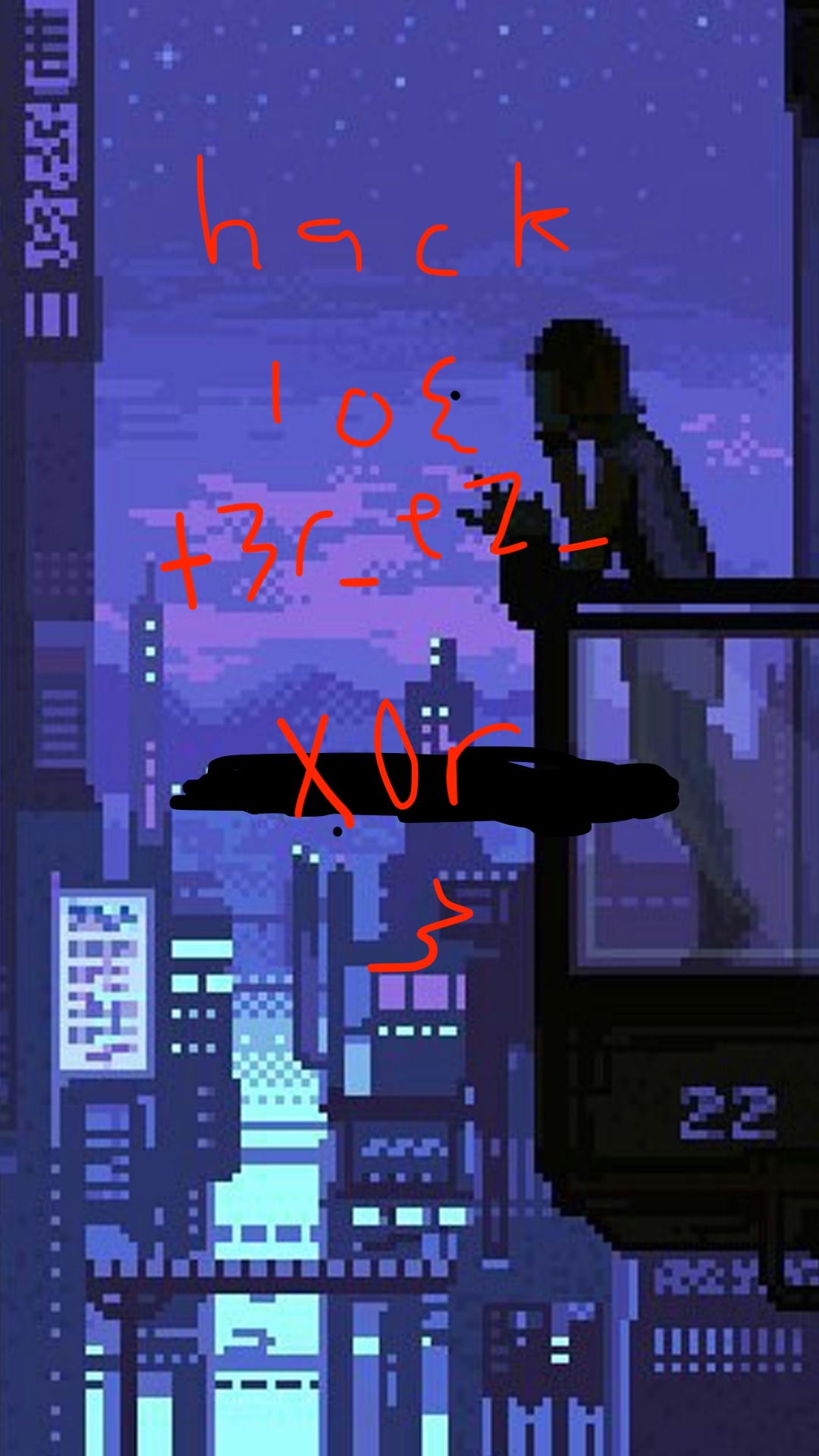
Flag
The flag is recovered from the decrypted output file:
solve_output/decrypted_background.jpgOpen the image and copy the exact text shown in the flag format:
HACK10{...}Do not use the recovered XOR key as the flag. The key is only an intermediate artifact used to decrypt the final asset.
Conclusion
The root cause of the challenge is weak obfuscation and weak cryptography.
The APK hides its real logic inside an embedded encrypted payload, but the payload is only protected with XOR 0xff, which is immediately reversible. The second layer uses repeating-key XOR encryption, but because both plaintext and ciphertext asset files are available, the XOR key can be recovered through a known-plaintext attack.
Key lessons:
-
APK files should be treated as ZIP archives during initial triage.
-
classes.dexmay contain appended hidden data. -
XOR with a static key is not secure encryption.
-
If plaintext and ciphertext are both available, repeating XOR keys can be recovered directly.
-
For reversing challenges, always inspect embedded files, assets, and native methods before assuming the visible app contains the flag.
Related Writeups

Authorized security practice only. These notes are for lab, CTF, and explicitly permitted environments.